Beginner Guide: 7 Principles to Write High-Quality Prompts

Have you ever stared at an AI chatbox wondering why your answers never quite hit the mark? The problem usually is not the AI—it is how you ask. This article teaches you 7 simple but effective principles to write high-quality Prompts starting today, so AI truly understands what you need.
With examples and diagrams, this guide takes you from zero to writing reusable prompts.
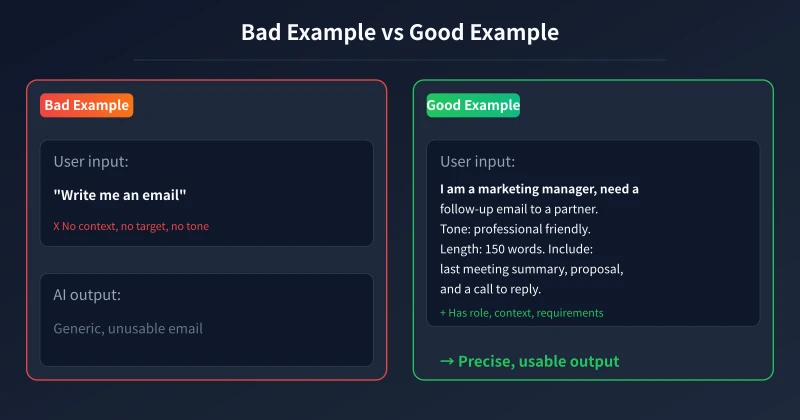
Principle 1: State Your Role (Role)
AI does not naturally know who you are. Telling it what role you want it to play immediately changes the output style and depth.
- Average: "Write me a piece of copy"
- Better: "You are a brand copywriter with 10 years of experience. Write a product launch copy for a smart home device."
The difference is obvious: prompts with a role produce more targeted results.
Principle 2: Provide Full Context (Context)
AI is not your colleague. It does not know your company's projects, clients, or internal details. The more specific your background, the more precise the result.
- What: write an email / fix code / summarize
- For whom: boss / client / peers
- Use case: reporting / marketing / learning
- Constraints: time, word count, budget
Principle 3: Give a Specific Action (Action)
Start your question with a clear verb instead of vague requests like "help me".
- ✓ "Help me summarize this in 3 points"
- ✓ "Help me rewrite this in a more formal tone"
- ✓ "Help me list 5 feasible options"
The more precise the verb, the less AI goes off-track.
Principle 4: Specify Output Length (Length)
AI defaults to writing a lot. Tell it how much you want to avoid wordiness.
- Word range: "under 200 words", "500-800 words"
- Structure limits: "no more than 5 points", "in 3 paragraphs"
- Detail level: "concise", "detailed explanation"
Principle 5: Provide Examples (Example)
This is a technique most beginners overlook. If you give AI an example, it can mimic your style.
"Refer to the style below: [paste example text]. Now write a similar one for my new product."
The more relevant your examples, the closer the output gets to what you want.
Principle 6: Specify Output Format (Format)
Tell AI exactly what format you want, saving you time on reorganization.
- "Use a table with columns: time, task, assignee"
- "Output in JSON with keys: title, content, tags"
- "Use Markdown with h2 headings and lists"
- "One-sentence summary"
Principle 7: Iterate (Iterate)
Few people know that AI conversations have context. If the first output is not right, just keep talking:
- "Too long, compress to 100 words"
- "Second point is impractical, give me another"
- "Make the tone more casual and conversational"
Treat AI like a colleague who understands conversation. Keep giving feedback until it is right.
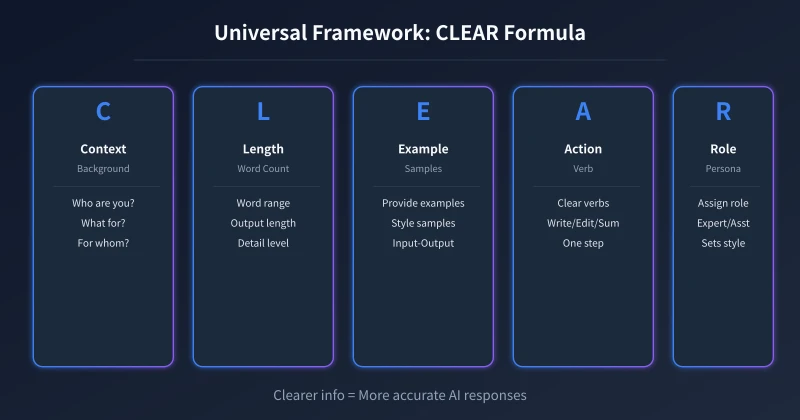
Practical Formula: The CLEAR Memory Aid
To make it easy to remember, we condense the 7 principles into the acronym CLEAR:
- Context: Provide background
- Length: Specify length
- Example: Provide references
- Action: Clarify the action
- Role: Assign a role
Run through these 5 letters before each question, and you will notice AI accuracy improve significantly.
Real Example: Applying CLEAR
Plain question:
"Help me write an event plan"
With CLEAR framework:
- R - Role: You are an event operations expert
- C - Context: Company plans a year-end team-building event for 200 employees, budget 30,000 yuan
- A - Action: Design a complete event proposal
- L - Length: Under 500 words
- E - Example: Refer to last year's outdoor team-building event
Complete Prompt:
"You are an event operations expert. The company is planning a year-end team-building event for 200 employees with a 30,000 yuan budget. Design a complete event proposal under 500 words, including: event theme, time and venue, detailed itinerary, and budget allocation. Reference the style of last year's outdoor team-building event."
The answer you get from this prompt will be 10 times more precise than "help me write an event plan".
Common Mistakes: 5 Errors Beginners Make Most Often
- Too broad: "Help me write something" — AI has nothing to work with
- Missing info: No context, target audience, or purpose
- Too much at once: Asking AI to write a plan, draw images, and make tables simultaneously — step by step is more accurate
- Skipping iteration: Giving up after the first unsatisfactory result — conversation is the key
- "Please help me": No verb at the start, AI easily misunderstands intent
Summary
The core of AI prompting is not fancy techniques—it is about being clear. Role, context, action, length, example, format, iteration—7 principles, one CLEAR formula. Start applying them to every question today.
The clearer the information, the more AI can help you get things right. That is all the secret to high-quality prompts.
Related Articles
AI 帮你写简历:从零到专业,五步搞定求职利器
不管你是应届生还是职场转行,AI 都能帮你把简历从"凑合能用"变成"眼前一亮"。本文用五个步骤,手把手教你用 AI 生成、修改、优化出一份真正能拿面试的专业简历。
AI 语音转文字:零基础实操指南,三步把说话变成文字
还在打字到手指发酸?还在为会议记录发愁?AI 语音转文字技术已经非常成熟,学会使用它,可以帮你把说话直接变成文字,效率提升数倍。本文将手把手教你选择工具、完成转写、导出使用,让 AI 成为你的打字替身。
Tech FrontierAI 提问技巧入门:让 AI 回答更准确的 7 个实用方法
明明 AI 功能强大,但每次提问得到的回答都差强人意?其实问题往往不在 AI,而在于你提问的方式。本文用最直观的方式教你 7 个让 AI 回答更准确的实用技巧,包括四要素公式、精准提问、背景信息、拆分任务、追问迭代、万能模板和常见错误,小白也能立即上手。
Comments are not yet available, stay tuned