Complete Guide to AI-Assisted Writing: From Idea to Final Draft
Why You Need AI-Assisted Writing
Whether you are a student, professional, or content creator, writing is a skill you cannot avoid. But many people face the same struggles: staring at a blank page, getting stuck halfway, or feeling their writing is not professional enough.
AI-assisted writing does not mean letting AI write for you. It means having AI help you break through writing bottlenecks. Think of it as a writing partner available 24/7, ready to brainstorm, refine your expression, and check your logic.
Preparation: Choosing the Right Tool
Here are the main types of AI writing assistants available today:
- General chat-based tools: ChatGPT, Claude, Gemini — suitable for all writing scenarios
- Specialized writing tools: Jasper, Copy.ai — focused on marketing copy
- Chinese tools: Wenxin Yiyan, Tongyi Qianwen, Kimi — better Chinese language performance
Beginners should start with general chat-based tools — they are the easiest to learn and cover the widest range of use cases.
Step 1: Define Your Writing Need
Before opening AI, think through three questions:
- What to write: Article type (blog, report, email, social media post)
- Who reads it: Target audience (professionals, general users, students)
- What tone: Formal and serious, casual and lively, or professional and rigorous
Share these three elements with AI, and it will give you a solid direction.
Step 2: Learn to Ask (Prompt Techniques)
Prompt quality directly determines AI response quality. Look at this comparison:
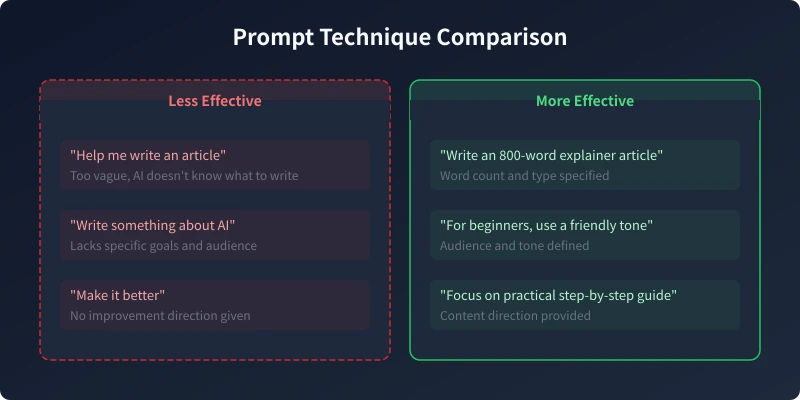
Good prompts include these elements:
- Task description: What specifically you want AI to do (write, revise, outline)
- Background info: Provide necessary context for AI
- Format requirements: Word count, structure, paragraph style
- Style preference: Tone, word choice, target audience
Step 3: Iterate Through Multi-Round Conversations
The first result is usually not the final draft. Think of AI writing as a conversation process:
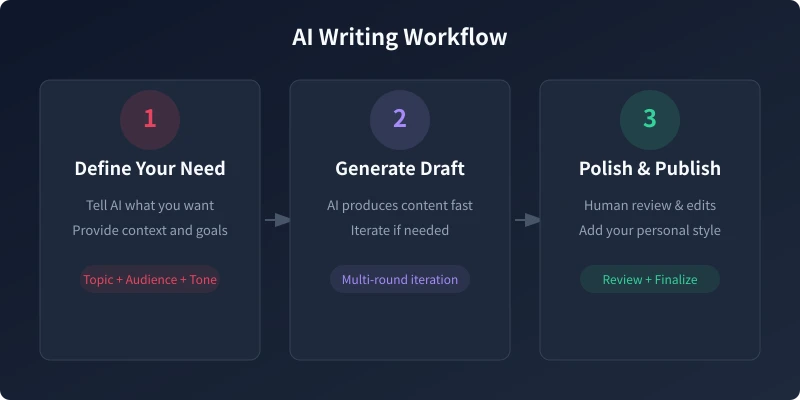
Iteration tips:
- If unsatisfied: "This sounds stiff, please rewrite in a more conversational tone"
- Need more detail: "Please add specific data examples in the second paragraph"
- Want different style: "Switch to a more formal business tone"
- Too long: "Condense to under 500 words, keep the core points"
Practical Use Case Examples
Case 1: Writing Weekly Reports
List your completed tasks for the week, then tell AI: "Help me organize these work items into a concise weekly report, highlighting achievements and data, in a professional but not stiff tone." AI will structure your content and reorganize it with more professional language.
Case 2: Writing Social Media Copy
Tell AI about your product or content topic, and have it generate multiple versions. For example: "Write 5 Xiaohongshu posts for an AI note-taking tool, require eye-catching content with a call to action, keep under 100 characters each."
Case 3: Writing Emails
Clearly describe the email purpose, your relationship with the recipient, and the expected response. AI can help you write appropriate and efficient emails. Remember to provide specific context, like "This is an introductory email to a potential partner."
Case 4: Writing Article Outlines
Have only a vague idea? Let AI help you expand. Input "I want to write an article about remote work efficiency, please create a detailed outline" and AI will give you a structured outline that you can adjust as needed.
Pitfall Guide: Common AI Writing Mistakes
- Do not publish AI-generated content directly: Always review manually for factual accuracy
- Do not over-rely on template expressions: AI tends to use cliches, add your personal style
- Do not ignore originality: AI content may be similar to other sources, rephrase in your own words
- Do not ask too many questions at once: One clear question is more effective than a pile of vague requests
Advanced Techniques
Once comfortable with the basics, try these advanced approaches:
- Role-playing: Have AI take on a specific role (e.g., "You are a senior editor")
- Provide examples: Give AI a writing style sample you like as reference
- Step-by-step execution: Outline first, draft second, polish last — works better than generating everything at once
- Have AI review your own writing: Share your article with AI to find logical gaps and expression issues
Summary
The core of AI-assisted writing is human-AI collaboration. AI handles efficiency and structure; you handle creativity and soul. Master prompt techniques and iteration methods, and AI becomes your strongest writing partner.
Remember: the best articles always combine AI efficiency with your thinking.
Related Articles
AI Speech to Text: Beginner's Guide to Convert Voice to Text in 3 Steps
Learn how to convert speech to text using AI tools. Perfect for meeting notes, content creation, and video subtitles. Three practical scenarios with step-by-step instructions.
TutorialsAI Local Deployment Guide: Run Large Models in 3 Steps for Free
Learn how to deploy AI models locally in just 3 steps. No coding experience needed, completely free, and your data stays private on your own computer.
TutorialsAI Shopping Decision Guide: From Price Comparison to Avoiding Pitfalls
Learn how to use AI for shopping decisions. From price comparison to avoiding pitfalls - make smarter purchasing choices with AI assistance.
Comments are not yet available, stay tuned