How to Ask AI Better Questions: 5 Practical Techniques for Better Answers
Why Do You Always Get Poor Answers from AI?
Many people face the same problem when they first start using AI: I asked a specific question, so why is the answer always generic and imprecise?
The problem is not with the AI — it is with how you ask.
AI is like a mirror. It reflects what you give it. Ask vaguely, and it answers vaguely. Ask precisely, and it answers precisely.
This guide shares 5 proven practical techniques that will turn every conversation with AI into a high-quality one.
Tip 1: Define the Role — Tell AI Who It Is
This is the most basic and most effective technique. Assigning a role to AI gives it a thinking framework, making its responses much more precise.
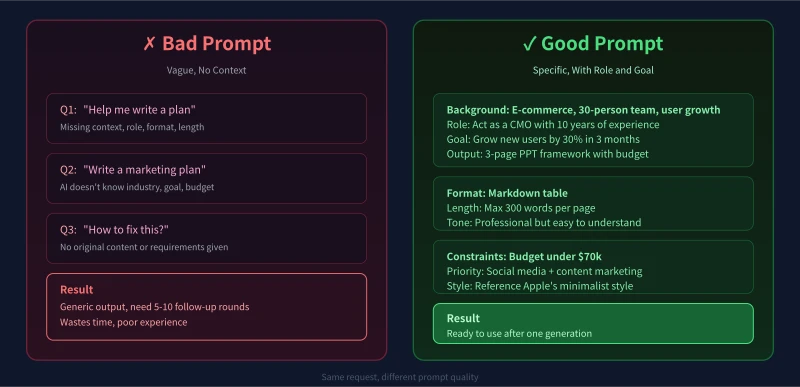
Wrong Example
"Help me write a sales plan"
Right Example
"Act as a senior sales manager with 10 years of experience, and help me write a SaaS product sales plan targeting small and medium businesses"
Common Role Keywords
- Writing scenarios: senior copywriter, professional editor, brand strategist
- Learning scenarios: patient high school teacher, experienced private tutor
- Workplace scenarios: senior project manager, industry expert, professional HR
- Life scenarios: nutritionist, fitness coach, financial advisor
Tip: The more specific the role description, the better. "Teacher" is too vague. "A high school physics teacher skilled in heuristic teaching" is much better.
Tip 2: Give Context — Let AI Understand Your Situation
The same question can have completely different answers depending on your background. Telling AI your specific situation makes its suggestions much more relevant.
Key Information to Share
- Identity: Are you a student, office worker, entrepreneur, or retiree?
- Current situation: Where are you starting from? What resources and foundation do you have?
- Time constraints: How much time do you have? Is it urgent or a long-term project?
- Budget range: What is your budget ceiling to avoid unrealistic recommendations?
- Skill level: Are you a complete beginner, have some knowledge, or are you an expert?
Example
"I am an office worker, currently at zero foundation, with 1 hour of learning time per day, and a budget within 2000 yuan. I want to learn a skill I can monetize part-time."
Tip 3: Describe Your Goal — Tell AI Exactly What You Want
Many people tell AI what they want to do but not to what degree. A clear goal description makes AI output much more targeted.
Characteristics of a Good Goal
- Measurable: Lose 5 kg in 3 months, not just "lose weight"
- Timed: Complete within this month, not "as soon as possible"
- Specific standard: A summary that is easy to understand, not just "a simple summary"
Tip 4: Specify the Format — Let AI Output the Way You Want
Many people spend time reformatting AI answers after receiving them. You can specify the output format upfront and save that effort.
Common Format Instructions
- Lists: "Output 5 suggestions as an ordered list"
- Tables: "Compare the pros and cons of the following options in a table"
- Template: "Use the format of [Title + Points + Explanation]"
- Word limit: "Keep it within 500 words"
- Tone: "Use professional but easy-to-understand language"
Tip 5: Set Constraints — Prevent AI from Going Off Track
AI sometimes gives impractical suggestions. Setting constraints helps prevent this.
Common Constraints
- Tool limits: "Only use free online tools"
- Skill level limits: "Do not use technical solutions that require programming"
- Time limits: "Each step should not exceed 30 minutes"
- Format requirements: "Do not use markdown, use plain text"
The Universal Prompt Template
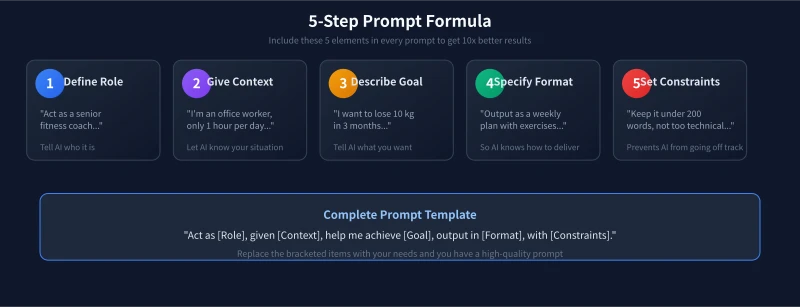
Combine the 5 techniques above and you get a universal prompt template:
"Act as [Role], given [Context], help me achieve [Goal], output in [Format], with [Constraints]."
Complete Example
"Act as a content marketing expert with 5 years of experience. Create a 3-month content marketing plan for a health food brand targeting young people. Output as a weekly plan including daily topics, publishing platforms, and expected results. Only use free social media channels. Keep each entry under 200 words."
Advanced Tips
Multi-Round Refinement
It is normal not to get perfect results on the first try. You can continue asking follow-up questions based on the answer:
- "Can you elaborate more on point 3?"
- "Can you give a concrete example?"
- "Make the plan more concise"
Provide Reference Examples
If you want AI to match a certain style, give it a reference:
"Please write in the following style: [paste a piece of well-written text]"
Summary
AI is not magic. It is a mirror. The more thought you put in, the more value you get back.
Remember these 5 tips:
- Role: Tell AI who it is
- Context: Tell AI about your situation
- Goal: Tell AI what you want
- Format: Tell AI how to output
- Constraints: Tell AI what to avoid
Next time before you ask, take 30 seconds to think about these 5 elements. You will notice a dramatic improvement in AI answer quality.
Related Articles
AI 帮你写简历:从零到专业,五步搞定求职利器
不管你是应届生还是职场转行,AI 都能帮你把简历从"凑合能用"变成"眼前一亮"。本文用五个步骤,手把手教你用 AI 生成、修改、优化出一份真正能拿面试的专业简历。
AI 语音转文字:零基础实操指南,三步把说话变成文字
还在打字到手指发酸?还在为会议记录发愁?AI 语音转文字技术已经非常成熟,学会使用它,可以帮你把说话直接变成文字,效率提升数倍。本文将手把手教你选择工具、完成转写、导出使用,让 AI 成为你的打字替身。
Tech FrontierAI 提问技巧入门:让 AI 回答更准确的 7 个实用方法
明明 AI 功能强大,但每次提问得到的回答都差强人意?其实问题往往不在 AI,而在于你提问的方式。本文用最直观的方式教你 7 个让 AI 回答更准确的实用技巧,包括四要素公式、精准提问、背景信息、拆分任务、追问迭代、万能模板和常见错误,小白也能立即上手。
Comments are not yet available, stay tuned