AI Client Integration Guide: One Interface to All Large Language Models
Why Do You Need an AI Client?
If you have used ChatGPT, you have probably also used DeepSeek, Claude, or other AI platforms. Each platform has its own web interface. Every time you want to switch to a different model, you have to open a new browser tab, log in again, and find the right conversation window. By the end of the day, just switching between platforms takes several minutes.
What is even more troublesome is that you may have subscribed to OpenAI and also have a DeepSeek membership. Both accounts have credits, but every time you start a conversation, you have to think about which platform and which model will give you the best result.
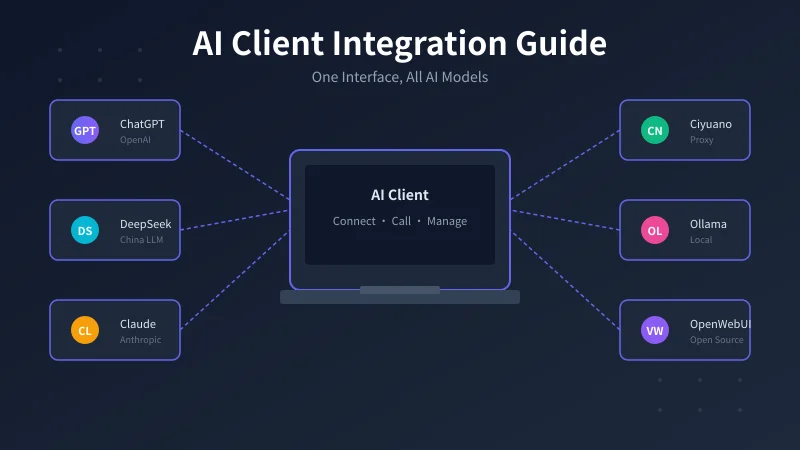
An AI client is built exactly to solve this problem. It is a middle layer that lets you use one single interface to connect to all models from multiple AI providers.
Three Integration Approaches Compared
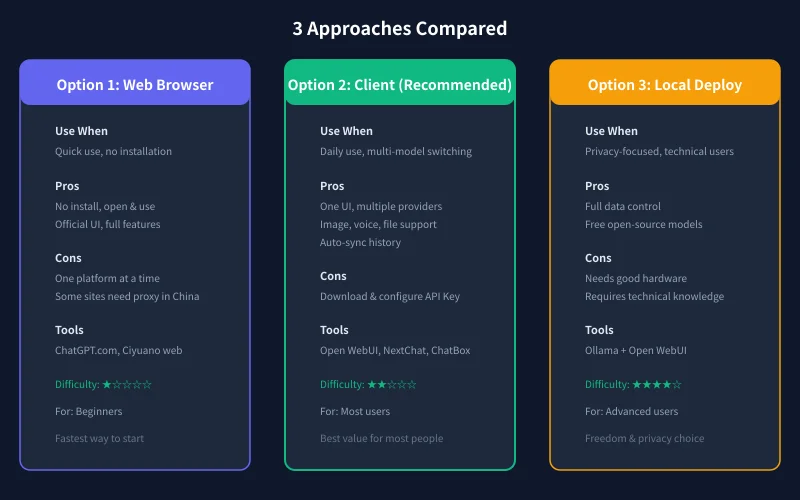
There are three mainstream approaches to access AI models, each suitable for different scenarios:
Option 1: Web Browser
Directly visit official websites such as ChatGPT.com or Ciyuano.ai. The advantage is zero installation; you can use it right after opening the browser, and the official interface has the most complete features. The disadvantage is that you can only access one platform's models at a time, and some overseas platforms require a proxy to access in China.
Option 2: Third-party Client (Recommended)
Download a client such as Open WebUI, NextChat, or ChatBox, and fill in each provider's API Key and address in the settings. You can then switch between providers freely in one interface. The advantages are that you do not need to switch browsers, history is unified, images, voice, and file uploads are supported, and credits from multiple platforms can be used together. The disadvantage is that you need to download and configure it.
Option 3: Local Deployment
Run open-source models on your own computer using Ollama plus Open WebUI or similar tools. The advantage is that all data stays with you, providing the best privacy protection, and open-source models are free. The disadvantage is that it requires good hardware (16GB RAM or more recommended) and some technical knowledge to set up.
For most users, Option 2: Third-party Client is the best value choice.
Practical Tutorial: Connect Multiple AI Models with Open WebUI
The following tutorial uses Open WebUI as an example. The whole process takes about 10 minutes.
Step 1: Select Provider Type
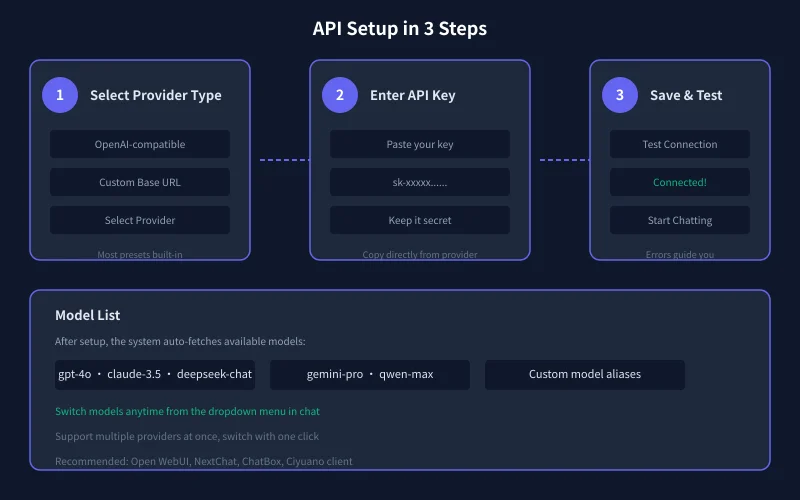
Open the settings page of your client, find "Model Provider" or "Provider Management," and click "Add." In the type list, select:
- OpenAI-compatible API: Works with most providers (Ciyuano, SiliconFlow, OpenRouter, etc.) because they all follow the OpenAI API format.
- OpenAI: Connect directly to the official OpenAI service.
- DeepSeek: Some clients have a preconfigured DeepSeek option.
- Anthropic / Claude: Some clients also have Claude preconfigured.
If you are using the Ciyuano proxy service, select "OpenAI-compatible API," because Ciyuano fully supports the OpenAI API format.
Step 2: Enter API Key and Base URL
Open the "Provider Settings" page in your client, find the provider you just added, click Edit, and fill in the following:
Provider Name: Enter anything you like, for example "Ciyuano" or "My Proxy Service," so you can recognize it easily.
Base URL: This is the API address of the AI provider. For Ciyuano, the address is https://api.ciyuano.com plus the API path. You can find the exact address in your provider dashboard.
API Key: Go to your provider dashboard, find "API Management" or "Key Management," create a new key, and copy it. Paste it into the client's key input field. Note that this key is your credential; never share it with anyone.
Step 3: Save and Test Connection
Click "Save" and go back to the model list page. The normal flow is:
- Click "Refresh Model List" or "Load Models."
- Wait a few seconds; the system will automatically fetch available models.
- If you see model names such as gpt-4o, claude-3.5, deepseek-chat, the connection is successful.
- If it says "Connection failed" or "401 error," check that your API Key is correct.
After success, go back to the chat interface. All models will appear in the dropdown menu, and switching models becomes as simple as switching songs.
Other Recommended Clients
Besides Open WebUI, the following clients are also worth trying:
NextChat: A lightweight web-based client, easy to deploy, supports multiple providers. Good as a backup option.
ChatBox: A desktop client for Mac, Windows, and Linux, with a modern interface, voice input, and image upload support.
Ciyuano Client: A multi-platform client built on Ciyuano's API proxy service. Fast access within China, no proxy needed, supports multi-model switching.
Troubleshooting Common Connection Issues
Common Causes of Connection Failure
If your configuration is complete but the connection fails, follow this order to troubleshoot:
- Check if the API Key is correct: The most common mistake. Make sure you copied the full key and there are no extra spaces.
- Check if the Base URL is correct: Make sure there are no extra slashes or typos.
- Check your network: Accessing overseas providers from China may require a proxy. Using Ciyuano proxy eliminates this issue.
- Check if you have enough credits: Some error messages are actually caused by insufficient account balance. Check your payment records.
Chinese Character Display Issues
If you are using an English client and Chinese characters display as garbled text, look for "Font" or "Language" options in the client settings and set it to "Simplified Chinese" or choose a display mode that supports CJK fonts.
Provider Priority
If you have configured multiple providers, you can set a "Primary Provider" and a "Backup Provider." When the primary provider is unavailable, the system automatically switches to the backup, preventing conversation interruption.
Summary
The core value of an AI client is "one interface connecting all AI." Whether you use Ciyuano proxy, OpenAI official, DeepSeek, or Claude, the client can integrate them all into a single conversation interface. After configuration, you can test multiple models in the same conversation, compare which answer is better, and choose the most suitable model for each task type.
For users in China, using the Ciyuano API proxy service is the most stable and convenient way to access overseas models, without the hassle of proxies or VPN configuration.
Related Articles
AI 帮你写简历:从零到专业,五步搞定求职利器
不管你是应届生还是职场转行,AI 都能帮你把简历从"凑合能用"变成"眼前一亮"。本文用五个步骤,手把手教你用 AI 生成、修改、优化出一份真正能拿面试的专业简历。
AI 语音转文字:零基础实操指南,三步把说话变成文字
还在打字到手指发酸?还在为会议记录发愁?AI 语音转文字技术已经非常成熟,学会使用它,可以帮你把说话直接变成文字,效率提升数倍。本文将手把手教你选择工具、完成转写、导出使用,让 AI 成为你的打字替身。
Tech FrontierAI 提问技巧入门:让 AI 回答更准确的 7 个实用方法
明明 AI 功能强大,但每次提问得到的回答都差强人意?其实问题往往不在 AI,而在于你提问的方式。本文用最直观的方式教你 7 个让 AI 回答更准确的实用技巧,包括四要素公式、精准提问、背景信息、拆分任务、追问迭代、万能模板和常见错误,小白也能立即上手。
Comments are not yet available, stay tuned