Complete Guide to AI Prompt Optimization: A 4-Element Formula to 10x AI Response Quality
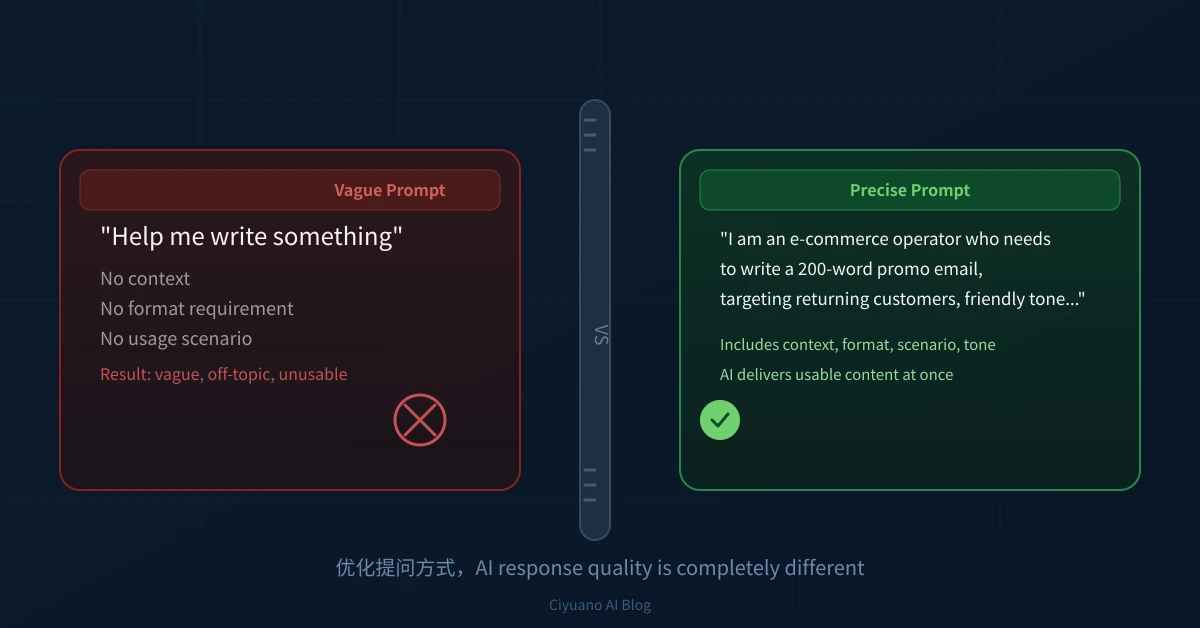
Why the Same Question Gets Different AI Answers
Many people experience this when first using AI: the same question sometimes gets an excellent answer, and other times the response is all over the place. Even changing the wording slightly can make the AI perform completely differently.
The truth is: it is not about AI being unstable. It is about how you ask the question. AI is like a highly capable assistant who cannot read your mind. The clearer the information you give it, the more precise its response.
Three Common Mistakes When Asking AI
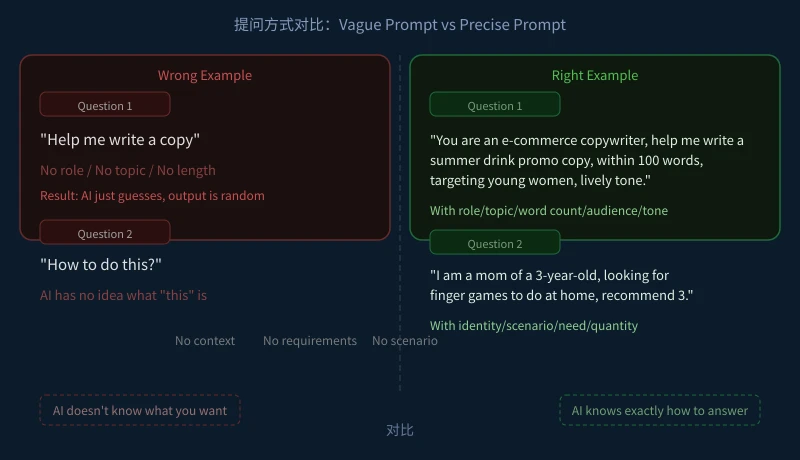
Mistake One: Missing Context
Wrong example: "Help me write a copy."
What AI is thinking: Copy for what product? Who is it for? How long? What tone? Since it knows nothing, it can only guess, and the result is usually wrong.
Better example: "Help me write a smartwatch e-commerce promo copy, within 100 words, targeting young office workers, with a lively tone."
Adding product, word count, audience, and tone gives AI immediate direction.
Mistake Two: Unclear References
Wrong example: "How to do this thing?" or "Help me check that file."
AI cannot see your screen and does not know what "this" refers to—whether a file, an image, or an idea. Always tell AI exactly what the object is.
Better example: "Help me analyze the trends in this 2025 e-commerce sales data table, focusing on the category with the fastest sales decline."
Mistake Three: Vague Requirements
Wrong example: "Summarize it." "Help me optimize it." "Make it better."
From AI's perspective, these mean nothing. "Make it better"—better how? Shorter? More detailed? More formal? AI cannot decide for you.
Better example: "Please condense this product description to within 150 words, keeping the core selling points, in a style similar to Apple's website—concise and powerful."
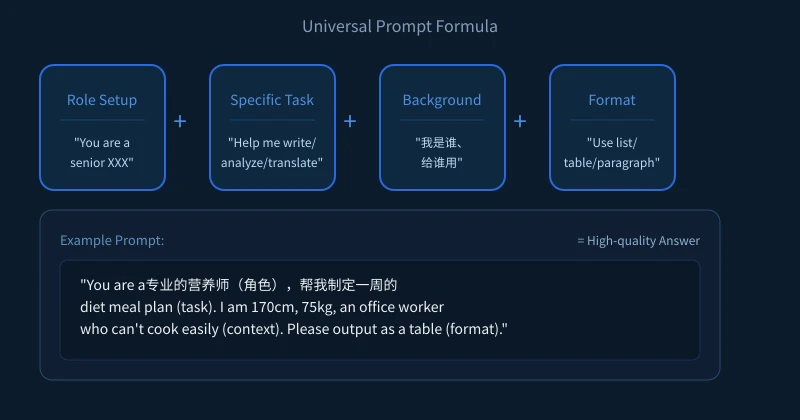
The Universal Prompt Formula: Four Elements
Remember this formula, applicable to almost every scenario:
Element One: Role Setup
Tell AI "who it is," and it immediately switches to the corresponding professional response mode.
- "You are an experienced fitness coach" — for exercise and diet advice
- "You are a senior foreign trade salesperson" — for business English emails and client communication
- "You are a patient primary school math teacher" — for explaining problems to children
- "You are a product manager" — for requirement analysis and feature design
Element Two: Specific Task
Write what, analyze what, translate what—state it clearly in one sentence.
Avoid saying "help me sort this out." Instead say "help me write/analyze/compare/translate/summarize/organize..."
Element Three: Background Information
Tell AI who you are, who this is for, and the scenario:
- Identity: primary school parent / office worker / college student / entrepreneur
- Audience: boss / client / colleague / yourself
- Scenario: interview / report / daily communication / social media post
Element Four: Format Requirements
Tell AI how you want the output:
- Format: list / table / bullet points / paragraph / JSON
- Length: within 100 words / around 500 words / no more than 3 paragraphs
- Language: Chinese / English / bilingual
- Tone: formal / casual / friendly / professional
Two Real-World Scenario Comparisons
Scenario One: Writing a Weekly Report
Low-quality question: "Help me write a weekly report."
Result: AI gives you a generic template, the content is empty.
High-quality question: "You are a backend engineer at an internet company. Help me write a weekly work report with this structure: completed this week, next week plan, issues encountered. This week I optimized the user registration API. Next week I will start the payment module. Within 200 words, concise and formal tone."
Result: AI generates a usable weekly report directly, requiring almost no editing.
Scenario Two: Learning English
Low-quality question: "Help me learn English."
Result: AI gives a pile of learning materials with no clear starting point.
High-quality question: "You are an English teacher. My English level is at a high school graduate level. My goal is to have basic business English conversation skills. Please create a 30-day learning plan for me, no more than 30 minutes per day, focusing on three scenarios: hotel check-in, airport transportation, and business meetings."
Result: AI gives you a detailed day-by-day plan that you can follow directly.
Three Tips You Can Use Immediately
Tip One: Break Tasks Into Steps
Do not throw complex tasks at AI in one shot. Step-by-step works better:
- Step one: "List the sections needed for a market research report."
- Step two: "Now write the first section: industry background. Around 300 words."
- Step three: "Continue with the second section..."
Tip Two: Ask AI to Repeat Your Requirements
After asking your question, add: "Please repeat your understanding first, then proceed once confirmed." This prevents AI from misunderstanding your needs.
Tip Three: Provide Examples
If AI misunderstands the style you want, show it an example you like:
"Rewrite in this style: 'Today's meeting was efficient and pragmatic, three key decisions were reached...'"
Summary
AI is not all-powerful, but AI used with good prompting skills is far more powerful than you imagine. Remember two words: specific, clear.
Next time you use AI, ask yourself three questions:
- Does AI know who I am?
- Does AI know what I need?
- Does AI know what output format I want?
Answer all three, and your AI experience will immediately level up.
Related Articles
AI 帮你写简历:从零到专业,五步搞定求职利器
不管你是应届生还是职场转行,AI 都能帮你把简历从"凑合能用"变成"眼前一亮"。本文用五个步骤,手把手教你用 AI 生成、修改、优化出一份真正能拿面试的专业简历。
AI 语音转文字:零基础实操指南,三步把说话变成文字
还在打字到手指发酸?还在为会议记录发愁?AI 语音转文字技术已经非常成熟,学会使用它,可以帮你把说话直接变成文字,效率提升数倍。本文将手把手教你选择工具、完成转写、导出使用,让 AI 成为你的打字替身。
Tech FrontierAI 提问技巧入门:让 AI 回答更准确的 7 个实用方法
明明 AI 功能强大,但每次提问得到的回答都差强人意?其实问题往往不在 AI,而在于你提问的方式。本文用最直观的方式教你 7 个让 AI 回答更准确的实用技巧,包括四要素公式、精准提问、背景信息、拆分任务、追问迭代、万能模板和常见错误,小白也能立即上手。
Comments are not yet available, stay tuned