AI Study Planning Assistant Guide: From Planning to Exam Sprint
Why Use AI to Plan Your Learning?
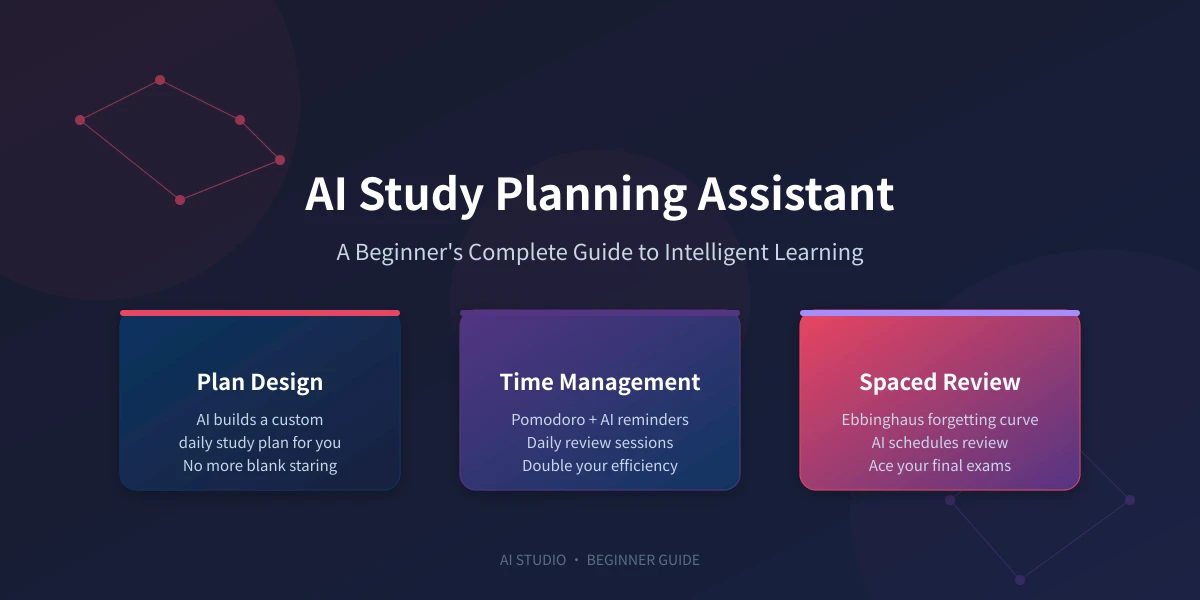
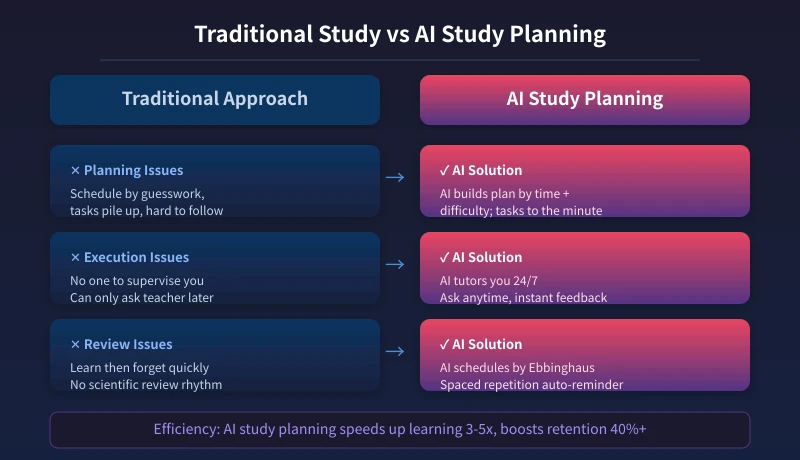
Learning is hard for three reasons: you don't know what to study (no direction), you don't know where to start (no plan), and what you learn gets forgotten (no review). Many people work hard but don't see results — the problem is often planning, not effort.
The biggest value of an AI study planning assistant is turning vague effort into an executable plan. You just need to tell it your goal and timeline, and it will break everything down into daily and weekly tasks. It's also always available when you need review, tutoring, or exam prep.
Preparation: Pick an AI Tool
You don't need fancy tools for AI study planning. Any chat-style AI will do. ChatGPT, DeepSeek, Claude, and Doubao all work. For beginners, DeepSeek or Doubao are great choices — they understand Chinese well and are easy to use.
Step 1: Start with One Sentence
When you first talk to the AI, you don't need a complicated prompt. One sentence explaining your situation is enough. Here's a standard template:
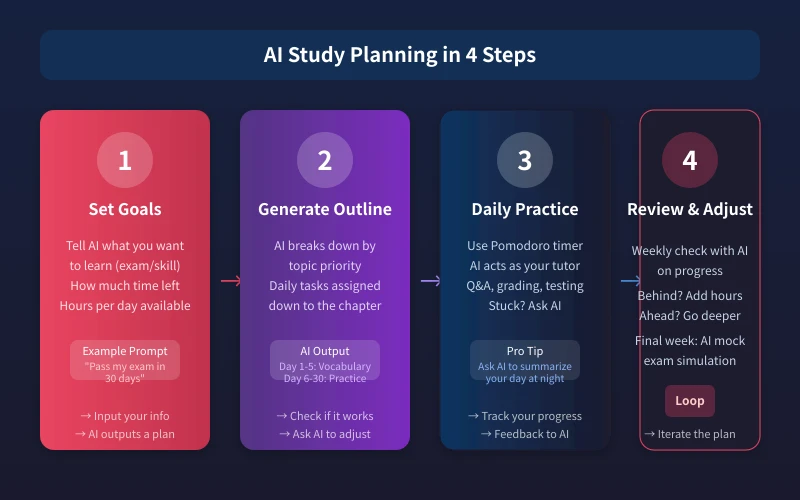
I want to [achieve goal] within [timeline]. My current level is [status]. I can invest [hours] per day. Please make me a study plan.
Step 2: Get an Executable Outline from AI
Once you receive a plan, don't rush to start. Have a confirmation conversation with the AI first:
- Check the pace: How much time will this take me daily? Is it too packed?
- Confirm key topics: I'm weakest in XX — does this plan cover it?
- Build in buffer: Leave one day per week flexible for catching up
A good AI will adjust based on your feedback. This conversation matters — it ensures the plan is truly tailored to you.
Step 3: Daily Execution — Use AI as Teacher and Partner
With the plan in place, here's how to use AI during daily study:
Before studying: I'm going to study XX today. List the 3 core concepts first
When stuck: I'm stuck on [specific problem]. Can you explain it?
After studying: I just learned XX. Give me 5 practice questions to test myself
Bedtime review: I studied these today [list]. Summarize them into flashcards
Step 4: Scientific Review with AI
Most people forget what they learn because they don't review scientifically. AI can fix this:
Tell AI your memory needs: I memorized 50 words today. Schedule my review based on the Ebbinghaus forgetting curve
AI will generate a review schedule like this:
- Day 1: Same day review (1 hour later)
- Day 2: Next day review
- Day 4: Three days later
- Day 7: One week later
- Day 15: Half a month later
Set these as phone alarms, or have AI push them daily, and you'll reduce forgetting dramatically.
Step 5: Exam Sprint — AI Simulates Real Exams
In the final 1-2 weeks before an exam, AI's biggest value is exam simulation:
Generate mock test: Create a mock exam of the same difficulty as my last test, with multiple choice and short answer questions
Time-limited practice: Set a timer. I have 30 minutes to finish these questions
Grading and feedback: I'm done. Grade each question and point out my mistakes
Strengthen weak areas: I lost the most points on XX type questions. Give me 10 targeted practice questions
Traditional Study vs AI Study Planning
Quick Prompt Reference
Save these prompt templates for every stage of your learning journey:
- Plan creation: Complete XX goal in X days, my base is YY, available ZZ hours per day. Create a plan
- Knowledge explanation: Explain XX concept in plain language, with a real-life example
- Test yourself: Based on what I just learned, give me 5 fill-in-the-blank questions
- Review schedule: I memorized [list]. Schedule my review using Ebbinghaus curve
- Error analysis: I got these wrong [paste]. Analyze my mistakes and give targeted practice
- Mock exam: Generate a full XX exam mock paper, timed at 90 minutes
- Bedtime review: Turn what I learned today into flashcards
Frequently Asked Questions
The AI's plan feels too idealistic.Just tell it this pace is too fast, slow me down. It will adjust. Don't be shy — the AI is there to serve you.
Can the AI's explanations be wrong?Possibly. For factual content (numbers, names, historical events), verify against authoritative sources. But for learning methodology and basic concept explanations, AI is generally reliable.
Do I have to turn off the AI after each session?No. You can come back anytime and continue the conversation. The AI remembers context within the same chat session. Try reviewing with AI at the same time daily to build a habit.
Is free AI enough?Absolutely. Study planning doesn't require heavy computing power. Free tier is fully capable.
In Conclusion
An AI study planning assistant doesn't mean you don't need to work hard. It means working hard with direction. It solves two of the biggest pitfalls in learning: not knowing what to study and forgetting what you've learned.
If you're about to learn something new, start today. One sentence to your AI can launch your study plan. You'll quickly see the difference between directed effort and blind effort.
Related Articles
AI 帮你写简历:从零到专业,五步搞定求职利器
不管你是应届生还是职场转行,AI 都能帮你把简历从"凑合能用"变成"眼前一亮"。本文用五个步骤,手把手教你用 AI 生成、修改、优化出一份真正能拿面试的专业简历。
AI 语音转文字:零基础实操指南,三步把说话变成文字
还在打字到手指发酸?还在为会议记录发愁?AI 语音转文字技术已经非常成熟,学会使用它,可以帮你把说话直接变成文字,效率提升数倍。本文将手把手教你选择工具、完成转写、导出使用,让 AI 成为你的打字替身。
Tech FrontierAI 提问技巧入门:让 AI 回答更准确的 7 个实用方法
明明 AI 功能强大,但每次提问得到的回答都差强人意?其实问题往往不在 AI,而在于你提问的方式。本文用最直观的方式教你 7 个让 AI 回答更准确的实用技巧,包括四要素公式、精准提问、背景信息、拆分任务、追问迭代、万能模板和常见错误,小白也能立即上手。
Comments are not yet available, stay tuned