AI Chat Prompting Tips: Write Prompts That Get Great Answers in One Shot
Why Are You Getting Bad Answers from AI?
Many people share the same frustration when using AI chat tools: the AI seems powerful, but the answers it gives you are vague, inaccurate, or completely off-topic.
The problem usually isn't the AI — it's how you ask. Just like communicating with people, the clearer your question, the better the answer. This article teaches you four practical principles to instantly improve the quality of your prompts.
Principle 1: Be Specific About What You Want
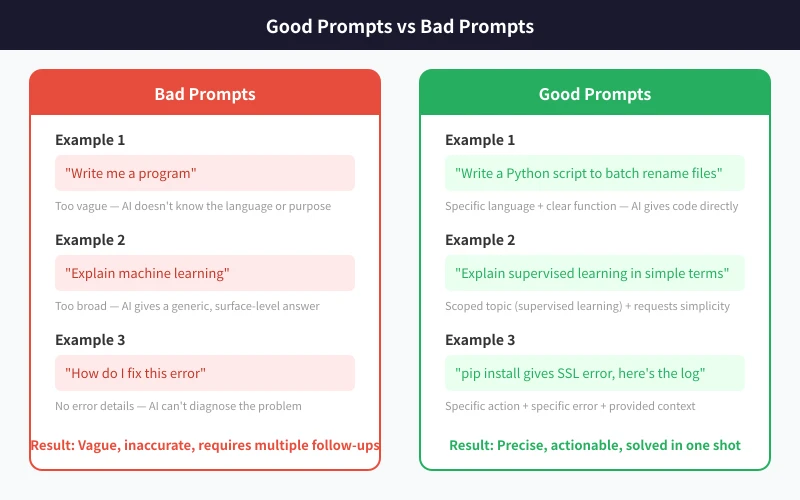
Many people ask broad questions like "write me a program" or "explain machine learning." AI can answer these, but the response will inevitably be generic.
Bad examples:
- "Write me a program" — What language? What function? For what purpose?
- "Explain machine learning" — Which aspect? For what audience? How deep?
Good examples:
- "Write a Python script to batch rename files using the format date_sequence"
- "Explain supervised learning in plain language for someone with no programming background"
The key difference: good prompts include a specific goal and a clear scope.
Principle 2: Provide Context
AI doesn't know your background, your tool versions, or your specific situation. The more context you provide, the more precise the answer.
Context includes:
- Your role: "I'm a beginner front-end developer"
- Technical environment: "I'm using React 18 + TypeScript"
- What you've tried: "I already tried approach A but got error XX"
- Desired outcome: "I need something suitable for production"
Example:
Without context: "How do I fix this error?"
With context: "I'm getting an SSL error when running pip install requests on Python 3.10. The error is [SSL: CERTIFICATE_VERIFY_FAILED], happening in a corporate intranet. I've tried the --trusted-host flag but it didn't work."
Principle 3: Use the "Four-Step" Framework
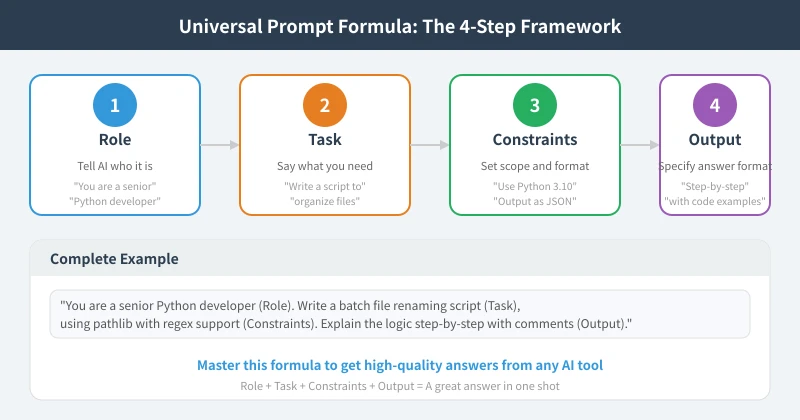
For complex requests, structure your prompt using this universal formula:
Role + Task + Constraints + Output Format
- Role: Tell the AI what role to play ("You are a senior Python developer")
- Task: Clearly state what you need ("Write a file organization script")
- Constraints: Define the tech stack, scope, and requirements ("Use pathlib with regex support")
- Output: Specify your preferred answer format ("Explain the logic step-by-step with comments")
Complete example:
"You are a senior Python developer. Write a batch file renaming script using the pathlib library with regex support for file selection. Explain the code logic step-by-step and add comments at key points."
With this kind of prompt, the AI's answer is almost ready to use directly — no follow-up needed.
Principle 4: Iterate, Don't Restart
If the first answer isn't quite right, don't start over with a brand-new prompt. Continue the conversation — it's much more efficient:
- Adjust direction: "This approach is good, but can you make it run asynchronously?"
- Add requirements: "The code works, but can you add error handling?"
- Deep dive: "Can you explain the regex in step 3?"
AI remembers the context of the current conversation, so following up is far more efficient than starting fresh.
Five Ready-to-Use Prompt Templates
Here are five proven prompt templates you can use right away:
Template 1 — Learning a concept:
"Explain [concept] to a [target audience] using simple analogies, with 2-3 real-life examples."
Template 2 — Writing code:
"Implement [feature] using [language/framework] with [technical constraints]. Include comments explaining what each section does."
Template 3 — Troubleshooting:
"I'm getting [error message] when I [action] in [environment]. I've already tried [attempted solutions]. Help me analyze possible causes and provide solutions."
Template 4 — Comparison:
"Compare [Option A] and [Option B] from the perspectives of [dimension 1], [dimension 2], and [dimension 3], and give a recommendation."
Template 5 — Content creation:
"Write a [type] about [topic] for [audience], approximately [length], in a [style] tone."
Common Mistakes
- Mistake 1: Shorter is better. Concise ≠ effective. A clear long question beats a vague short one by 100x.
- Mistake 2: AI should read my mind. AI has no telepathy — it can only work with the words you give it.
- Mistake 3: Ask everything at once. Break complex tasks into multiple steps. Confirm each step before moving on.
- Mistake 4: AI is always right. Always verify, especially code — test it in a safe environment first.
Conclusion
Good AI prompting doesn't require advanced skills. The core is simply saying what you want clearly. Remember the four-step formula: Role, Task, Constraints, Output — and your prompt quality will jump to the next level.
Starting today, try using one of the templates above to ask AI a question. You'll notice an immediate difference in answer quality.
Related Articles
AI Speech to Text: Beginner's Guide to Convert Voice to Text in 3 Steps
Learn how to convert speech to text using AI tools. Perfect for meeting notes, content creation, and video subtitles. Three practical scenarios with step-by-step instructions.
TutorialsAI Local Deployment Guide: Run Large Models in 3 Steps for Free
Learn how to deploy AI models locally in just 3 steps. No coding experience needed, completely free, and your data stays private on your own computer.
TutorialsAI Shopping Decision Guide: From Price Comparison to Avoiding Pitfalls
Learn how to use AI for shopping decisions. From price comparison to avoiding pitfalls - make smarter purchasing choices with AI assistance.
Comments are not yet available, stay tuned