AI Document Processing Guide: Read PDFs, Summarize Long Texts, and Extract Key Insights with AI
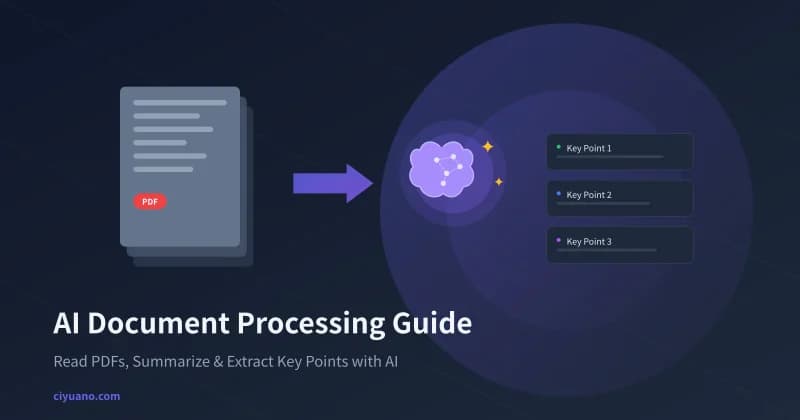
Facing a 50-page PDF report, a screen full of academic papers, or a product manual in a foreign language — do you often feel overwhelmed? AI document processing tools can help you quickly extract core content, generate summaries, and answer questions, boosting your reading efficiency by 10x or more. This guide walks you through how to use AI to process all kinds of documents.
What Is AI Document Processing
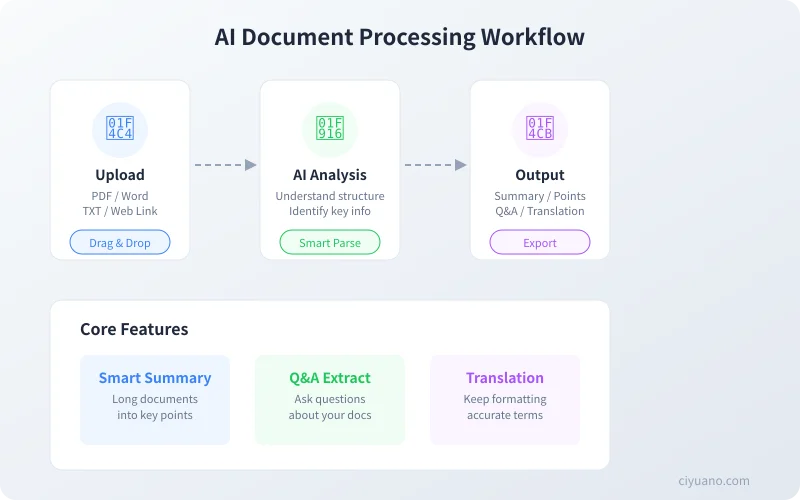
AI document processing uses the capabilities of large language models (LLMs) to intelligently analyze uploaded documents. You can throw a PDF, Word document, or even a web link at AI, and it can:
- Quickly summarize: Condense a lengthy article into a few paragraphs
- Extract key points: Automatically identify core arguments, data, and conclusions
- Answer questions: Respond to your specific questions based on the document content
- Translate documents: Complete multilingual translation while preserving formatting
- Compare and analyze: Process multiple documents simultaneously to find similarities and differences
Step 1: Choose the Right Tool
Here are the main AI document processing approaches — choose the one that fits you best:
| Tool Type | Examples | Best For |
|---|---|---|
| Online AI Chat | Ciyuano, ChatGPT, Claude | Processing individual documents on the fly, no installation needed |
| Specialized Document Tools | NotebookLM, ChatPDF | Batch processing, team collaboration |
| API Integration | Ciyuano API, OpenAI API | Automated processing, workflow integration |
Beginner tip: If you're just getting started, use an online AI chat tool like Ciyuano — just upload your file and you're good to go. Zero barrier to entry.
Step 2: Upload Your Document
Using Ciyuano as an example, the process is straightforward:
Steps:
- Open ciyuano.com and log in to your account
- Find the attachment button in the chat box (usually a paperclip icon)
- Select the file you want to process. Supported formats include:
- PDF files (most common)
- Word documents (.docx)
- Plain text files (.txt)
- Text in images (via OCR recognition)
- Wait for the upload to complete — AI will automatically recognize the document content
File size limit: Most tools support files up to 10MB. If your file is too large, split it into smaller files before uploading.
Step 3: Tell AI What You Want
After uploading your document, you need to give AI a clear instruction. Different instructions produce completely different results:
Scenario 1: Quickly Understand the Document
Recommended prompt:
"Summarize the core conclusions of this report in 300 words, and list the 3 most important findings."
This way, AI will give you a structured summary instead of a vague overview.
Scenario 2: Find Specific Information
Recommended prompt:
"What does this product manual say about the pricing strategy? Please quote the key passages directly from the original text."
Scenario 3: Translate a Foreign Document
Recommended prompt:
"Please translate this document into English, preserving the original paragraph structure. Include the original technical terms in parentheses."
Scenario 4: Compare Multiple Documents
Recommended prompt:
"I've uploaded two competitive analysis reports. Please compare their similarities and differences in market size, growth trends, and competitive landscape using a table."
Traditional Reading vs AI-Assisted Processing
Here's a side-by-side comparison of the two approaches:
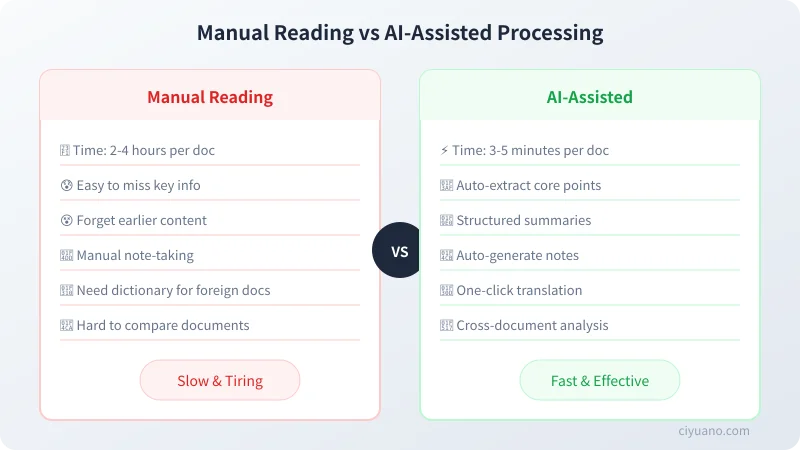
The advantage of AI document processing isn't just speed — it helps you focus on what matters. When reading long documents, people often get lost in details. AI can help you extract the most valuable information from a big-picture perspective.
Advanced Tips
Tip 1: Process Very Long Documents in Sections
If your document exceeds 50 pages, upload it in sections. First have AI summarize each chapter, then combine the chapter summaries for an overall analysis. This produces more accurate results for each section.
Tip 2: Follow-Up Questions Matter More Than the First Prompt
After getting your first summary, don't stop there. Keep asking:
- "What's the data source for this conclusion?"
- "What's the author's stance on issue X?"
- "Are there any overlooked potential risks?"
Follow-up questions help you dig out deeper insights.
Tip 3: Ask AI to Cite Sources
"Please note which page or chapter each key point comes from in your answer, so I can verify against the original."
This lets you quickly locate the original text and verify whether AI's summary is accurate.
Tip 4: Specify the Output Format
Based on your intended use, have AI output in a specific format:
- Taking notes: Output as a Markdown bullet-point list
- Writing a report: Output with title, body, and conclusion structure
- Making a presentation: Output as a slide outline with one key point per slide
- Sending an email: Output as a 200-word email summary
Common Document Processing Scenarios
| Document Type | Recommended Prompt | Expected Output |
|---|---|---|
| Academic Papers | "Summarize the research methods, experimental results, and main conclusions" | Structured paper summary |
| Product Manuals | "List all feature modules and how to use them" | Feature checklist + usage guide |
| Financial Reports | "Extract key financial metrics and year-over-year changes" | Data summary table |
| Contracts | "Highlight key terms, deadlines, and breach-of-contract liabilities" | Key terms list |
| Technical Documentation | "Explain the core technical principles in plain language" | Simplified technical explanation |
Automate with API
If you need to process large volumes of documents in batch, you can automate it with the Ciyuano API:
// Upload document and get analysis results
const response = await fetch('https://api.ciyuano.com/v1/chat/completions', {
  method: 'POST',
  headers: {
    'Authorization': 'Bearer YOUR_API_KEY',
    'Content-Type': 'application/json'
  },
  body: JSON.stringify({
    model: 'deepseek-v4',
    messages: [{
      role: 'user',
      content: 'Summarize the key points of this document in Markdown format'
    }],
    // Attachments uploaded via file parameter
  })
});
With the API, you can:
- Batch process contract reviews and automatically flag risk clauses
- Automate academic paper summaries to save research time
- Build an internal enterprise knowledge base document processing system
- Schedule periodic scraping of industry reports and generate analysis summaries
Important Notes and Limitations
While AI document processing is powerful, there are some things to keep in mind:
- Verify accuracy: AI summaries may have omissions or misinterpretations — always cross-check critical information against the original
- Privacy protection: For sensitive files (contracts, financial data), consider using privately deployed models
- Format limitations: Scanned PDFs (image-only) depend on OCR quality for recognition
- Context length: Very long documents may exceed the model's context window and need to be processed in sections
Get Started Now
Find a document you need to read recently and try this template:
You are a professional document analyst.

Please process this document with the following requirements:
1. Summarize the core content in 200 words
2. List the 5 most important key points
3. Note which section of the document each key point comes from
4. Identify any data or logic issues in the document

Output format: Markdown
Copy this template into your AI chat tool, upload your document, and you'll be amazed at how efficiently AI can process it.
Key takeaway: AI won't replace your reading — it transforms you from "reading word by word" to "reading with precision." Let AI find the key points first, then dive deeper yourself. That's the most efficient approach.
Related Articles
AI Speech to Text: Beginner's Guide to Convert Voice to Text in 3 Steps
Learn how to convert speech to text using AI tools. Perfect for meeting notes, content creation, and video subtitles. Three practical scenarios with step-by-step instructions.
TutorialsAI Local Deployment Guide: Run Large Models in 3 Steps for Free
Learn how to deploy AI models locally in just 3 steps. No coding experience needed, completely free, and your data stays private on your own computer.
TutorialsAI Shopping Decision Guide: From Price Comparison to Avoiding Pitfalls
Learn how to use AI for shopping decisions. From price comparison to avoiding pitfalls - make smarter purchasing choices with AI assistance.
Comments are not yet available, stay tuned