AI Email Assistant: A Practical Guide
In the workplace, email is the most common communication method, but many people spend a significant amount of time each day on "writing emails" — wrestling with wording, adjusting formatting, and calibrating tone. This guide teaches you how to use AI to quickly handle the 5 most common types of workplace emails, with each one taking only 3-5 minutes.
Why Use AI to Write Emails
The difficulty of writing emails isn't in typing, but in organizing language and gauging the right tone. Reports need to be concise and powerful, requests need to be tactful and appropriate, and client emails need to be professional and warm — all of these require careful consideration. AI's advantages lie in:
- Quick framework generation: You provide key information, and AI outputs a well-structured email in seconds
- Precise tone control: By specifying "formal," "friendly," or "tactful" in your prompt, AI automatically adjusts the wording
- Multilingual support: Need to write an email in English? AI can directly generate idiomatic business English
- Consistent formatting: Subject line, greeting, body, and sign-off — AI arranges them according to standard formats
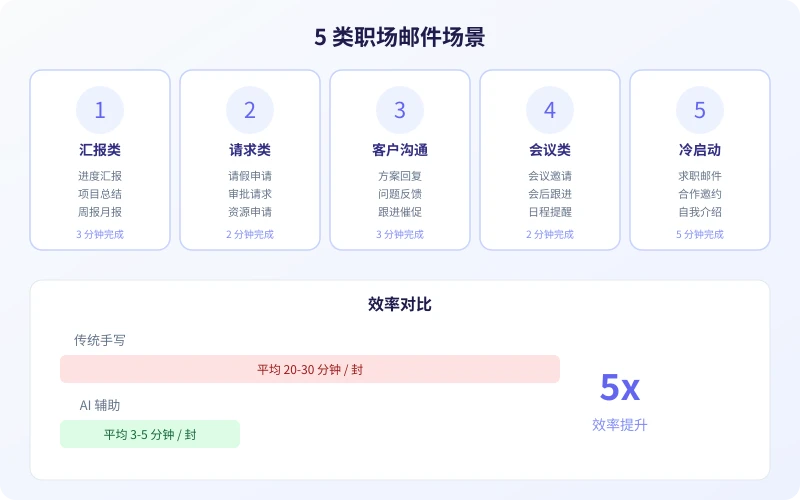
Scenario 1: Report Emails
Progress reports, project summaries, weekly and monthly reports — the core of these emails is "helping your boss quickly understand the situation." Many people either write too verbosely or too briefly. AI helps you find the right balance.
Practical Prompt Template:
"Please help me write a project progress report email.
Recipient: [Direct manager / Department head / Client]
Project name: [Project name]
Completed this week: [List 2-3 items]
Issues encountered: [Brief description, or write 'None']
Next week's plan: [List 2-3 items]
Tone: [Formal but not stiff]
Word count: [Keep within 200 words]"
Steps:
- Open your AI chat tool (Ciyuano, ChatGPT, etc.)
- Paste the template and replace the bracketed content with your actual situation
- AI will generate a well-structured report email in seconds
- Check that key data is accurate, make minor wording adjustments, and send
Tip: Keep your weekly work records in a document. When writing reports, just feed the records to AI — saving you the trouble of organizing them.
Scenario 2: Request Emails
Leave requests, approvals, resource applications — the key to these emails is "providing sufficient reasons with an appropriate tone." Being too forceful seems impolite, while being too subtle fails to convey your request clearly. AI helps you strike the right balance.
Leave Request Template:
"Please help me write a leave request email.
Recipient: [Direct manager]
Leave type: [Annual leave / Sick leave / Personal leave]
Leave dates: [Start and end dates]
Reason: [Brief description]
Work handover: [XXX has been arranged to cover]
Tone: [Polite and concise]"
Resource Request Template:
"Please help me write a resource request email.
Recipient: [Approver]
Request details: [Equipment / Budget / Personnel]
Purpose: [Why it's needed]
Expected impact: [What value it brings]
Urgency: [Normal / Somewhat urgent / Urgent]
Tone: [Professional and well-reasoned]"
The core of request emails is "giving the recipient a reason to agree." AI will automatically help you organize your arguments, making your email more persuasive.
Scenario 3: Client Communication Emails
Writing emails to clients is the most challenging — you need to be both professional and approachable, express your position while maintaining the relationship. AI can help you quickly find this balance.
Proposal Response Template:
"Please help me write a client proposal confirmation email.
Client name: [Company / Individual]
Communication context: [What was discussed previously]
Our proposal: [Core content]
Quote / Timeline: [If applicable]
Items needing client confirmation: [List 1-2 points]
Tone: [Professional, enthusiastic, neither humble nor arrogant]"
Follow-up Reminder Template:
"Please help me write a follow-up reminder email.
Recipient: [Client / Partner]
Previous communication: [Brief summary]
Item awaiting response: [Specific item]
Time elapsed: [X days]
Tone: [Friendly reminder, not pushy]"
The hardest part of follow-up emails is "following up without being annoying." AI uses natural transitions and polite expressions to make reminders feel like concern rather than pressure.
Scenario 4: Meeting Emails
Meeting invitations, post-meeting follow-ups, schedule reminders — these emails seem simple, but if written poorly, people may overlook key information. AI helps you highlight important details.
Meeting Invitation Template:
"Please help me write a meeting invitation email.
Meeting topic: [Topic]
Time: [Date + specific time]
Location / Link: [Meeting room or online link]
Attendees: [List key attendees]
Agenda: [List 2-3 discussion points]
Preparation needed: [If any]
Tone: [Formal but friendly]"
Post-Meeting Follow-up Template:
"Please write a post-meeting follow-up email based on the following meeting details.
Meeting topic: [Topic]
Attendees: [List]
Key discussion points: [List 2-3 points]
Decisions made: [List]
Action items + Assignees: [List]
Next step timeline: [Next meeting or deadline]"
The value of post-meeting follow-up emails lies in "solidifying consensus." AI helps you turn verbal discussions into clear written records, avoiding future disputes.
Scenario 5: Cold Outreach Emails
Job application emails, collaboration invitations, self-introductions — writing to strangers is the most headache-inducing. You don't know their preferences but want to make a good impression. AI helps you quickly generate an appropriate first impression.
Job Application Template:
"Please help me write a job application email.
Position: [Job title]
Company: [Target company]
My strengths: [List 2-3 core competencies]
Relevant experience: [Brief description of the most relevant experience]
Attachments: [Resume / Portfolio]
Tone: [Confident, professional, not boastful]"
Collaboration Invitation Template:
"Please help me write a business collaboration invitation email.
Recipient: [Company / Individual]
Who I am: [One-sentence introduction]
Collaboration idea: [Specific proposal]
Value to the recipient: [Why they should be interested]
Suggested next step: [Schedule a call / Send materials]
Tone: [Concise, sincere, not verbose]"
The core principle of cold outreach emails: state your purpose in the first sentence, demonstrate value in the middle, and end with a clear call to action. AI will automatically organize content according to this structure.
5 Tips for Writing Better AI Emails
1. The More Specific the Information, the Better the Output
Don't just say "help me write an email." Tell AI who the recipient is, what the context is, and what result you want. The more complete the information, the more tailored AI's output will be.
2. Specify Tone and Word Count
Even for the same type of report email, writing to your direct manager versus your CEO is completely different. Clearly tell AI the tone you want (formal/friendly/tactful) and the word count range for much better results.
3. Provide a Reference Style
If you've previously written an effective email, paste it for AI to see. It will learn your style, and subsequent emails will sound more like you.
4. Always Review Before Sending
AI-generated emails may have minor inaccuracies — name spellings, dates, numbers, etc. Always read through before sending to ensure all facts are accurate.
5. Build Your Template Library
Save your most commonly used email templates. Next time you write a similar email, just update the specific content — no need to brainstorm from scratch each time. This will continuously improve your email writing efficiency.
Try It Now
Open your AI chat tool, pick the email type you write most often, and try one of the templates from this guide. You'll find that emails that used to take 20 minutes of deliberation can now be done in 3 minutes.
- Choose a scenario template
- Fill in your specific information
- Generate the email and check details
- Copy, paste, and send
Remember: AI-written emails are drafts, not final versions. Your review and adjustments are key to ensuring quality. Human-AI collaboration doubles efficiency.
Related Articles
AI Speech to Text: Beginner's Guide to Convert Voice to Text in 3 Steps
Learn how to convert speech to text using AI tools. Perfect for meeting notes, content creation, and video subtitles. Three practical scenarios with step-by-step instructions.
TutorialsAI Local Deployment Guide: Run Large Models in 3 Steps for Free
Learn how to deploy AI models locally in just 3 steps. No coding experience needed, completely free, and your data stays private on your own computer.
TutorialsAI Shopping Decision Guide: From Price Comparison to Avoiding Pitfalls
Learn how to use AI for shopping decisions. From price comparison to avoiding pitfalls - make smarter purchasing choices with AI assistance.
Comments are not yet available, stay tuned