AI-Powered Self-Introductions: A Smart Writing Guide for Interviews, Social Events, and Personal Bios
Why Is Self-Introduction So Hard?
Many people's minds go blank the moment they hear "Please introduce yourself." You know yourself better than anyone, yet you don't know what to say, how to say it, or where to begin.
It's not your fault. Self-introduction seems simple, but it's actually a skill: you need to convey the most important information in just a few seconds to a few minutes, while making the other person remember you and form a positive impression.
The good news is that AI can help. You just need to provide the raw material, and AI will help you organize your language, optimize the structure, and polish your expression. Next, I'll teach you how to use AI to write a professional yet natural self-introduction in four steps.
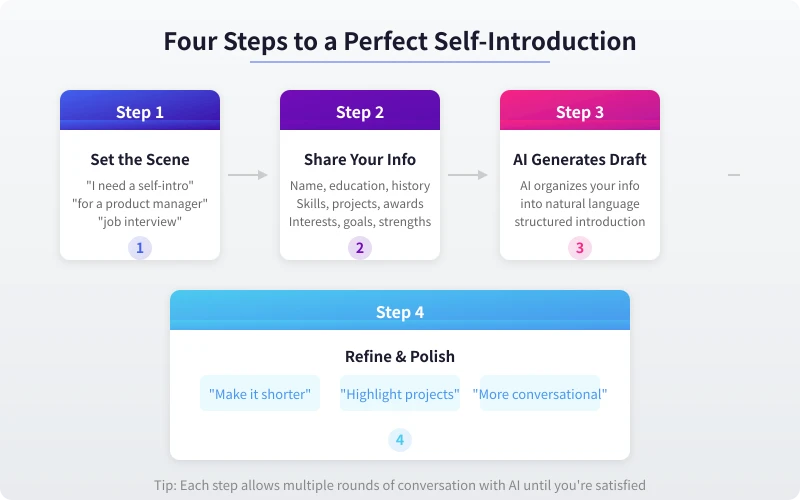
Step 1: Tell AI What Scenario You Need a Self-Introduction For
Self-introductions for different scenarios have completely different styles and content. Interviews should be professional, social events should be warm and approachable, and written bios should be concise. So the first step is to tell AI the scenario.
Common Self-Introduction Scenarios
- Job Interview: Focus on work experience, skills, and job fit, lasting 1–2 minutes
- Social Events: Relaxed and natural, highlighting personal traits and interests, around 30 seconds
- Business Meetings: Professional and concise, highlighting your role and responsibilities, 30–60 seconds
- Personal Bio: Written style, for resumes, social media, personal websites, etc.
- School/Club Orientation: Emphasize enthusiasm for learning and teamwork ability
Example Prompts for AI
Open your preferred AI tool (DeepSeek, ChatGPT, Claude, etc.) and enter the following:
- "I need a self-introduction for a job interview. I'm applying for a product manager position, about 1 minute long."
- "Help me write a self-introduction for a social event. It should be relaxed and natural, making a strong impression."
- "I need a personal bio for my LinkedIn profile, under 200 words."
The more specific your scenario description, the more tailored the AI-generated content will be.
Step 2: Provide Your Personal Information
AI doesn't know you—it needs you to provide the material. This step is crucial: the richer the information you provide, the more substantial and convincing the self-introduction will be.
Information You Should Tell AI
- Basic Info: Name, age (optional), city
- Education: School, major, degree
- Work Experience: Company name, job title, years of experience, core responsibilities
- Skills & Strengths: Professional skills, language abilities, certifications
- Project Highlights: Important projects you've worked on, specific results achieved
- Personal Traits: Personality strengths, hobbies, work style
- Career Goals: Desired position, preferred city, salary range (optional)
Example Prompts
You can paste your resume content directly to AI, or describe it in natural language:
- "My name is Alex, 25 years old, graduated from Beijing University of Posts and Telecommunications with a degree in Computer Science. I worked as a product manager at ByteDance for 2 years, mainly responsible for the short video recommendation system. During that time, I optimized the recommendation algorithm, increasing user retention time by 15%. I'm outgoing and enjoy running and photography."
- "My strengths are strong logical thinking and good communication skills. At my previous company, I led a cross-department collaboration project involving product, engineering, and design teams, which was delivered on time and won the company's Annual Outstanding Project Award."
You don't need to list everything at once—you can share information with AI in multiple rounds to gradually refine the introduction.
Step 3: Let AI Generate a First Draft
After providing the scenario and material, ask AI to generate a first draft.
Example Prompts
- "Based on the above information, write a 1-minute interview self-introduction. It should sound natural and conversational, not like reciting a script."
- "Help me write a 150-word personal bio with a warm and approachable tone, suitable for social media."
- "Based on my experience, write two versions of my self-introduction: a formal one (for interviews) and a casual one (for social events)."
What an AI-Generated First Draft Might Look Like
Interview version example:
- "Hello, I'm Alex. I graduated from Beijing University of Posts and Telecommunications with a degree in Computer Science, and I've been working as a product manager at ByteDance for two years, primarily responsible for product design for the short video recommendation system. During this time, I led a recommendation algorithm optimization project where I adjusted recommendation strategies and improved the user profile model, resulting in a 15% increase in average user retention time. I'm very interested in data-driven product decisions and excel at cross-team collaboration. I hope to have the opportunity to join your company and work with the team to build even better products."
Social version example:
- "Hi everyone, I'm Alex—a product person who likes to let data do the talking. I work on recommendation algorithms at ByteDance, basically helping people find content they'll love. Outside of work, I'm a photography enthusiast who's always out with a camera on weekends. Great to meet you all!"
After seeing the first draft, don't rush to use it. In most cases, the draft still needs adjustments.
Step 4: Iterate Until You're Satisfied
This step is what makes the difference. The first draft is just a starting point—through multiple rounds of conversation with AI, you can polish your self-introduction to its best version.
Common Adjustment Commands
- Adjust Length: "Too long, compress it to under 1 minute" / "Make it more concise, keep it within 100 words"
- Adjust Style: "Make it more conversational" / "More formal, no internet slang" / "More confident and commanding"
- Adjust Focus: "Highlight my project management experience" / "Downplay education, emphasize work experience"
- Adjust Structure: "Start with work experience, then mention education" / "Add my expectations for the position at the end"
- Add Highlights: "Include a specific number or achievement" / "Make the ending more memorable"
- Cut Fluff: "Remove pleasantries" / "Don't say 'I think,' just state it directly"
Iteration Example
You: "The previous version is too formal for a social event. Help me make it more relaxed."
AI: "Hi everyone, I'm Alex. I work on recommendation algorithms at ByteDance—basically helping people find content they'll love. I once optimized a recommendation strategy that boosted user retention significantly, which was really satisfying. Outside of work, I enjoy photography and running—always keeping busy."
You: "Not bad, but 'really satisfying' feels a bit weak. Use a stronger expression."
AI: "Hi everyone, I'm Alex. I work on recommendation algorithms at ByteDance—basically helping people find content they'll love. I once optimized a recommendation strategy that boosted user retention by 15%—that's the project I'm most proud of. Outside of work, I enjoy photography and running—always keeping busy."
Keep iterating until you feel "this is exactly what I want to say."
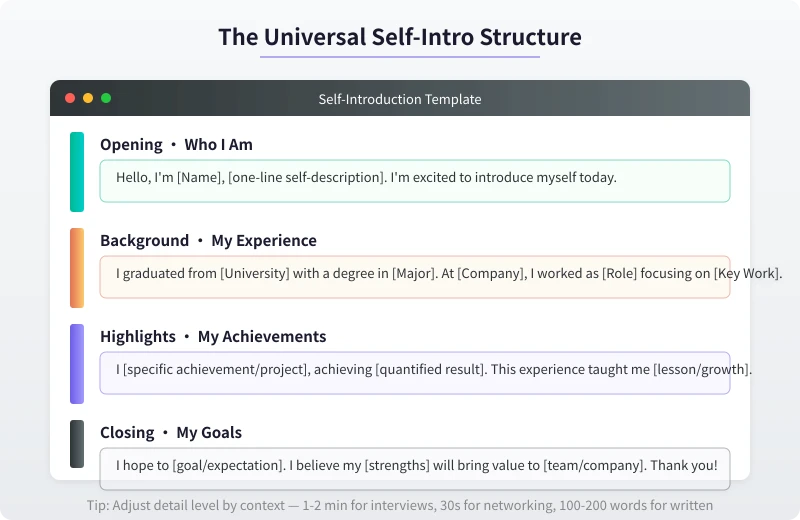
Self-Introduction Templates for Different Scenarios
If you prefer ready-made templates, here are structures for several common scenarios:
Interview Self-Introduction (1–2 Minutes)
Structure: Opening → Education → Work Experience → Project Highlights → Job Fit → Closing
Key points: Each section should be 1–2 sentences. Project highlights should include specific data. End by expressing enthusiasm for the position.
Social Self-Introduction (30 Seconds)
Structure: Who I Am → What I Do → Interesting Trait → Greeting
Key points: Relaxed and natural, conversational tone, add a bit of humor or personal flair to be memorable.
Written Personal Bio (100–200 Words)
Structure: Identity Tag → Core Experience → Achievement Data → Personal Philosophy
Key points: Concise and powerful, every sentence carries information, avoid empty phrases.
Business Meeting Self-Introduction (30–60 Seconds)
Structure: Name → Company/Role → What You Do → Purpose of This Meeting
Key points: Professional and concise, highlight responsibilities and capabilities relevant to the meeting.
Practical Tips and Things to Note
Tip 1: Prepare Multiple Versions
Don't just prepare one version. Have AI write three versions: formal, casual, and brief. Use different versions for different occasions—better safe than sorry.
Tip 2: Add a Memorable Hook
A good self-introduction should have something that makes people remember you. It could be a unique experience, an interesting trait, or a powerful number. "The recommendation algorithm I optimized increased user retention by 15%" is far more memorable than "I'm good at data analysis."
Tip 3: Practice for Natural Delivery
After writing it, read it out loud several times. If it sounds like you're reciting a script, have AI make it more conversational. An interview self-introduction should feel like "talking," not "reciting."
Tip 4: Watch the Timing
For interview self-introductions, about 200–250 words per minute for 1 minute, about 400–500 words for 2 minutes. Count your words after writing, and ask AI to trim if it's too long.
Things to Watch Out For
- Don't Exaggerate: AI might "embellish" your experience, but don't let it fabricate achievements that don't exist. Interviewers may follow up on details.
- Don't Copy Verbatim: Change AI-generated content into your own words. A self-introduction that sounds memorized is easy to spot.
- Update Regularly: Every time you change jobs, learn a new skill, or complete a new project, remember to update your self-introduction.
A Recommended API Platform
If you want to use AI in more scenarios (like integrating it into your own tools), you can use the Ciyuano platform. One API Key gives you access to multiple models including DeepSeek, ChatGPT, and Claude, with pay-as-you-go pricing and flexible switching:
- Visit the Model List to see all available models
- Create a key on the API Key Management page
- Set the API endpoint to
https://www.ciyuano.com/v1, enter your Key, and you're ready to go
Summary
Using AI to write a self-introduction comes down to four steps: Describe the Scenario → Provide Material → Generate a First Draft → Iterate Until Satisfied. The whole process takes less than 10 minutes—far more efficient than struggling on your own.
But remember, AI helps you write the "words"—what truly moves people is "you." After writing it, make sure to deliver it in your own way, with your expressions, tone, and personal charm.
So go ahead—open an AI tool, share your information, and see what kind of self-introduction it can help you create.
Related Articles
AI Speech to Text: Beginner's Guide to Convert Voice to Text in 3 Steps
Learn how to convert speech to text using AI tools. Perfect for meeting notes, content creation, and video subtitles. Three practical scenarios with step-by-step instructions.
TutorialsAI Local Deployment Guide: Run Large Models in 3 Steps for Free
Learn how to deploy AI models locally in just 3 steps. No coding experience needed, completely free, and your data stays private on your own computer.
TutorialsAI Shopping Decision Guide: From Price Comparison to Avoiding Pitfalls
Learn how to use AI for shopping decisions. From price comparison to avoiding pitfalls - make smarter purchasing choices with AI assistance.
Comments are not yet available, stay tuned