AI Meeting Minutes Guide: From Recording to Structured Notes in 4 Steps
Every time a meeting ends, do you feel the same way? Tons of discussion happened, but when it's time to write up the minutes, all you have are scattered fragments. Who said what, what was decided, what's next — it's all jumbled together. Good news: AI can turn those fragments into a clear, structured meeting summary, and the process is surprisingly simple.
Why Use AI for Meeting Minutes?
There are two traditional ways to handle meeting notes:
- Write during the meeting: Easy to miss key details, and you can't fully participate while note-taking
- Recall after the meeting: Writing from memory means many details are already fuzzy
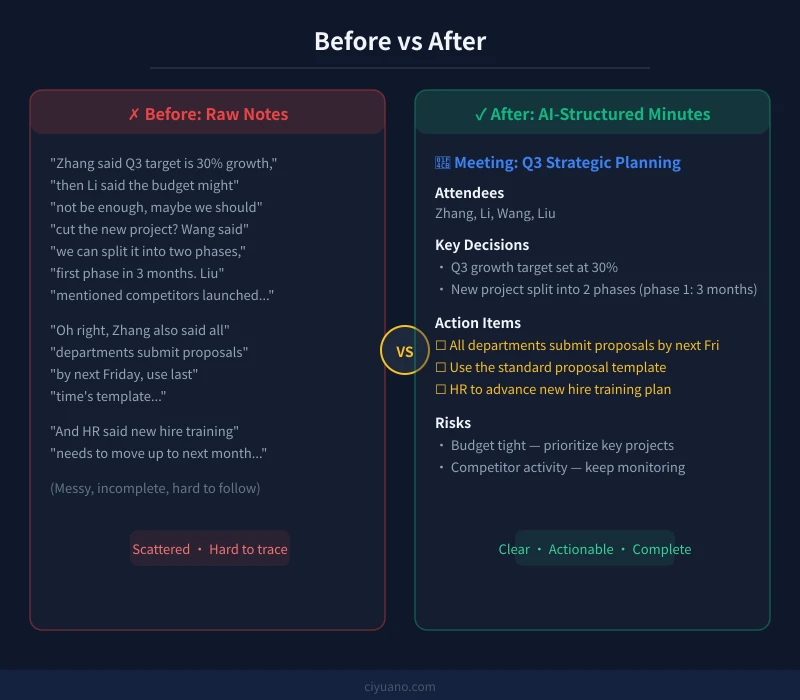
Where AI shines: you just provide the raw material (voice-to-text transcript, chat logs, rough notes), and it will:
- Extract key topics and discussion points
- Organize clear decisions and conclusions
- List action items with owners
- Restructure everything logically
No writing experience needed. Just follow these 4 steps.
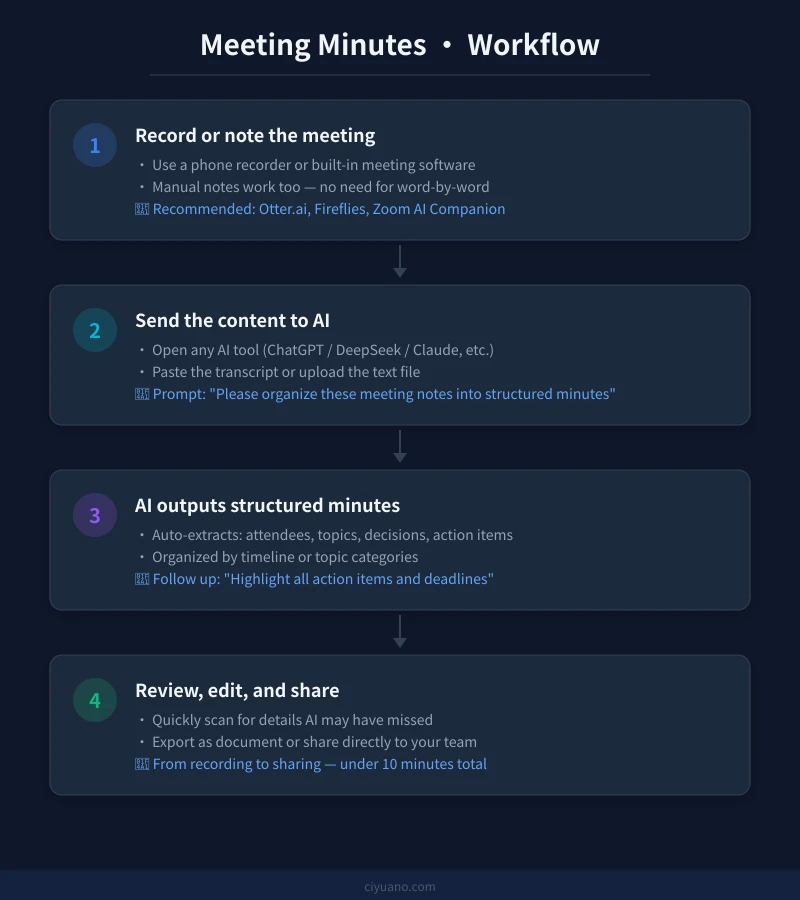
Step 1: Get the Raw Meeting Content
The first step is capturing the raw material. Here are the most common methods:
Method A: Audio-to-Text (Recommended)
If the meeting was recorded, use a transcription tool to convert audio to text, then hand it to AI.
Useful transcription tools:
- Otter.ai: Real-time transcription, great for English meetings
- Fireflies.ai: Auto-joins meetings, generates summaries
- Zoom AI Companion: Built into Zoom, auto-generates summaries
- Microsoft Copilot: Integrates with Teams for automatic notes
Method B: Manual Key Points
If you can't record, jot down keywords and key sentences during the meeting. No need for completeness — AI will fill in the logic.
Note-taking tips:
- Capture the core viewpoint for each topic
- Flag words like "decided" and "action needed"
- Note specific numbers, dates, and names
Method C: Chat Logs
For text-based meetings (Slack threads, group chats), just copy the conversation directly.
Step 2: Choose an AI Tool and Send Your Content
Once you have the raw material, open any AI chat tool:
- ChatGPT: GPT-4o works best, handles long text well
- Claude: Excellent at structured output, supports very long text
- DeepSeek: Strong Chinese understanding, free to use
- Gemini: Good at processing multimedia content
Recommended Prompt Template
Copy this prompt and replace "[MEETING CONTENT]" with your raw material:
1. Meeting basics (time, attendees)
2. Discussion topics (grouped by theme)
3. Key discussion points for each topic
4. Final decisions
5. Action items (with owner and deadline)
Meeting content:
[Paste your meeting content here]
Advanced Tips
Add specific instructions to the prompt for better results:
- "Use concise bullet points, no long paragraphs"
- "Emphasize action items and deadlines"
- "Present action items in a table format"
- "Note any dissenting opinions for each decision"
Step 3: Review and Supplement the AI Output
The AI-generated minutes are usually quite complete, but you should quickly check a few things:
Review Checklist
- Names: AI may mishear similar-sounding names
- Numbers: Verify amounts, percentages, and dates
- Action items: Confirm owners and deadlines are correct
- Missing items: Any important discussions AI didn't capture?
How to Add Missing Content
If you find something missing, just tell the AI:
The AI will automatically insert it in the right place.
Step 4: Export and Share
Once the minutes look good, it's time to share:
Export Options
- Copy text: Paste directly into Slack, Teams, or any group chat
- Convert to document: Ask AI for Markdown format, paste into Notion or Google Docs
- Send as email: Ask AI to draft a meeting minutes email for you
Let AI Write the Share Email
You can say:
More Useful Prompts
Here are ready-to-use prompts for common meeting types:
Weekly Standup
Project Review
Brainstorming Session
Client Meeting
Productivity Tips
- Record during, organize after: Focus on the discussion during the meeting, then spend 5 minutes with AI afterward
- Build a template: Once you find a prompt that works, reuse it every time for faster results
- Share promptly: Send minutes within 1 hour of the meeting while everyone still remembers
- Archive consistently: Save each set of minutes by date for easy future reference
A Great API Platform Recommendation
If you want to use AI in more work scenarios (like automatically processing daily meeting recordings), you can connect through the Ciyuano platform. One API Key gives you access to DeepSeek, ChatGPT, Claude, and more — pay as you go, switch models anytime:
- Visit the Model List to see all available models
- Create a key at the API Key Management page
- Set the API endpoint to
https://www.ciyuano.com/v1, enter your Key, and you're ready
Summary
Meeting minutes no longer have to be a burden. Remember this 4-step process:
- Capture: Record audio or jot down key points
- Send to AI: Use a structured prompt to organize
- Review: Verify names, numbers, and action items
- Share: Export and send to your team or via email
Next time a meeting ends, don't stare at a blank document — hand the raw material to AI, and a professional set of meeting minutes will be ready in 5 minutes.
Related Articles
AI Speech to Text: Beginner's Guide to Convert Voice to Text in 3 Steps
Learn how to convert speech to text using AI tools. Perfect for meeting notes, content creation, and video subtitles. Three practical scenarios with step-by-step instructions.
TutorialsAI Local Deployment Guide: Run Large Models in 3 Steps for Free
Learn how to deploy AI models locally in just 3 steps. No coding experience needed, completely free, and your data stays private on your own computer.
TutorialsAI Shopping Decision Guide: From Price Comparison to Avoiding Pitfalls
Learn how to use AI for shopping decisions. From price comparison to avoiding pitfalls - make smarter purchasing choices with AI assistance.
Comments are not yet available, stay tuned