AI-Powered Reading Notes: From Reading to True Knowledge Retention
Why Do You Forget Everything After Reading?
Many people share this frustration: you spend a week finishing a book, only to realize a month later that you can't recall anything. This happens because traditional reading is passive — your brain isn't actively processing the information. Research shows that passive reading yields only about 10% retention, while actively organizing notes can boost retention to over 50%.
The problem is that taking reading notes is time-consuming. Copying excerpts, organizing ideas, summarizing, drawing mind maps — every step drains your energy. But AI changes all of this. You can delegate the tedious organization work to AI and focus on thinking and understanding. This article will teach you how to create high-quality reading notes using AI through 5 practical scenarios.
Getting Started
You need two things:
- An AI chat tool: DeepSeek, ChatGPT, Claude, or Kimi all work. We recommend DeepSeek (free, great with Chinese) or Claude (excellent at long-form text analysis)
- A marking habit while reading: pen and paper, phone notes, or your e-reader's highlight feature — anything works
No technical background required. If you can copy and paste, you're ready to start.
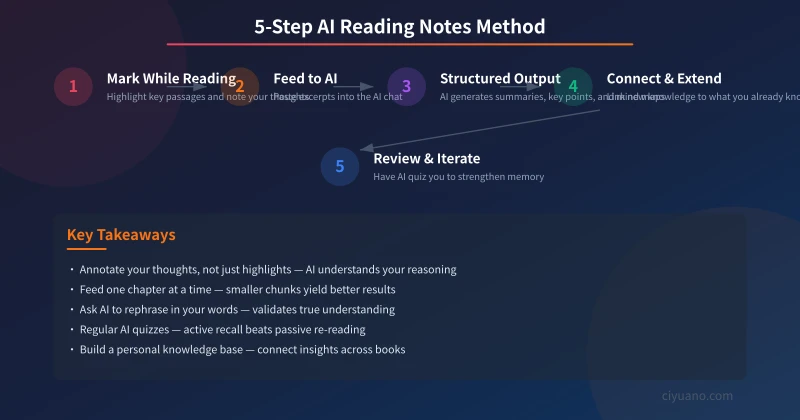
Scenario 1: Mark While Reading, Let AI Extract Key Points
Many people only underline while reading, but underlining is actually the shallowest form of processing. A better approach is to write down your thoughts, questions, or associations alongside each highlight.
Step-by-Step
- While reading, when you encounter an important passage, underline it first
- Write a sentence or two of your own thoughts next to it, such as "This contradicts what I read in Book X" or "I can apply this method at work"
- After finishing a chapter, copy all your markings along with your comments
- Open your AI tool, paste the content, and use the following prompt
Prompt Template:
I'm reading "Book Title". Below are my excerpts and thoughts from Chapter X. Please help me:
1. Extract 3-5 core takeaways from this chapter
2. Point out which ideas are most important and why
3. Organize my scattered thoughts into clearer statements
4. Fill in any gaps where my logic isn't clear
AI will transform your scattered markings into a structured list of key points. This process itself deepens your understanding.
Why Are Your Own Thoughts Important?
You might think your personal reactions are too naive to record. Quite the opposite — these thoughts are the most valuable material for AI to work with. They reflect your thinking process: you're connecting new knowledge to your existing experience. This is exactly the key step in knowledge internalization.
Scenario 2: Use AI to Generate Chapter Summaries
After reading an entire chapter, the volume of information can be overwhelming and hard to review quickly. Let AI create a concise chapter summary for you.
Step-by-Step
- After finishing a chapter, paste the key content to your AI tool (word-for-word isn't necessary — core content is enough)
- Ask AI to generate summaries of different lengths
- Keep 3 versions: one-sentence, three-sentence, and one-paragraph
- Choose the appropriate version when reviewing
Prompt Template:
Please summarize the following content into:
• One-sentence version (under 15 words)
• Three-sentence version (one core idea per sentence)
• One-paragraph version (about 100 words, including key details)
When to Use Which Version?
- One-sentence version: When skimming your notes, instantly know what the chapter covers
- Three-sentence version: Quick framework review during study sessions
- One-paragraph version: Direct reference when writing book reports or sharing with others
Scenario 3: Let AI Build a Knowledge Framework
Individual chapter notes are organized, but the knowledge across an entire book is interconnected. After finishing the whole book, let AI map out the complete knowledge framework.
Step-by-Step
- After finishing the book, compile the summaries or key points from each chapter
- Send all the content to AI at once
- Ask AI to generate a hierarchical knowledge framework
- Have AI identify the logical relationships between chapters
Prompt Template:
Below are the core takeaways from each chapter of "Book Title". Please help me:
1. Create a clearly structured hierarchical knowledge framework (using indented lists)
2. Mark the logical relationships between chapters (cause-effect, progressive, parallel, etc.)
3. Identify the main thread running through the entire book
4. Summarize the core value of this book in one sentence
Advanced: Generate a Text-Based Mind Map
If you prefer mind maps, ask AI to generate an indented list structure that you can paste into tools like XMind or Mubu to automatically convert into a visual mind map.
Scenario 4: Use AI for Cross-Book Connections
True knowledge isn't isolated. As you read more books, ideas from different books create connections, conflicts, or complementary insights. AI can help you discover these relationships.
Step-by-Step
- Select two or more books you've read
- Send their core ideas to AI separately
- Ask AI to analyze the relationships between them
Prompt Template:
I recently read "Book A" and "Book B". Below are their core ideas. Please analyze:
1. Which ideas do these two books share in common?
2. Where do they contradict each other?
3. What problems is each book best at solving?
4. Combining insights from both books, what new understanding can we arrive at?
Build Your Knowledge Network
Do a cross-book connection analysis after finishing each book. Over time, you'll build your own personal knowledge network. The denser this network, the deeper your understanding and the stronger your creativity.
Scenario 5: Let AI Create Review Quizzes
Cognitive science tells us that active recall is the most effective way to strengthen memory. Let AI create quizzes based on your notes, and test yourself regularly.
Step-by-Step
- Send your organized reading notes to AI
- Ask AI to create 10 review questions based on the content
- Include multiple question types: multiple choice, short answer, and application scenarios
- After a few days, try answering without looking at your notes, then check the answers
Prompt Template:
Below are my reading notes. Please create 10 review questions based on this content:
• 3 multiple choice questions (testing basic concepts)
• 4 short answer questions (testing depth of understanding)
• 3 application questions (testing practical usage)
Please include answers and explanations at the end.
Spaced Repetition Method
Don't try to do all questions at once. Recommended review schedule:
- Day 1: Right after finishing the book
- Day 3: Only redo the questions you got wrong
- Day 7: Do all questions again
- Day 30: Final consolidation
After each round, mark the knowledge points you haven't mastered well, and focus on those next time. AI can adjust question difficulty and focus based on your mistakes.
FAQ
What types of books work best with AI note-taking?
Non-fiction books work best — business, psychology, history, popular science, self-improvement, etc. Fiction and poetry also work, but the focus shifts to theme analysis and character relationship mapping. Technical books are particularly well-suited for AI-assisted step-by-step organization and knowledge framework building.
How much content should I give AI at once?
One chapter at a time is recommended. Too much content makes AI summaries overly general. If your AI tool supports long context (like Claude or Kimi), you can process more at once, but chapter-by-chapter processing usually yields better results.
Should I edit AI-generated notes?
Absolutely. AI-generated summaries are generic — you need to add your own understanding and context. The best approach is to let AI create a first draft, then rewrite it in your own words. This "rewriting" process is the key to knowledge internalization.
Won't this make me too dependent on AI?
It depends on how you use it. If you just let AI summarize and save without ever reviewing, then yes, you're cutting corners. But if you treat AI as an assistant that helps organize your thinking while you continue to ask questions, make connections, and think critically, AI can actually double your learning efficiency. Remember: AI handles the organization work — the thinking work is still yours.
What note-taking tools work well with AI?
These tools pair nicely with AI:
- Notion: Embeds AI conversations directly, keeping notes and AI in one place
- Obsidian: Supports bi-directional linking, great for building knowledge networks
- Apple Books / Kindle: Highlight features make it easy to copy content to AI tools
- Google Docs: Supports rich text and tables, good for structured notes
Related Articles
AI Resume Writing: From Zero to Professional in 5 Steps
Learn how to use AI to write a professional resume. Five simple steps from basic information to polished final draft. Perfect for job seekers who want to stand out.
Productivity ToolsAI Note Organization: Build a Personal Knowledge System in 5 Steps
Learn how to use AI for note organization. Build a personal knowledge system in 5 steps. Perfect for knowledge workers and students.
Productivity ToolsAI Side Hustle Planning: Find Your Second Income Source
Want to earn extra income through a side hustle but don't know where to start? AI can help you analyze your skills, match directions, make plans, and track progress. Find your ideal side hustle within a month, even with zero experience.
Comments are not yet available, stay tuned