AI Task Management: From Chaotic Lists to Smart Execution
Open your phone and find 30 items in your notes with no idea where to start? This article teaches you to use AI to turn messy thoughts into an actionable plan — no more "busy all day, got nothing done."
Why Your To-Do Lists Keep Failing
Most people's to-do lists have two fatal problems:
- List without doing: Writing down tasks makes you feel half done — and then nothing happens
- No prioritization: "Buy toothpaste" sits next to "Finish project proposal," and your brain automatically picks the easy one
AI doesn't just help you remember tasks — it helps you think. It analyzes relationships between tasks, estimates time, sets priorities, and gently reminds you when you procrastinate.
Step 1: Brain Dump — Get Everything Out
Don't think about categories or priorities. Open an AI chat and just say:
"Help me record things I need to do: quarterly report due next Wednesday, dentist appointment tomorrow at 3 PM, buy Mom's birthday gift this weekend, new project kickoff next week, kitchen light bulb needs replacing, credit card payment on the 25th, want to learn Python scraping, gym membership expiring soon..."
You'll find that speaking is much faster than typing. Many AI tools support voice input — just talk into your phone. AI automatically turns your ramblings into a structured list.
Tip: Use Context to Trigger Memories
If you can't remember everything at once, prompt yourself by context:
- "What needs handling at work?"
- "Anything at home to fix or buy?"
- "Any relationships to follow up on?"
- "Anything I want to learn or do for myself?"
AI will ask follow-up questions based on your answers, like "What's the exact deadline for the quarterly report?" — turning vague tasks into concrete action items.
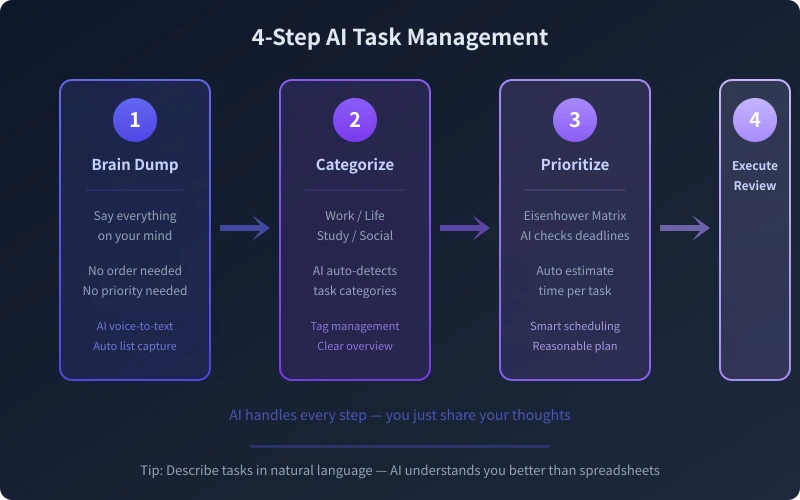
Step 2: Smart Categorization — Let AI File for You
After dumping everything, tell the AI:
"Group these tasks by category and tag them"
AI typically categorizes like this:
| Work | Quarterly report, new project kickoff |
| Life | Buy toothpaste, replace bulb, renew gym card |
| Finance | Credit card payment |
| Social | Mom's birthday gift |
| Learning | Learn Python scraping |
The benefit: when you only have 30 minutes free, you can say "What life-category tasks can I do right now?" and AI filters the right ones for your current context.
Custom Categories
If default categories don't fit, tell AI "Sort by urgency" or "Sort by location (office/home/outings)" and it reorganizes instantly. This flexibility is impossible with paper lists.
Step 3: Prioritize — Let AI Make Decisions
This is the most critical step. Tell the AI:
"Use the Eisenhower Matrix to prioritize, and estimate how long each task takes"
Based on your deadlines and task nature, AI gives you something like this:
🔴 Urgent & Important (do today)
- Credit card payment (5 min, online)
- Finish quarterly report (2 hours)
🟡 Important, Not Urgent (schedule this week)
- Prepare for project kickoff (1 hour)
- Mom's birthday gift (1 hour, weekend outing)
🟢 Urgent, Not Important (usefragmented time)
- Replace light bulb (15 min)
- Renew gym card (10 min, online)
⚪ Not Urgent, Not Important (when free)
- Learn Python scraping (long-term learning)
See? AI doesn't just sort — it estimates time for you. Now you know: before leaving work today, you can finish the first two quadrants completely.
Follow Up for Better Suggestions
If a ranking feels wrong, just say: "Learning Python matters more to me than renewing my gym card — adjust." AI reorders based on your feedback. It's your assistant, not your boss.
Step 4: Execute & Review — AI as Your Coach
After prioritizing, spend 2 minutes each morning saying:
"What are the top 3 things today? Help me schedule time blocks"
AI slots tasks into your calendar's free slots. At night, spend 1 more minute:
"Finished the quarterly report and replaced the bulb today, forgot the credit card payment — mark it for me"
AI updates the list status and automatically carries unfinished items to tomorrow. After one week, you'll feel noticeably more in control of your time.
Advanced: Auto-Generate Weekly Reports
On Friday, tell the AI:
"Based on this week's task completion, write me a weekly summary"
AI compiles your completion records into a clear weekly report, including:
- Completed tasks list
- Unfinished tasks with reason analysis
- Items to follow up next week
- Time allocation statistics (if data available)
This is far more reliable than trying to remember "what did I do this week?"
Ready-to-Use Prompt Templates
Here are some prompts you can copy and use right away:
Quick Brain Dump
"I have lots to do. Let me ramble, and you record and organize: [start listing tasks]"
Daily Planning
"Today is [date], I have free time during [time block]. Pick what I should do from my list and arrange by time"
Weekly Review
"Review this week's task completion, analyze why incomplete items weren't done, suggest improvements for next week"
Task Breakdown
"This task feels too big: [describe task]. Break it into steps I can finish in 30 minutes each"
Things to Keep in Mind
- Don't chase a perfect list: 80% accuracy from AI is enough — spending too much time re-sorting is itself a waste
- Clean up regularly: Purge expired tasks weekly so your list doesn't become a dump
- Combine with tools: After AI prioritizes, sync to TickTick, Notion, or other apps for execution
- Protect privacy: For sensitive personal matters (medical, financial details), choose a trusted AI platform
The core of task management isn't how powerful your tools are — it's whether you're willing to spend 5 minutes emptying your head. AI lowers that barrier: you just talk, and it organizes, prioritizes, and reminds. Try it, starting today.
Related Articles
AI Resume Writing: From Zero to Professional in 5 Steps
Learn how to use AI to write a professional resume. Five simple steps from basic information to polished final draft. Perfect for job seekers who want to stand out.
Productivity ToolsAI Note Organization: Build a Personal Knowledge System in 5 Steps
Learn how to use AI for note organization. Build a personal knowledge system in 5 steps. Perfect for knowledge workers and students.
Productivity ToolsAI Side Hustle Planning: Find Your Second Income Source
Want to earn extra income through a side hustle but don't know where to start? AI can help you analyze your skills, match directions, make plans, and track progress. Find your ideal side hustle within a month, even with zero experience.
Comments are not yet available, stay tuned