AI Writes Your Weekly Report: From Messy Notes to Professional Reports
Why Is Writing Weekly Reports So Hard?
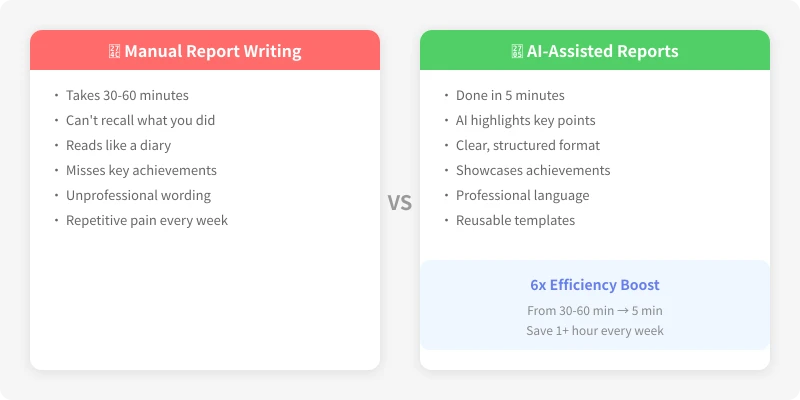
The pain of writing weekly reports is not in the writing — it is in the thinking. By Friday, you probably cannot recall what you did on Monday. Even if you remember, it is easy to turn it into a running log — Completed Task A, handled Issue B — with no highlights.
There are three core problems:
- Memory gaps: It is hard to recall a week worth of details on Friday
- No structure: You do not know how many sections to have or what goes where
- Flat expression: You did a lot, but the writing does not show impact
AI can help you solve all three. It excels at extracting key points from scattered information, organizing structure, and polishing expression.
Preparation: Build Your Work Material Bank
Before using AI, you need raw materials. The best habit is to spend 1 minute each day recording key work points. No need for complete sentences — keywords are enough:
Tue: Fixed payment callback bug, launched coupon module
Wed: Attended tech review meeting, proposed 3 optimization suggestions
Thu: Integrated new third-party logistics API, completed joint testing
Fri: Wrote automated test cases, coverage from 65% to 82%
These fragmented notes are AI raw materials. Even if you did not keep daily notes, you can reconstruct them from chat logs, calendar entries, and commit history.
Step 1: Give AI a Good Prompt
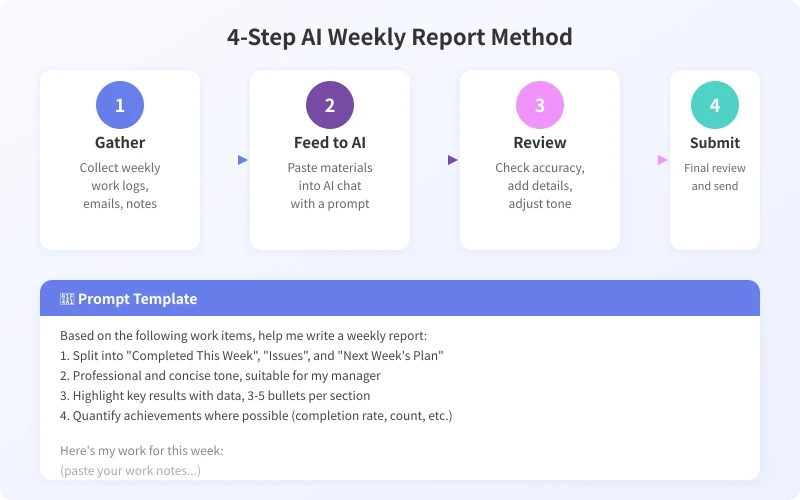
The prompt determines AI output quality. Here is a proven weekly report prompt template:
Based on the following work items, help me write a weekly report:
1. Split into Completed This Week, Issues and Solutions, and Next Week Plan
2. Professional and concise tone, suitable for my direct manager
3. Highlight key results with data, 3-5 bullets per section
4. Quantify achievements where possible (completion rate, volume, improvement percentage)
5. Keep each bullet to 1-2 sentences
Here is my work for this week:
(paste your work notes)
Why does this prompt work?
- It specifies the output structure (three sections), so AI will not freestyle
- It defines the audience (direct manager), so AI adjusts the tone
- It requires quantified results, avoiding vague descriptions
- It sets a length limit, preventing long-winded output
Step 2: Feed Your Materials to AI
Open your preferred AI tool (ChatGPT, DeepSeek, Claude, Gemini all work), paste the prompt along with your work notes, and within seconds you will get a complete weekly report draft.
The AI output will look something like this:
Completed This Week
- Completed user feedback analysis report, reviewed 200+ items, produced 3 product optimization recommendations
- Fixed payment callback bug and launched coupon module, payment success rate improved to 99.2%
- Integrated third-party logistics API and completed joint testing, expected launch next week
- Wrote automated test cases, coverage improved from 65% to 82%
Issues and Solutions
- Payment callback occasional timeout: Resolved with retry mechanism and timeout fallback
- Logistics API documentation incomplete: Proactively contacted their tech team for clarification
Next Week Plan
- Complete logistics module launch and gradual rollout
- Advance Q3 requirement technical design
- Optimize feedback analysis workflow with automated classification
Step 3: Review and Refine
AI-generated reports are usually at an 80-point level. Your job is to bring them to 95:
- Verify data: AI may embellish numbers — confirm all figures are accurate
- Add context: Background info AI does not know (like a production incident), adds persuasive power
- Adjust tone: If your manager prefers brevity, cut fluff; if they like detail, add process descriptions
- Remove filler: AI sometimes adds phrases like diligently or proactively — delete them ruthlessly
Advanced Tips
1. Let AI Learn Your Style
If your AI tool supports context, tell it upfront: My report style is short and direct, no pleasantries, focus on data. It will follow this style going forward.
2. Build Reusable Templates
Save a format you are happy with, then next time tell AI to write in this format — saving you from re-crafting prompts each week.
3. Use AI for Report Comparisons
Give AI both last week and this week reports and ask: What has changed in focus? What continuity achievements are worth highlighting? This produces deeper insights.
4. Batch Team Reports
If you are a manager, have AI consolidate your team individual reports into one team summary. Prompt: Please consolidate these N weekly reports into one team report, highlighting overall team achievements and collaboration highlights.
FAQ
Q: Will my manager know I used AI?
AI only helps organize language and structure — the core content is still your work. Just as using Excel for tables is not considered unprofessional, using AI for reports is a tool upgrade, not cheating.
Q: Does the AI tool matter?
For weekly reports, mainstream AI tools are similar. ChatGPT and DeepSeek both produce fluent English, Claude excels at nuanced writing, and Gemini handles structured output well. Pick whichever you already use.
Q: What should I do after writing the report?
Save both your work notes and final reports each week. After a month, you have material for a monthly summary; after a quarter, material for a quarterly review. AI can help distill monthly and quarterly reports from your weekly ones.
Related Articles
AI Resume Writing: From Zero to Professional in 5 Steps
Learn how to use AI to write a professional resume. Five simple steps from basic information to polished final draft. Perfect for job seekers who want to stand out.
Productivity ToolsAI Note Organization: Build a Personal Knowledge System in 5 Steps
Learn how to use AI for note organization. Build a personal knowledge system in 5 steps. Perfect for knowledge workers and students.
Productivity ToolsAI Side Hustle Planning: Find Your Second Income Source
Want to earn extra income through a side hustle but don't know where to start? AI can help you analyze your skills, match directions, make plans, and track progress. Find your ideal side hustle within a month, even with zero experience.
Comments are not yet available, stay tuned