AI Smart Notes: Organize Your Notes with AI

Ever taken quick meeting notes, then looked at them days later and had no idea what they meant? Notes piling up, finding things getting harder? This tutorial shows you how to turn messy, scattered notes into a well-organized knowledge base with AI — no coding required.
Why Use AI to Organize Notes
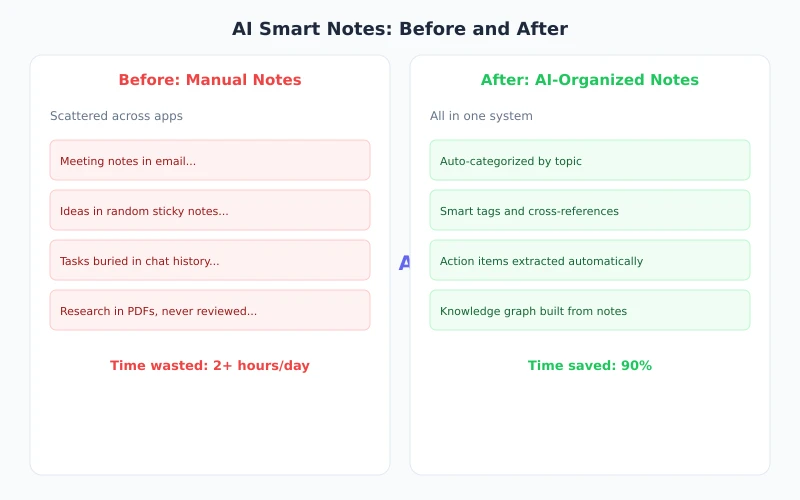
Traditional note organization — manual categorization, tagging, writing summaries — is extremely time-consuming. AI can do all of this in seconds:
- Auto-categorization: AI understands semantics and groups related notes together
- Key point extraction: Pulls out essential information and action items from long text
- Gap filling: Identifies logical gaps in your notes and adds transitions and summaries
- Format standardization: Converts notes from different sources into a consistent format
What You Need
You only need two things:
- An AI chat tool: Ciyuano, ChatGPT, or any other AI chatbot will work
- Your notes to organize: Any format works — text, screenshot descriptions, voice-to-text transcriptions
Tip: If your notes are on paper or in screenshots, use an OCR tool (like WeChat's scan feature or your phone's built-in Live Text) to convert them to text first, then hand them to AI.
Complete Workflow
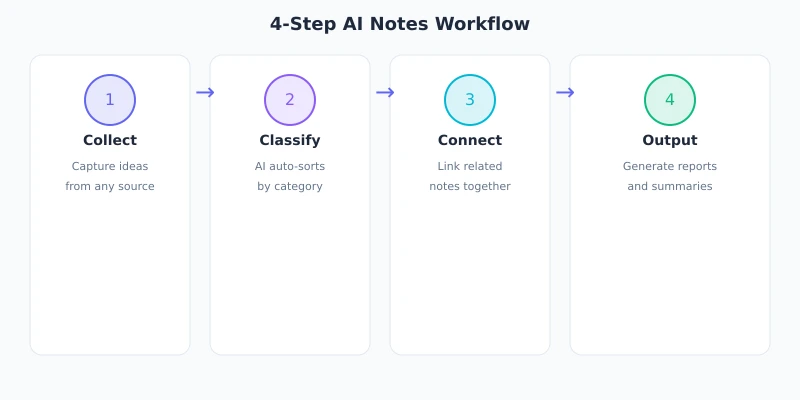
Step 1: Collect Your Raw Notes
Gather all your notes in one place. This can include:
- Copy-pasted snippets of scattered text records
- Important content extracted from chat conversations
- Meeting minutes, class notes, reading excerpts
- Inspiration fragments, to-do items, random ideas
No need to pre-organize anything — just dump the raw content to AI.
Step 2: Give AI a Clear Instruction
This step is key. A good instruction helps AI produce output that matches your expectations. Here are some practical instruction templates:
Please organize the following notes with these requirements:
1. Group by topic, with a short heading for each group
2. Extract the core point from each note
3. Flag any to-do items that need follow-up
4. Rewrite concisely, removing redundant information
5. Generate an overall summary at the end

Here are the raw notes:
[Paste your notes here]
You can also adjust the instruction as needed. For example:
Please organize these meeting records into structured minutes:
- Group by topic
- For each topic: discussion points, decisions made, owner, deadline
- Summarize all action items at the end

[Paste meeting records]
Step 3: Review and Fine-tune
AI's organized output is usually good, but not always perfect. Here's what to do:
- Quick scan: Check if the groupings make sense — any obvious misclassifications?
- Add details: AI may miss context that only you know
- Fix errors: If AI misunderstood something, tell it directly what's wrong
- Adjust format: Rearrange the layout to match your preferences
Note: Don't rely entirely on AI's judgment. AI doesn't know your work context or relationships — some categorizations may need manual adjustment.
Step 4: Save and Archive
Save your organized notes to your preferred tool:
- Notion / Google Docs: Great for team collaboration
- Obsidian / Logseq: Ideal for personal knowledge management
- Word / Google Docs: Most universal format
- Save as HTML: Perfect for publishing to a blog or website
Practical Instruction Templates
Here are some commonly used note organization instructions you can copy and use directly:
Template 1: Reading Notes
Please organize these reading notes:
1. Extract the book title and author
2. List core ideas (no more than 5)
3. Quote the most insightful passages
4. Write personal reflections and action items
5. Summarize the book in one sentence

[Paste reading notes]
Template 2: Study Notes
Please organize these study notes:
1. Group by knowledge point
2. For each point: concept explanation + key takeaways + examples
3. Mark parts I didn't understand (marked with question marks)
4. Generate a concise review outline

[Paste study notes]
Template 3: Idea Fragments
Please organize these idea fragments:
1. Categorize by theme
2. Remove duplicate ideas
3. Connect related fragments into complete thoughts
4. Highlight the most valuable ideas worth pursuing
5. Suggest next steps

[Paste idea fragments]
Advanced Tips
Tip 1: Process in Batches
If you have a large volume of notes (over 50), process them in batches. Give AI 20-30 notes at a time, organize each batch, then combine. This keeps AI's attention focused and produces higher quality output.
Tip 2: Use Multi-turn Conversations
Don't expect a single conversation to produce perfect results. Instead:
- Round 1: Let AI do an initial categorization
- Round 2: Deep-dive into a specific category
- Round 3: Have AI generate a summary and to-do list
Tip 3: Build Personal Templates
Once you find an instruction that works well for you, save it as a template. Next time you organize notes, just replace the content part — no need to rewrite the instruction.
Tip 4: Automate with API
If you have some coding experience, you can automate note organization through the API. For example, schedule daily tasks to send new notes to AI, organize them automatically, and save to a database. That's a simple AI workflow right there.
Common Mistakes
| Mistake | Correct Approach |
|---|---|
| Dumping too much content at once | Process in batches of 20-30 notes |
| Vague instructions ("organize these for me") | Specify grouping method, output format, and priorities |
| Fully trusting AI's categorization | Review manually, add context AI doesn't know |
| Forgetting about notes after organizing | Review and update regularly to keep notes fresh |
Summary
Organizing notes with AI comes down to three steps:
- Collect: Gather scattered notes in one place
- Instruct: Give AI a clear set of organization requirements
- Review: Human verification, additions, and corrections
Next step: Open your notes app, find your 10 most recent scattered notes, and try one of the instruction templates above. You'll find that what used to take 30 minutes of manual organization, AI handles in seconds.
Related Articles
AI Speech to Text: Beginner's Guide to Convert Voice to Text in 3 Steps
Learn how to convert speech to text using AI tools. Perfect for meeting notes, content creation, and video subtitles. Three practical scenarios with step-by-step instructions.
TutorialsAI Local Deployment Guide: Run Large Models in 3 Steps for Free
Learn how to deploy AI models locally in just 3 steps. No coding experience needed, completely free, and your data stays private on your own computer.
TutorialsAI Shopping Decision Guide: From Price Comparison to Avoiding Pitfalls
Learn how to use AI for shopping decisions. From price comparison to avoiding pitfalls - make smarter purchasing choices with AI assistance.
Comments are not yet available, stay tuned