
Many newcomers to AI share a common confusion: I know ChatGPT is useful, but how do I actually use it on my own devices? What's the difference between various clients? And what exactly is an API Key?
This guide walks you through choosing the best AI client for your needs and completing the setup. We'll use the Ciyuano relay service as an example, but the methods apply to any OpenAI-compatible API service.
Step 1: Get Your API Key
Before using any third-party client, you need an API Key. Think of it as your passport that tells the client who you are and which models you can access.
How to get one:
- Register and log in to the Ciyuano platform
- Go to Console → API Keys
- Click "Create New Key" and give it a name (e.g., "My Phone")
- Copy the generated key, which looks like
sk-relay-xxxxxxxxxxxx - Save it securely — never share it with others
Step 2: Choose Your Client
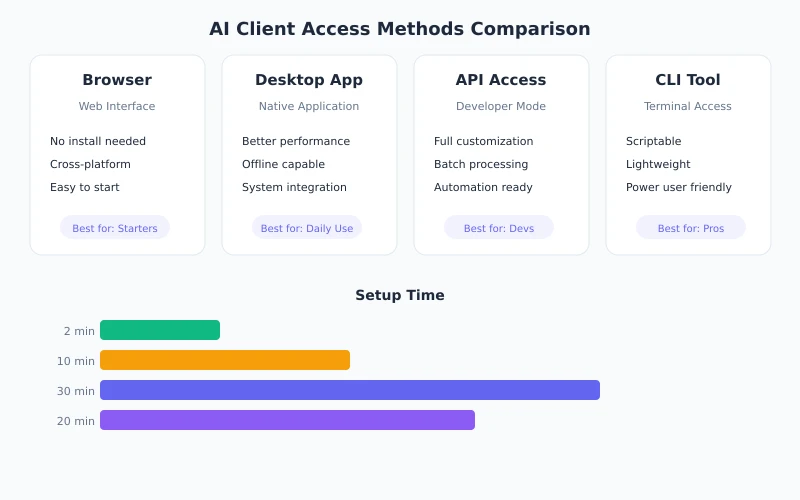
Pick the right client based on your use case:
Scenario 1: Daily Chat, Writing, Translation — Use a Browser
If you mainly chat with AI, write content, or translate, the simplest approach is using a browser to access ChatGPT or the Ciyuano platform directly. Zero setup required.
Scenario 2: Coding and Debugging — Use Editor Plugins
For developers, calling AI directly from your editor is more efficient. Cursor and VS Code + Continue are the top choices.
Scenario 3: Use on the Go — Mobile Apps
Official apps from ChatGPT and Claude offer the best experience. Third-party apps like ChatBox support custom API endpoints for greater flexibility.
Scenario 4: Automation and Batch Processing — Use the Command Line
For integrating AI into workflows, direct API calls via cURL or programming languages offer maximum flexibility.
Step 3: Verify Your Connection
After setup, send a simple test message. If you get a normal response, you're good to go. Common issues include incomplete API keys, wrong URLs, network problems, or insufficient balance.
Pro Tips: Managing Multiple Clients
- Create separate keys for each device
- Use a relay service to access multiple models with one key
- Set up usage alerts to avoid unexpected charges
- Rotate keys every 3-6 months for security
Choose the right client, configure your API Key, and you can use AI anywhere — no coding or command-line skills needed. Done in 5 minutes.