AI Writing Assistant Guide: 5 Scenarios to Handle Daily Writing
Every day we write all kinds of text at work — emails, reports, copy, summaries. These writing tasks seem simple but often eat up a huge amount of time. This article shows you how to use an AI writing assistant to compress repetitive writing work into just minutes while maintaining professional quality.
What Is an AI Writing Assistant
An AI writing assistant doesn't think for you — it helps you turn ideas into text quickly. You provide direction and key information; AI handles language organization, structure building, and expression polishing. The final output still needs your review and adjustment, but the process from "staring at a blank document" to "having an editable draft" is dramatically shortened.
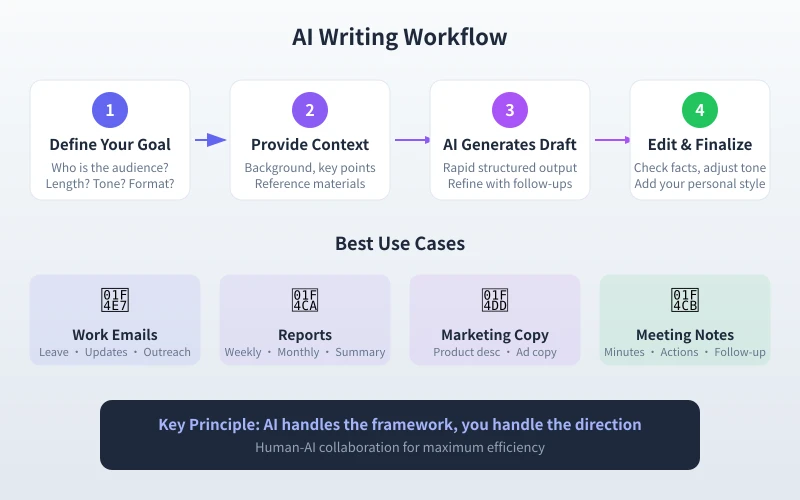
The diagram above shows the complete AI writing workflow. The core idea is simple: AI handles framework work, you focus on direction and detail refinement. A 3-5x efficiency improvement in writing is very common with this approach.
Scenario 1: Writing Work Emails
Work emails are the most typical repetitive writing task. Leave requests, progress updates, client replies, meeting invitations — these emails have similar formats but require fresh language every time.
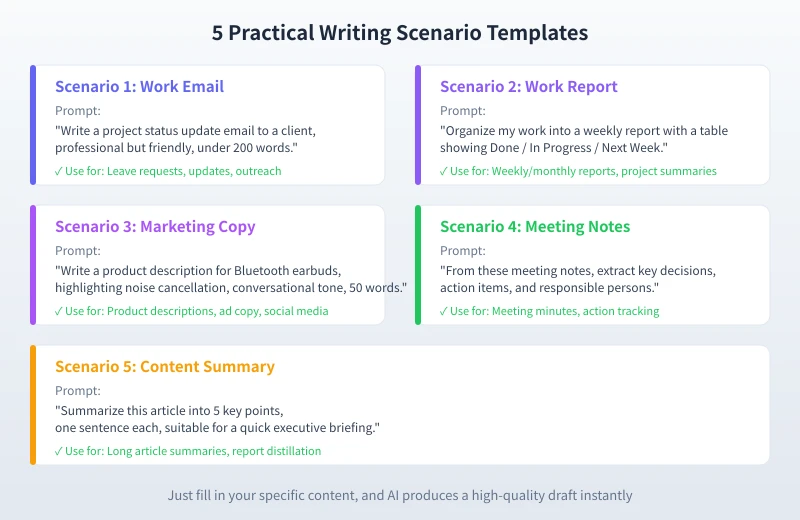
Practical prompt template:
"Please write a [email type] email to [recipient].
Context: [brief situation description]
Key points: [core message to convey]
Tone: [formal/friendly/diplomatic]
Length: [keep under X words]"
Real-world comparison:
- Without a prompt: AI generates a generic email that needs heavy editing
- With a template prompt: AI produces a near-usable version — you only need minor tweaks
Pro tip: If you write certain emails regularly (like weekly progress reports), save your first well-written version as a reference template. Then have AI write in that style going forward for consistency.
Scenario 2: Organizing Work Reports
Weekly reports, monthly reports, project summaries — these reports have highly similar structures, but each time you manually organize content and format layouts. AI can quickly turn scattered work notes into structured reports.
Practical prompt template:
"Please organize my work into a [weekly/monthly] report:
1. Use a table showing: Completed, In Progress, Next Week's Plan
2. One sentence per item
3. Mark priority (High/Medium/Low)
4. Add a brief summary at the end
This week's work content:
[paste your work notes]"
The efficiency gain here is very obvious. Many people spend 30 minutes writing weekly reports — with this method, you can produce a draft in 5 minutes and spend another 5 minutes reviewing and adjusting.
Scenario 3: Writing Marketing Copy
The hardest part of writing copy isn't the writing itself — it's knowing where to start. AI can quickly generate multiple draft directions for you to pick from and then refine.
Practical prompt template:
"Write a [use case] copy for [product name].
Product features: [list 2-3 core selling points]
Target audience: [who will read this copy]
Style: [conversational/professional/artistic/humorous]
Length: [keep under X words]
Reference style: [optional, provide a copy sample you like]"
Advanced tip: Have AI generate 3-5 different style versions at once, then pick the most promising direction to develop further. This is much faster than brainstorming from scratch.
Scenario 4: Organizing Meeting Notes
After a meeting, facing a pile of scattered notes and needing to organize them into clear meeting minutes — this process often takes longer than the meeting itself. AI can quickly extract key information for you.
Practical prompt template:
"Please organize meeting minutes from these notes:
1. Meeting topic and participants
2. Key topics discussed (ranked by importance)
3. Decisions made
4. Action items + responsible person + deadline
5. Items needing follow-up
Raw notes:
[paste meeting notes]"
If your team uses speech-to-text tools to record meetings, feeding the transcription directly to AI for organization will be even more efficient.
Scenario 5: Quickly Summarizing Long Content
Received a long report, lengthy email, or article but don't have time to read it all? AI can help you quickly extract the core information.
Practical prompt template:
"Please summarize the following content into [X] key points:
- One sentence per point
- Highlight key data and conclusions
- Suitable for [target audience] to quickly understand
- Add a brief [X]-word summary at the end
Original content:
[paste the long text]"
Best Practices for AI Writing
After mastering the scenario templates, these general principles will help you get even better results:
1. Don't Give Too Many Tasks at Once
Have AI do one thing at a time. Email or report — not both. Mixing multiple tasks degrades AI output quality.
2. Provide Reference Samples
If you have similar documents you've written before, paste a section for AI to see. It will mimic your style and structure, producing content that better fits your needs.
3. Iterate and Refine
AI's first output is usually not the final version. Treat it as a draft, then use follow-up prompts to adjust details: "Make the tone more formal," "Expand the second paragraph," "Delete the last sentence."
4. Check the Facts
Data and facts in AI-generated content may be inaccurate. Always manually verify numbers, dates, and names.
5. Keep Your Voice
AI-written text is often "too perfect" — lacking personal flair. When finalizing, add your habitual expressions to give the text warmth and personality.
Get Started Now
Pick the type of writing you do most often and try one of the templates in this article. It doesn't need to be perfect — just experience the efficiency boost of AI-assisted writing.
- Open your AI chat tool (CiyuanQu, ChatGPT, or any other)
- Pick a scenario template and fill in your specific content
- Review the AI-generated draft and feel the efficiency difference
- Use follow-up prompts to fine-tune until you're satisfied
Remember: AI isn't here to replace you — it's here to save you time. The best writing approach is human-AI collaboration: AI provides the framework, you provide the soul.
Related Articles
AI Speech to Text: Beginner's Guide to Convert Voice to Text in 3 Steps
Learn how to convert speech to text using AI tools. Perfect for meeting notes, content creation, and video subtitles. Three practical scenarios with step-by-step instructions.
TutorialsAI Local Deployment Guide: Run Large Models in 3 Steps for Free
Learn how to deploy AI models locally in just 3 steps. No coding experience needed, completely free, and your data stays private on your own computer.
TutorialsAI Shopping Decision Guide: From Price Comparison to Avoiding Pitfalls
Learn how to use AI for shopping decisions. From price comparison to avoiding pitfalls - make smarter purchasing choices with AI assistance.
Comments are not yet available, stay tuned