AI Study and Review Planner: A Practical Guide to Planning, Organizing Knowledge, and Pre-Exam Sprinting in Four Steps
Why Use AI to Assist Learning and Review?
Many students face three common problems when reviewing: not knowing where to start, too many notes to read, and not knowing weak points after doing exercises. AI excels at these three things—helping you plan, organize, and identify gaps.
You don't need to know how to code or understand "prompt engineering." Just tell the AI your needs like you're chatting with a smart friend, and it will give you a clear plan.
Step 1: Let AI Create a Review Plan for You
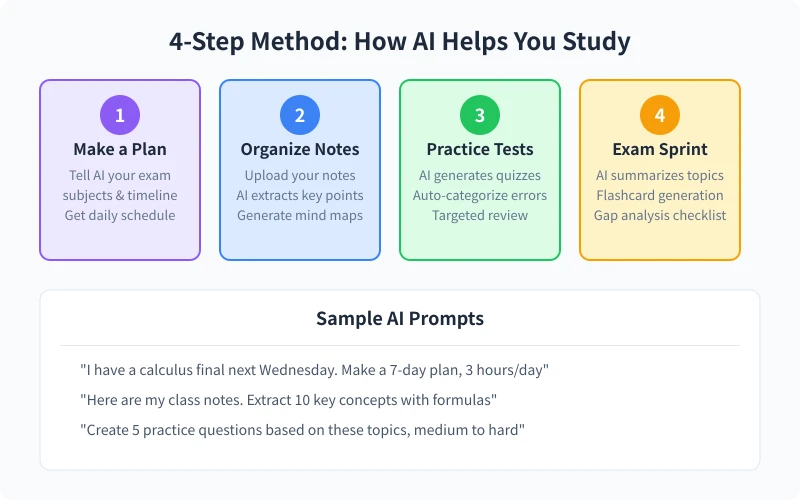
The worst thing about reviewing is having no plan—jumping around aimlessly. Letting AI create a specific daily plan is much more efficient than planning blindly on your own.
How to Talk to AI?
You need to tell the AI three key pieces of information: what you'll be tested on, when the exam is, and how much time you can study each day. The more specific the information, the more reliable the plan AI gives you.
Example Prompt:
"I have a college math final exam next Wednesday. The exam covers calculus and series. I can study about 3 hours a day. Please create a 7-day review plan for me, specifying what to study each day."
AI will give you a plan like this:
- Days 1-2: Review basic calculus concepts + limits and continuity
- Days 3-4: Derivatives and differentiation + practice typical problem types
- Day 5: Integration basics + substitution method and integration by parts
- Day 6: Convergence and divergence of series + power series expansion
- Day 7: Comprehensive mock test + review wrong answers
Advanced Tips
If you have a syllabus or a review outline from your teacher, directly take a picture or copy the content and send it to the AI. It will arrange the plan based on the actual exam scope rather than making a generic schedule.
Step 2: Let AI Organize Your Notes and Knowledge Points
You've taken a bunch of notes in class, but when reviewing they're messy and overwhelming? AI can quickly extract the key points and turn your chaotic notes into a structured knowledge system.
How to Do It
Method 1: Paste Notes Directly
Copy and paste your class notes to the AI and say: "Please help me organize these notes, extract 10 core knowledge points, and summarize each point in one sentence."
Method 2: Take a Photo
If you have handwritten notes, take a photo with your phone and upload it to an AI that supports images (like ChatGPT, Kimi). The AI will recognize the handwriting and organize the content.
Method 3: Generate a Mind Map
Ask the AI to clarify the relationships between knowledge points: "Please help me organize the knowledge system of calculus in a hierarchical structure, from broad categories to subcategories, similar to a mind map format."
Step 3: Let AI Create Practice Problems for You
Just reading without practice is useless. AI can generate problems based on what you've studied, and after you finish, it can explain them to you—like having a tutor available 24/7.
How to Ask AI to Create Problems?
Basic Prompt: "Please create 5 multiple-choice questions on derivatives and integrals from calculus, with medium difficulty."
Advanced Prompt: "I just got this problem wrong: ∫(2x+1)dx. Please analyze where I might have gone wrong, then create 3 similar problems for me to practice."
Mock Exam: "Please simulate a college math final exam paper with 10 multiple-choice questions, 5 fill-in-the-blanks, and 3 calculation problems, with difficulty referencing previous years' final exams."
Advantages of AI Explanations
After finishing the problems, you can ask the AI to explain each one. Unlike looking at an answer key, the AI adjusts the depth of explanation based on how you ask—if you say "I don't understand," it will re-explain in a simpler way.
Step 4: Final Sprint—Let AI Help You Fill Gaps
In the last 1-2 days before the exam, you don't need to learn new content. Focus on filling in gaps. AI can do three things for you:
1. Generate Quick-Review Cards
"Please organize the core formulas of calculus into quick-review card format, with each card containing the formula name, the formula itself, and its usage scenario."
AI will give you a list that you can print out or save on your phone for quick reference anytime.
2. Summarize High-Frequency Exam Topics
"Based on common question types in previous college math finals, please summarize the 10 most likely knowledge points to appear on the exam, ranked by importance."
3. Review Mistakes
If you previously had the AI create problems and you practiced with them, gather the questions you got wrong and send them to the AI: "These are the questions I got wrong before. Please help analyze the reasons for my mistakes and summarize the knowledge points I need to focus on reviewing."
Recommended Tools: Which AI Works Best for Learning?
Different AI tools have their strengths. Choose based on your needs:
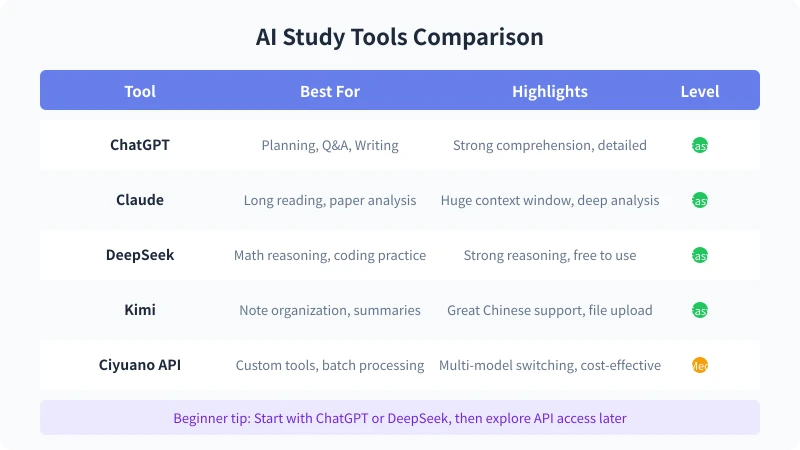
ChatGPT
Best overall ability, suitable for planning, practice problems, and Q&A. If you can only choose one, pick this.
DeepSeek
Outstanding in math reasoning, especially good at explaining calculation and proof problems in STEM fields. Also free to use.
Kimi
Strong understanding of Chinese, ideal for organizing Chinese notes and analyzing Chinese textbooks. Supports file uploads and can handle very long content at once.
Claude
Good at analyzing lengthy content, suitable for reading papers or analyzing textbook chapters. Has a large context window, can process an entire book at once.
Tips for Use
1. Don't Ask Too Many Questions at Once
Ask one question at a time, wait for the AI to answer, then ask the next. This results in higher quality answers.
2. Follow Up Often
If the AI's answer isn't clear enough, simply say "I don't understand, can you explain again?" or "Can you give an example?" The AI will adjust based on your feedback.
3. Save Important Conversations
When you get a particularly good explanation or summary, copy and save it. Although the AI retains conversation history, organizing it into a document makes review easier.
4. Don't Rely Entirely on AI
AI is a supplementary tool, not a replacement for your own learning. You still need to memorize formulas and do problems by hand. AI helps you be more efficient, but it can't memorize for you.
Common Questions
Are AI-generated review plans reliable?
Most of the time they are reliable, but you need to adjust based on your own situation. For example, AI doesn't know which subjects you're strong in and which you're weak in. You can tell it, and it will reallocate time accordingly.
Are AI-generated problems the same difficulty as the exam?
If you tell the AI to reference a specific exam (e.g., "difficulty level of previous years' final exams"), it will try to match it closely. But it can't guarantee exact consistency, so it's best to practice with your teacher's past papers as well.
Can AI recognize handwritten notes?
AI that supports image input (ChatGPT, Kimi, etc.) can recognize handwritten notes, but if your handwriting is too messy, recognition may be inaccurate. Try to write neatly, or ask the AI to confirm the recognition results after taking the photo.
Is using AI for learning considered cheating?
Using AI to assist with review and learning is reasonable, just like using reference books or watching instructional videos. However, using AI during an exam is cheating. Be sure to distinguish between learning scenarios and exam scenarios.
Related Articles
AI Speech to Text: Beginner's Guide to Convert Voice to Text in 3 Steps
Learn how to convert speech to text using AI tools. Perfect for meeting notes, content creation, and video subtitles. Three practical scenarios with step-by-step instructions.
TutorialsAI Local Deployment Guide: Run Large Models in 3 Steps for Free
Learn how to deploy AI models locally in just 3 steps. No coding experience needed, completely free, and your data stays private on your own computer.
TutorialsAI Shopping Decision Guide: From Price Comparison to Avoiding Pitfalls
Learn how to use AI for shopping decisions. From price comparison to avoiding pitfalls - make smarter purchasing choices with AI assistance.
Comments are not yet available, stay tuned