AI Translation Assistant Complete Guide: Photo, Document & Real-time Translation
Can't read the menu at a foreign restaurant? Received a work email in English you can't understand? Struggling with foreign language materials? Language barriers are one of the most common daily frustrations. The good news is that AI translation assistants have made cross-language communication simpler than ever. This guide teaches you how to use AI tools for practical translation needs, more efficient and accurate than traditional translation software.
How AI Translation Differs from Traditional Translation
Traditional translation tools (like Google Translate or Baidu Translate) mainly translate sentence by sentence. While fast, they often produce disconnected context and stiff phrasing. The key difference with AI translation assistants is: they understand the context of entire passages, producing more natural translations that fit actual usage scenarios.
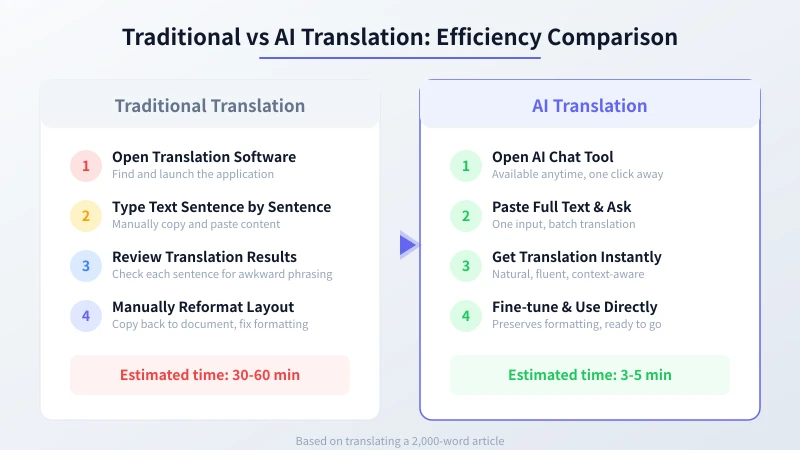
Simply put, traditional translation is "word for word," while AI translation is "meaning for meaning." You don't need to paste sentence by sentence — you can give AI entire paragraphs or articles, and it will understand the context before providing smoother translations.
Four Core Use Cases
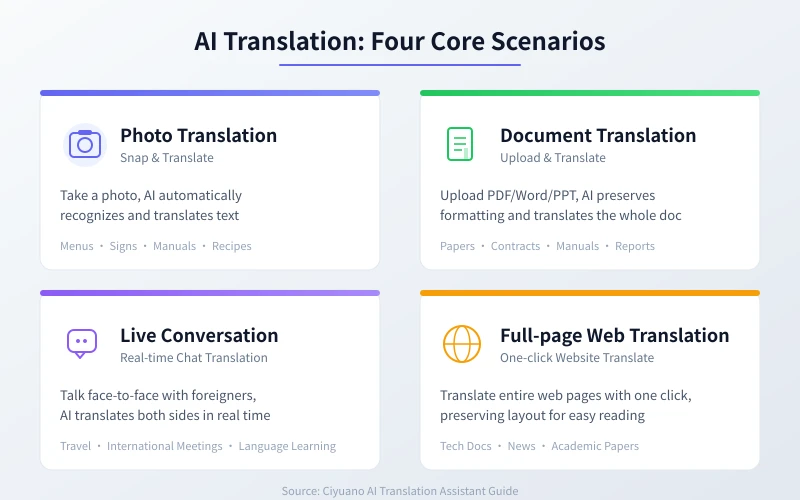
Scenario 1: Photo Translation
Dining at a restaurant abroad with a foreign language menu? Take a photo with your phone, and AI can translate it for you. This is especially useful for travel — road signs, menus, product manuals, and medicine labels can all be understood with a quick photo.
Steps:
- Open your AI chat tool (Ciyuano, ChatGPT, Doubao, etc.)
- Tap the image upload button, take a photo or select from gallery
- Enter the prompt:
"Please translate the text in this image, preserving the original layout" - AI will automatically recognize and translate the text in the image
Pro tip: If the photo has a lot of text, add "Please translate line by line in the original order" — AI will more accurately maintain text correspondence.
Scenario 2: Document Translation
Regularly receiving English PDF reports, foreign contracts, or product manuals at work? Traditional tools only translate plain text, losing all formatting. AI translation assistants can upload entire documents and translate them while preserving the original layout.
Steps:
- Open your AI chat tool and upload the PDF/Word/PPT file
- Enter the prompt:
"Please translate this document into English, preserving the original format and layout" - AI will translate paragraph by paragraph, maintaining headings, lists, and tables
- Check that key terminology translations are accurate
Use cases:
- Academic papers: Translate abstracts and conclusions to quickly grasp core findings
- Business contracts: Reference translations to understand clauses (important contracts still need professional translation)
- Technical docs: Translate API documentation, development guides, and technical materials
- Product manuals: Translate instructions for imported products
Scenario 3: Real-time Conversation Translation
Traveling abroad and need to ask for directions, in an international meeting requiring communication, or chatting with a native speaker — these scenarios need real-time two-way translation. AI translation assistants can serve as your "real-time translator."
Steps:
- Open your AI chat tool and set the translation direction (e.g., "Chinese to English")
- When the other person speaks a foreign language, input it to AI for Chinese translation
- When you speak Chinese, have AI translate it to the foreign language for the other person
- You can input multiple sentences at once — AI will translate them together
Advanced tip: Install an AI chat app on your phone. When you need translation, take a photo of what the other person says — AI can recognize speech-to-text and then translate, saving you from manual input.
Scenario 4: Full-page Web Translation
Found a great English tech blog or news article but struggling to read it? AI can translate the entire webpage content while preserving the original structure.
Steps:
- Copy the webpage URL or the text content
- Paste it into your AI chat tool
- Enter the prompt:
"Please translate this article, preserving the heading structure" - AI returns the complete translated content
Best for translating:
- Technical documentation and development guides
- News articles and in-depth reports
- Academic papers and research reports
- Product introductions and tutorials
Practical Translation Prompt Templates
Good prompts can double your translation quality. Here are several commonly used translation prompt templates you can copy and use directly:
General Translation Template:
"Please translate the following content into [target language]. Requirements:
1. Natural and fluent translation, no translationese
2. Preserve the tone and style of the original
3. Keep technical terms in English
4. Mark original text for uncertain translations
Original text:
[paste content]"
Professional Document Template:
"Please translate this [document type] into English. Requirements:
1. Preserve original formatting (headings, lists, tables)
2. Use industry-standard translations for technical terms
3. Annotate key terms with English originals on first mention
4. Keep uncertain terms in English
Document content:
[paste content]"
Conversational Translation Template:
"Please translate the following content into [target language]. Requirements:
1. Use colloquial expressions
2. Sound natural, like a local speaking
3. Avoid formal written language and literal translation
4. Suitable for daily conversation scenarios
Original text:
[paste content]"
Tips to Improve Translation Quality
Master these techniques for more professional and accurate translations:
1. Provide Context
Don't just throw text at AI for translation. Tell it the background. For example, "this is a business email to a client" or "this is a technical article about AI" — AI will adjust its translation style based on the scenario.
2. Specify Direction and Style
Clearly tell AI what language and style you want. "Translate to English, formal tone" and "translate to English, conversational" will produce completely different results.
3. Preserve Technical Terms
For technical document translations, have AI annotate key terms with their English originals. For example, "machine learning (Machine Learning)" — this makes it easier to understand and reference later.
4. Translate Long Texts in Segments
For very long documents, translate in segments of 500-1000 words each. This allows AI to focus better on the current passage's context, producing higher quality translations.
5. Cross-validate Key Content
For important documents (contracts, papers, official files), use two different AI tools to cross-validate and ensure key information is accurate.
Recommended AI Translation Tools
All these tools support AI translation. Choose the one that fits your workflow:
- Ciyuano: Multi-model switching, stable translation quality, great for daily use
- ChatGPT: Strong translation ability, document upload support, ideal for professional translation
- Doubao: Excellent Chinese understanding, free to use, great for beginners
- DeepSeek: Cost-effective with good translation quality, perfect for frequent use
- Claude: Strong long-text handling, ideal for translating long documents
Start Translating Now
No complex setup needed. Open any AI chat tool, paste text that needs translation with the right prompt, and experience the efficiency of AI translation.
- Choose an AI chat tool you already use
- Try one translation using the templates from this guide
- Compare the results between AI and traditional translation
- Find the translation workflow that works best for you
Remember: AI translation isn't meant to replace professional translators — it's meant to help you handle everyday translation needs quickly. For important documents, AI translation can serve as a first draft, then be reviewed and polished by professionals.
Related Articles
AI Speech to Text: Beginner's Guide to Convert Voice to Text in 3 Steps
Learn how to convert speech to text using AI tools. Perfect for meeting notes, content creation, and video subtitles. Three practical scenarios with step-by-step instructions.
TutorialsAI Local Deployment Guide: Run Large Models in 3 Steps for Free
Learn how to deploy AI models locally in just 3 steps. No coding experience needed, completely free, and your data stays private on your own computer.
TutorialsAI Shopping Decision Guide: From Price Comparison to Avoiding Pitfalls
Learn how to use AI for shopping decisions. From price comparison to avoiding pitfalls - make smarter purchasing choices with AI assistance.
Comments are not yet available, stay tuned