AI Writing Assistant Complete Guide: Master Emails, Reports, and Copywriting
Why You Need an AI Writing Assistant
First thing every morning — open your inbox, see 20 unread emails, each needing a reply. It's month-end, and you need to write a project summary report. The client is asking for marketing copy. These writing tasks pile up and can eat half your day.
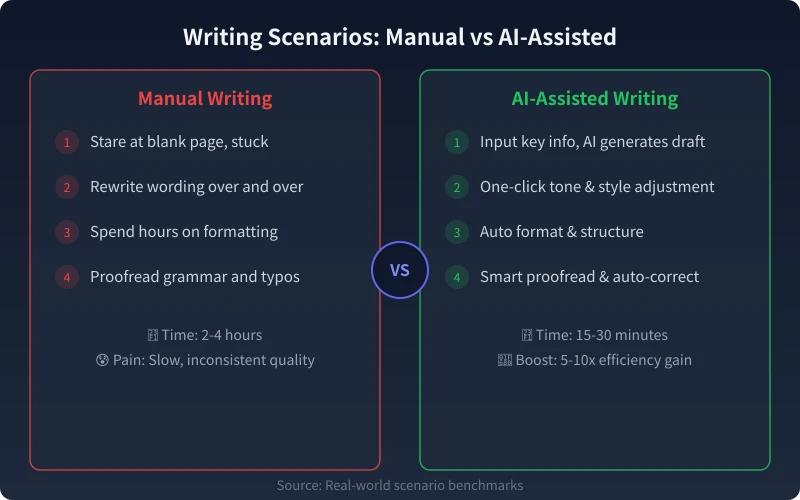
Here's the good news: AI writing assistants are mature enough to speed up repetitive writing tasks by 5-10x. It's not about letting AI write everything — it's about changing from "starting from scratch" to "editing an AI draft" — which is obviously much easier.
Getting Started: Choose the Right Tool
Before diving in, you need a comfortable AI writing tool. Here are three mainstream options:
- Online chat tools (ChatGPT, Claude, DeepSeek) — Chat directly on web or app, zero barrier, suitable for most scenarios
- Client apps (NextChat, ChatBox) — Connect to multiple AI models with a friendlier interface, great for intermediate users
- Professional writing tools (Notion AI, Jasper) — Built into the editor for the smoothest writing experience
If you're a beginner, start with online chat tools — lowest barrier to entry. Consider other options once you're comfortable.
Scenario 1: Email Writing
Emails are the most common workplace writing task. Good news — AI excels at writing emails because they follow a fixed format, and AI just needs to fill in the content.
Step-by-Step Process
Step 1: Define email essentials
Tell AI the following in the chat box:
- Who the email is for (boss, client, colleague, stranger)
- The purpose (report, request, thanks, follow-up, decline)
- Key information to include
- Desired tone (formal, friendly, serious, casual)
Step 2: Input your prompt
Here's a universal template — just copy and modify:
"Help me write an email. The recipient is our client Mr. Wang. The purpose is to follow up on the contract signing timeline. The tone should be polite but firm. Key info: we sent the contract two weeks ago, our project team is ready, and we're waiting for his confirmation."
Step 3: Review and adjust
After AI generates the email, check three things:
- Fact accuracy: AI may invent details — ensure names, dates, and amounts are correct
- Tone appropriateness: Adjust formality based on your relationship with the recipient
- Personal info: Add context AI doesn't know to make the email more targeted
Pro tip: Batch processing
If you need to reply to many emails in a day, send multiple email contents to AI at once and let it generate reply drafts in one go. Much faster than writing them one by one.
Scenario 2: Report Writing
Report writing is a nightmare for many — you have the data but don't know how to organize it into a clear, structured report. AI can help enormously here.
Step-by-Step Process
Step 1: Organize key data
Before writing, list your core data and conclusions in plain language. For example:
- This quarter's sales: $500K, 15% year-over-year growth
- New customer growth: 30%, mainly from online channels
- Customer retention rate: 85%, up 5 percentage points from last quarter
Step 2: Have AI generate the report framework
Send the data to AI and say: "Based on the above data, generate a quarterly sales report framework with executive summary, data analysis, problem summary, and next steps sections."
Step 3: Fill in section by section
AI will first give you a framework. Once confirmed, have it expand each section. For example: "Please expand the 'Data Analysis' section, focusing on reasons for online channel growth."
Step 4: Data visualization suggestions
You can also ask AI which data would benefit from charts: "Which data in this report would work well as charts? What chart types do you recommend?"

Scenario 3: Copywriting
Whether it's product descriptions, social media posts, or ad copy, AI can quickly produce initial drafts.
Step-by-Step Process
Step 1: Provide product/service info
Tell AI what you're promoting and who your target audience is:
- Product name and core selling points
- Target user profile (age, profession, pain points)
- Platform (WeChat Moments, Xiaohongshu, Official Account, Douyin)
- Copy style (professional, lively, recommendation, educational)
Step 2: Specify copy format
Different platforms require very different formats. Tell AI which one you need:
- WeChat Moments: Short, catchy, with image suggestions
- Xiaohongshu: Clickbait title + valuable content + tags
- Official Account: Complete structure, in-depth
- Product detail page: Feature list + usage scenarios
Step 3: Generate multiple versions
A great approach: ask AI to generate 3 different style versions simultaneously, pick the best one, then have it fine-tune. This is much more efficient than generating one version and repeatedly modifying it.
5 Tips for Better AI Writing
1. Give AI a role
Add "You are a senior expert in XX field" at the start of your prompt. AI will automatically adjust its vocabulary and expertise level. A prompt saying AI is a "10-year veteran copywriter" produces completely different copy than one saying it's a "new intern."
2. Use examples to guide
If you have a copy style you like, paste a sample for AI: "Help me write something similar to this style." AI will mimic the tone, structure, and expression of your example.
3. Step-by-step beats one-shot
Instead of asking AI to write a full article at once, do it in stages: first get an outline, confirm it, then expand section by section. This gives you better control over content direction.
4. State your constraints clearly
Word limits, terminology requirements, banned words — specify all in your prompt. AI can't read your mind; if you don't say it, it won't know.
5. Treat AI as a draft generator
AI's greatest value is getting you from 0 to 70. The refinement from 70 to 90 is still your job. Don't expect a perfect result in one shot — multiple rounds of conversation is the right approach.
FAQ
Will people know if I used AI?
There's currently no 100% accurate AI detection tool. But don't just copy AI output — modify at least 30% of the content, add your own perspective and writing habits, making it both natural and reflective of your personal style.
Can AI-generated copy be used commercially?
Most AI tools generate content with no copyright restrictions, so it can be used for commercial purposes. But check for factual errors or inappropriate statements — after all, you're the one publishing it.
Will using AI for writing make my skills decline?
Quite the opposite. AI saves you time on repetitive tasks, letting you focus more on strategy and creative thinking. Just like calculators didn't make people bad at math — they freed up mental energy for higher-value thinking.
Summary
AI writing assistants don't replace your writing ability — they automate repetitive text work. Remember this principle: AI handles the draft, you handle the refinement. Master this workflow and your writing efficiency will multiply.
Try it now: open your preferred AI tool, use one of the templates from this guide to write an email, and experience the efficiency boost firsthand.
Related Articles
AI Speech to Text: Beginner's Guide to Convert Voice to Text in 3 Steps
Learn how to convert speech to text using AI tools. Perfect for meeting notes, content creation, and video subtitles. Three practical scenarios with step-by-step instructions.
TutorialsAI Local Deployment Guide: Run Large Models in 3 Steps for Free
Learn how to deploy AI models locally in just 3 steps. No coding experience needed, completely free, and your data stays private on your own computer.
TutorialsAI Shopping Decision Guide: From Price Comparison to Avoiding Pitfalls
Learn how to use AI for shopping decisions. From price comparison to avoiding pitfalls - make smarter purchasing choices with AI assistance.
Comments are not yet available, stay tuned