How to Write Weekly Reports with AI: Finish Your Summary in 5 Minutes
Why Is Writing Weekly Reports So Painful?
Every Friday afternoon, the same anxiety hits — the weekly report is due. You accomplished plenty this week, but when you sit down to write, your mind goes blank.
The good news: AI can compress this task from 30 minutes to 5 minutes. It does not fabricate content for you — it helps organize your scattered information into a structured report.
What You Need
- An AI tool: ChatGPT, DeepSeek, Kimi, or any AI assistant works
- This week work notes: No need to organize them — just list whatever comes to mind
- 5 minutes: Really, just 5 minutes
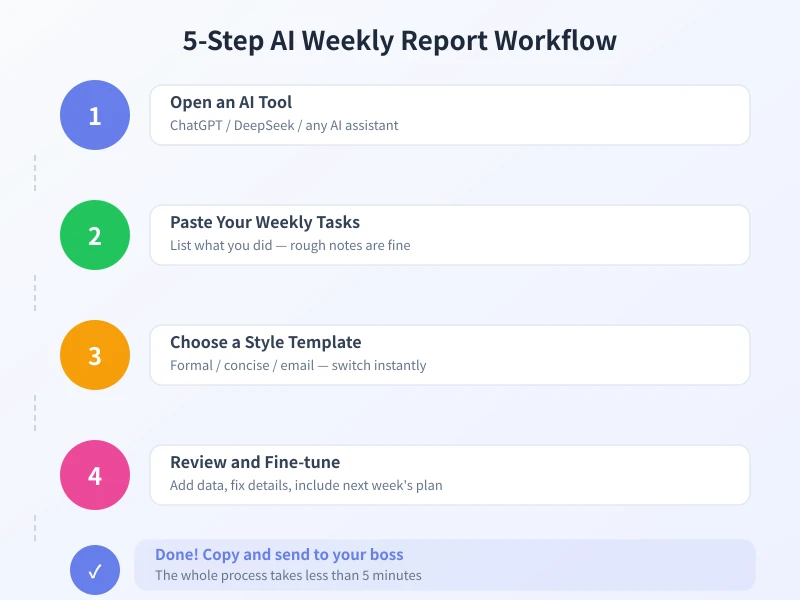
Step 1: Open AI and Paste Your Task List
Open ChatGPT (or any AI tool) and list everything you did this week. No formatting needed, no complete sentences required — keywords are fine.
Here is what I did this week:
- Monday: Held a requirements review meeting for the user system project
- Wrote the initial PRD draft, about 15 pages
- Aligned the technical plan with the dev team
- Wednesday: Handled 12 customer feedback items, 3 were high priority
- Confirmed the new UI design with the design team
- Thursday: Wrote the Q3 planning draft
- Helped a new colleague get up to speed on the project
Step 2: Let AI Generate the Report
Add this prompt after your task list:
Based on the above, please write a weekly work report. Requirements:
1. Split into This Weeks Accomplishments and Next Weeks Plan
2. Describe each task in concise professional language
3. Highlight results and data
4. Tone should be formal but not stiff
5. Infer next weeks plan from the current work
Step 3: Choose the Right Style
Different situations call for different report styles.
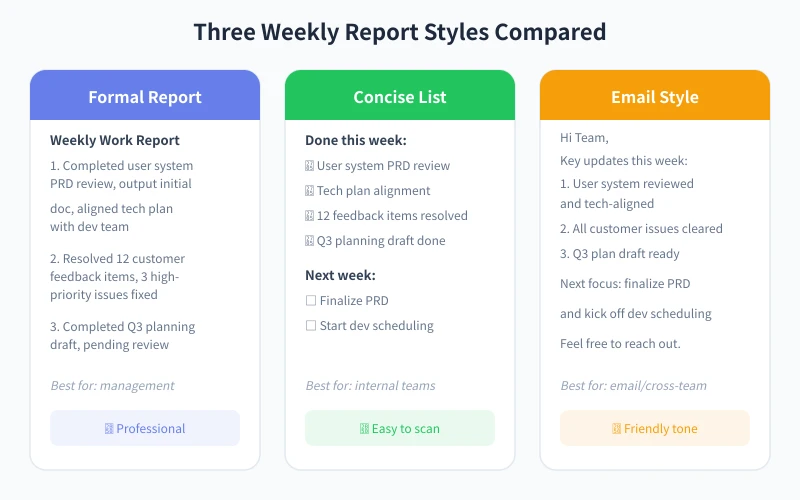
Formal Report (For Management)
Please rewrite in a formal report style, with more professional language and data support, suitable for department heads.
Concise List (For Internal Teams)
Please rewrite in a concise list format, using checkmarks for completed items and boxes for next weeks plans.
Email Style (For Cross-team)
Please rewrite in email style, starting with Hi Team in a friendly and natural tone.
Step 4: Review and Fine-tune
- Add specific data: AI does not know your exact numbers — you need to add those
- Fix factual errors: AI might make inferences — double-check for accuracy
- Adjust priorities: Reorder based on actual importance
- Add metrics: Quantified results make reports more convincing
Step 5: Copy, Paste, Send
After reviewing, simply copy the AI-generated content and paste it into your report template. The entire process takes no more than 5 minutes.
Advanced Tips
Create a Report Template
Save your commonly used prompts as a template. Create a Weekly Report Generator conversation in ChatGPT and pin your prompts. Each week, just paste a new task list.
Take Quick Notes During the Week
Spend 1 minute before leaving work each day jotting down what you did. On Friday, just feed your notes to AI.
Common Questions
Will AI-generated reports be too generic?
If you only give keywords, yes. The solution: provide more details. The richer the details, the more personalized the output.
Will my boss know it is AI-written?
As long as you review and add specific data, there is no difference. AI just helps organize the language.
Access More Models via Ciyuano API
- Visit the Model List to see all available models
- Create a key on the API Key Management page
- Set the API endpoint to
https://www.ciyuano.com/v1
Summary
The core of writing weekly reports with AI is four steps: List tasks, Generate, Adjust style, Review. Take quick notes during the week, feed them to AI on Friday, and you are done in 5 minutes.
Related Articles
AI Speech to Text: Beginner's Guide to Convert Voice to Text in 3 Steps
Learn how to convert speech to text using AI tools. Perfect for meeting notes, content creation, and video subtitles. Three practical scenarios with step-by-step instructions.
TutorialsAI Local Deployment Guide: Run Large Models in 3 Steps for Free
Learn how to deploy AI models locally in just 3 steps. No coding experience needed, completely free, and your data stays private on your own computer.
TutorialsAI Shopping Decision Guide: From Price Comparison to Avoiding Pitfalls
Learn how to use AI for shopping decisions. From price comparison to avoiding pitfalls - make smarter purchasing choices with AI assistance.
Comments are not yet available, stay tuned