AI Writing Assistant Complete Guide: Master Smart Writing from Scratch
Why You Need an AI Writing Assistant
Many people think AI writing is just about "helping write an article." In reality, an AI writing assistant is far more than that—it's an all-in-one tool that handles all kinds of written work for you.
From a formal business email to a social media post to a research paper outline, AI can produce high-quality drafts in seconds. The key is: you need to learn how to "talk" to it properly.
Four Practical Scenarios at a Glance
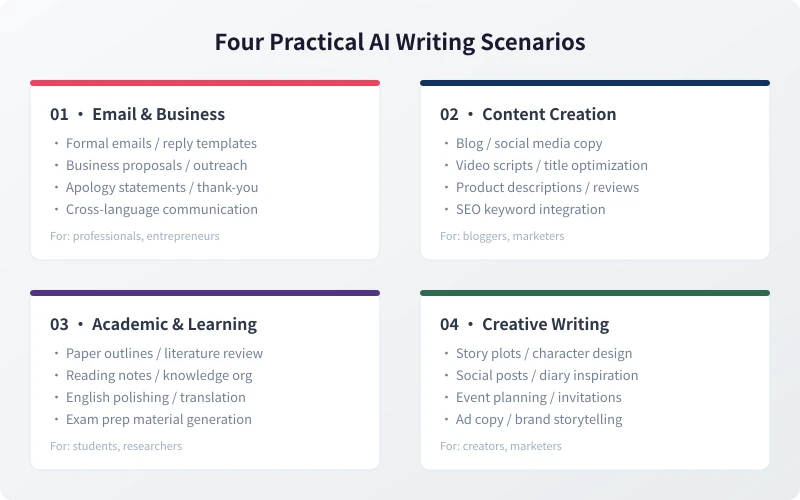
Scenario 1: Email & Business Communication
Professionals write dozens of emails every day. AI can help you quickly generate:
- Formal email templates: AI automatically matches tone and format for clients, managers, and partners
- Business proposals: Input your core ideas, and AI expands them into complete proposal documents
- Apologies & thank-you notes: Handle tricky communication scenarios with appropriate and sincere wording
Scenario 2: Content Creation
The biggest headache for content creators is "producing content every day." AI can help with:
- Topic generation: Give AI a niche direction, and it can batch-produce trending topics
- Copywriting: Blog posts, social media notes, video scripts—each with corresponding templates
- Title optimization: Get 10 different style titles for the same content to choose from
Scenario 3: Academic & Learning
A great helper for students and researchers:
- Paper outlines: Input your research direction, and AI builds the framework
- Literature reviews: Quickly organize existing research and identify gaps
- English polishing: Make your paper language more natural and academic
Scenario 4: Creative Writing
When inspiration runs dry, AI is the best "spark trigger":
- Story conception: Give AI a setting and let it develop the plot
- Creative copy: Slogans, brand stories, event copy—AI offers unexpected angles
- Social media posts: Never spend half an hour thinking about what to post again
5 Key Elements of Effective Prompts
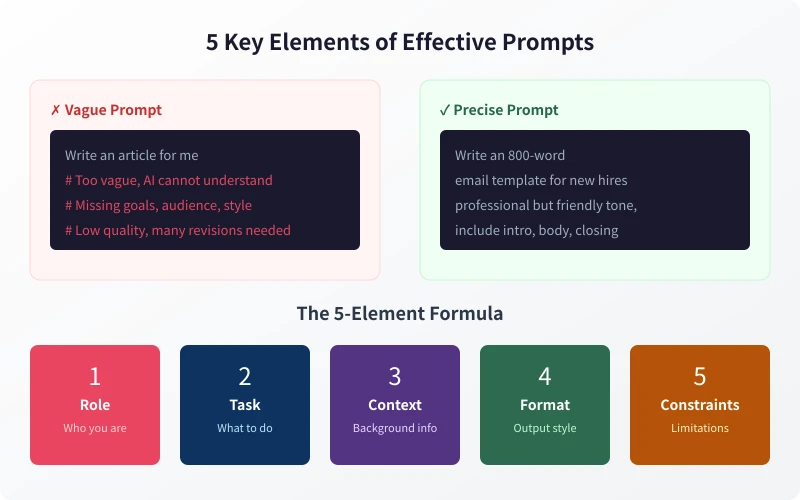
Many people feel AI outputs are "not good enough"—the issue is usually with the prompt. Master these five elements to dramatically improve AI output quality:
1. Role: Tell AI Who It Is
Set AI's role at the beginning of your prompt, such as "You are an experienced copywriter" or "You are an academic paper writing expert." The more specific the role, the more professional the output.
2. Task: Be Clear About What to Do
Don't just say "help me write." Be specific: what type of text, approximately how many words, for what scenario. The clearer the task description, the more precisely AI can deliver.
3. Context: Provide Background Information
Give AI sufficient context: Who is your target audience? What's the purpose of this piece? Any relevant materials from before? The more information, the better AI can match your needs.
4. Format: Specify Output Style
Clearly tell AI what format you want: bullet points or paragraphs? Do you need headings? Any word count limits? The clearer the format requirements, the less revision later.
5. Constraints: Set Limitations
Sometimes you need AI to "not do" certain things: avoid certain words, don't be too formal, don't use metaphors... Constraints help filter out unwanted content.
Hands-On Demo: Writing a Business Email from Scratch
Here's a complete example. Suppose you need to write a partnership invitation email to a potential client:
Step 1: Prepare Your Information
Before writing the prompt, organize what you already know: the client's company name, cooperation direction, your strengths, and expected partnership approach.
Step 2: Build Your Prompt
Using the 5-element formula, assemble your prompt:
- Role: You are a professional business development manager
- Task: Write a ~300-word partnership invitation email
- Context: The recipient is XX Tech Company; we have mature AI solutions and want to explore API integration partnership
- Format: Include greeting, body, closing signature; professional but not stiff tone
- Constraints: Don't over-promote, avoid too much technical jargon
Step 3: Review & Adjust
After AI gives you the draft, don't send it directly. Check these points:
- Are the facts accurate (company names, product details)?
- Does the tone match your expectations?
- Is any important information missing?
Advanced Tips: Making AI Your Long-Term Writing Partner
Once you've mastered the basics, you can further boost efficiency:
- Build a prompt library: Save yourcommonly used prompt templates for easy reuse next time
- Iterate step by step: For complex content, don't ask AI to write everything at once—start with an outline, then expand section by section
- Compare multiple versions: Use the same prompt to generate several versions and pick the best one
- Feedback loop: Tell AI what needs improvement, and let it adjust in the next round
Common Mistakes to Avoid
When using AI writing assistants, avoid these common errors:
- Over-reliance: AI is a tool, not a replacement. You still handle final review and creative decisions
- Ignoring copyright: AI-generated content may resemble other sources—run a plagiarism check before publishing
- Not verifying facts: AI may "invent" data or cite non-existent sources—always verify important information
An AI writing assistant isn't some mysterious high-tech—it's a super-fast text processing tool right at your fingertips. With the right approach, it can save you tons of time and let you focus on more valuable creative work.
Related Articles
AI Speech to Text: Beginner's Guide to Convert Voice to Text in 3 Steps
Learn how to convert speech to text using AI tools. Perfect for meeting notes, content creation, and video subtitles. Three practical scenarios with step-by-step instructions.
TutorialsAI Local Deployment Guide: Run Large Models in 3 Steps for Free
Learn how to deploy AI models locally in just 3 steps. No coding experience needed, completely free, and your data stays private on your own computer.
TutorialsAI Shopping Decision Guide: From Price Comparison to Avoiding Pitfalls
Learn how to use AI for shopping decisions. From price comparison to avoiding pitfalls - make smarter purchasing choices with AI assistance.
Comments are not yet available, stay tuned