AI Writing Assistant Guide: Daily Writing, Email Replies, Content Creation Made Easy
Why You Need an AI Writing Assistant
Every day we write things — replying to emails, drafting work reports, creating social media posts, or organizing meeting notes. But often, we get stuck on the very first sentence, unsure how to begin or how to structure our thoughts.
An AI writing assistant solves exactly this problem. No programming skills required, no complex account registration — just open a webpage, type what you want to write, and within seconds you get a well-structured, fluent piece of text.
Get Started in Three Steps
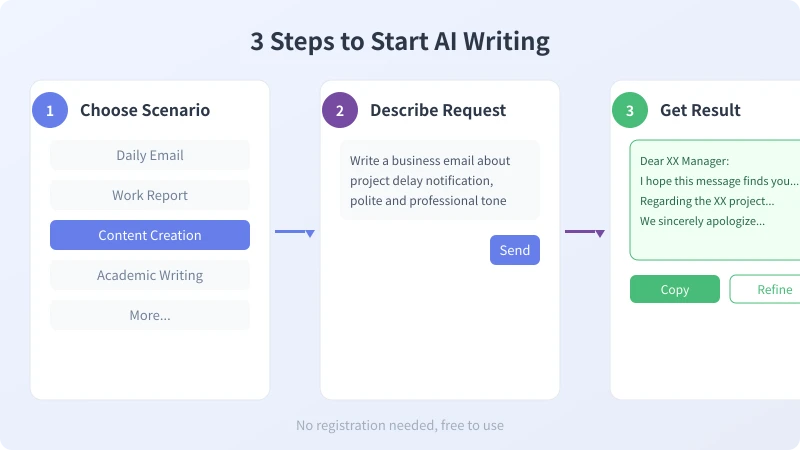
Step 1: Choose a Writing Scenario
When you open an AI writing tool, you will typically see multiple scenario templates. Common ones include:
- Business Email — for formal email communication
- Work Report — weekly, monthly, or project progress reports
- Content Creation — social media posts for platforms like Xiaohongshu, WeChat Moments, or Weibo
- Academic Writing — paper abstracts, literature reviews, thesis proposals
- Daily Writing — leave requests, notices, event plans, etc.
Choose a scenario based on your needs, and the AI will adjust its output style accordingly.
Step 2: Describe Your Request
This is the most critical step. You need to tell the AI what you want to write, who it is for, and what tone to use. Here are some practical templates:
- Email template: "Write an email about [topic], recipient is [role], tone should be [formal/warm/urgent]"
- Report template: "Write a work report for [project name], include this week's progress, problems encountered, and next steps"
- Content template: "Write a [platform] post about [topic], style should be [casual/professional/warm], include relevant hashtags"
Step 3: Get Results and Refine
After the AI generates content, you can:
- Copy and use directly — for simple scenarios, AI output is usually good enough
- Request modifications — enter instructions like "make it more formal" "add an opening paragraph" "add a call-to-action at the end"
- Switch styles — enter "rewrite in a more conversational tone" "add data support"
Five Practical Writing Scenarios
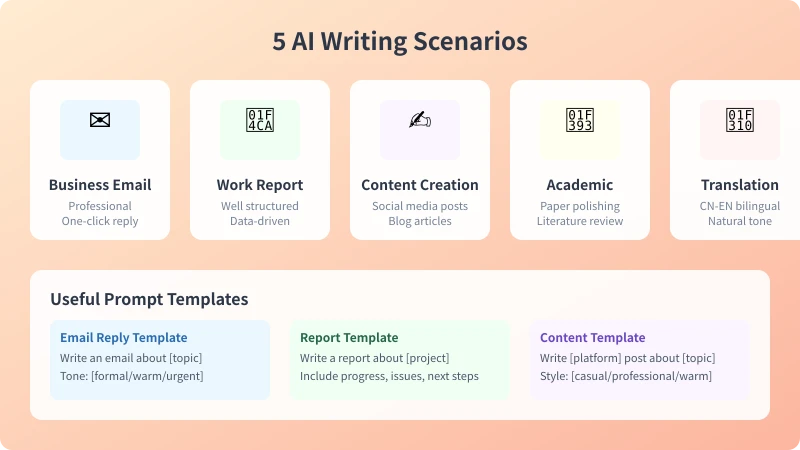
Scenario 1: Business Emails
Business emails are the most common writing need. AI can help you quickly generate professional and appropriate emails, including:
- Project progress notifications
- Meeting invitations and follow-ups
- Client communication and replies
- Partnership discussions and thank-you notes
Tip: When describing your request, specify the email purpose and your relationship with the recipient. The AI will automatically adjust the tone.
Scenario 2: Work Reports
Writing weekly or monthly reports is a pain point for many people. AI can help you quickly organize your thoughts and generate a well-structured report. You only need to list what you did this week, and the AI will:
- Sort content by timeline or importance
- Add data and quantified descriptions
- Suggest "next steps" section
- Use professional but natural language
Scenario 3: Content Creation
Social media content requires "appeal + brevity + call-to-action". AI excels at generating:
- Xiaohongshu product recommendation posts (with hashtags)
- WeChat Moments daily sharing
- Product promotion copy
- Holiday greetings and event announcements
Tip: Tell the AI your target audience and posting platform, and it will automatically match the corresponding style.
Scenario 4: Academic Writing
For students and researchers, AI can assist with:
- Paper abstracts and introductions
- Literature review organization
- Experiment reports and data analysis descriptions
- Thesis proposals and defense scripts
Note: AI-generated content can serve as a draft and reference. The final version needs to be modified and supplemented based on your actual research content.
Scenario 5: Multi-language Translation
AI writing tools typically have built-in translation capabilities, supporting:
- Chinese-English bilingual translation (maintaining natural context)
- Multi-language version generation simultaneously
- Accurate translation of technical terms
- Localized expression adjustments
Prompt Tips for Better AI Output
Two people using the same AI writing tool can get very different output quality. The key lies in how you prompt the AI. Here are some core principles:
- Be specific: Don't say "write me an email" — instead say "write a project delay notification email, formal tone, include the delay reason and estimated completion time"
- Provide context: Tell the AI who it is for, the scenario, and any special requirements
- Work step by step: For complex content, generate in stages — first the outline, then the details
- Iterate and refine: When unsatisfied with AI output, provide specific direction for improvement
FAQ
Will the AI generate duplicate content?
No. AI generates content fresh each time based on your description. Even with the same description, the output will have subtle differences.
Is it free or paid?
Most AI writing tools have free versions that are sufficient for daily use. Advanced features (longer output, more scenario templates) may require payment.
Is the content safe?
Mainstream AI tools have content safety mechanisms and will not generate illegal or harmful content. However, it is recommended not to input sensitive personal information into AI tools.
Related Articles
AI Speech to Text: Beginner's Guide to Convert Voice to Text in 3 Steps
Learn how to convert speech to text using AI tools. Perfect for meeting notes, content creation, and video subtitles. Three practical scenarios with step-by-step instructions.
TutorialsAI Local Deployment Guide: Run Large Models in 3 Steps for Free
Learn how to deploy AI models locally in just 3 steps. No coding experience needed, completely free, and your data stays private on your own computer.
TutorialsAI Shopping Decision Guide: From Price Comparison to Avoiding Pitfalls
Learn how to use AI for shopping decisions. From price comparison to avoiding pitfalls - make smarter purchasing choices with AI assistance.
Comments are not yet available, stay tuned