AI Note-Taking Assistant Guide: Meeting Notes, Study Notes & Knowledge Management Made Easy
Can't keep up with notes during meetings? Falling behind the teacher's pace in class? Forgetting everything you read after a couple of days? These problems all share the same root: information comes too fast for us to organize. AI note-taking assistants are built to solve exactly this. They not only turn scattered information into structured notes, but also auto-categorize, extract key points, generate summaries, and even help you build a searchable knowledge base. This guide walks you through using AI to organize every type of note.
What Is an AI Note-Taking Assistant
Traditional note-taking means "manual recording" — you listen, you write, you organize. The entire process depends on your attention span and writing speed. An AI note-taking assistant changes this workflow: you just provide the raw content (audio, images, text), and AI handles understanding, transcribing, organizing, and archiving.
In short: you handle "capture," AI handles "processing." This division of labor can boost note-taking efficiency by 5-10x.
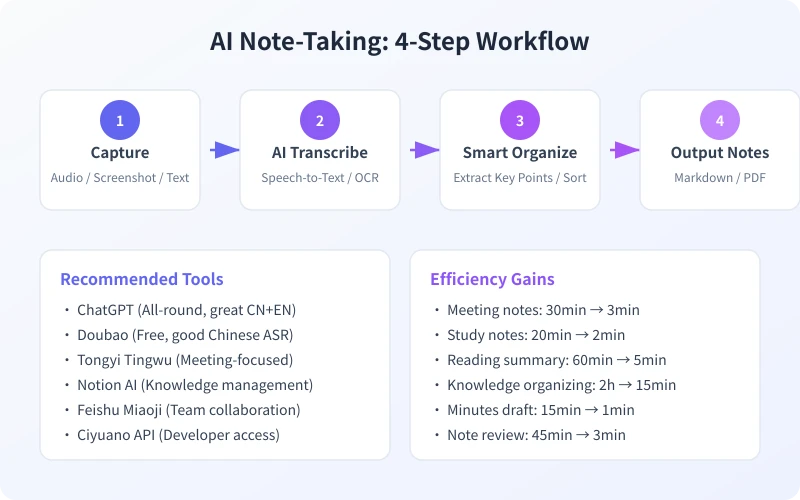
The diagram above shows the core workflow of AI note-taking. Whether you are processing meeting recordings, class notes, or reading excerpts, the process follows these four steps: Capture content, AI transcribe, Smart organize, Output notes. Let us break down each scenario below.
Four Practical Use Cases
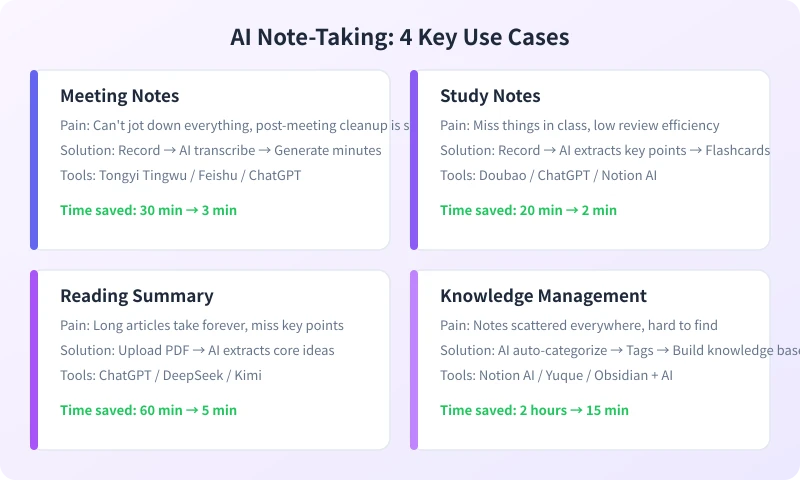
Scenario 1: Meeting Notes
During meetings, you have probably experienced this: trying to listen and write at the same time, only to fall behind after the first few minutes. Or you skip note-taking entirely, planning to organize later — but by then, many details have slipped away.
With an AI note-taking assistant, you just start recording before the meeting, then hand the audio to AI afterward.
Steps:
- Record the meeting: Use a phone recording app, Feishu meeting recorder, or any audio tool
- Upload the recording: Open your AI tool (Doubao, ChatGPT, Tongyi Tingwu), select "Upload file" or "Voice input"
- Send a prompt: Type — "Transcribe this meeting recording, segment by speaker, and generate minutes including topics, key discussion points, and action items"
- Review output: AI will produce complete meeting minutes in 1-2 minutes. Review and add any missing details
Tip: Tools like Tongyi Tingwu and Feishu Miaoji automatically identify different speakers, producing better results than general-purpose AI tools. But general tools win on free access and flexibility.
Scenario 2: Study Notes
In class, the teacher talks too fast and you cannot capture everything. After class, you want to review but cannot find the key points. An AI note-taking assistant solves this effortlessly.
Steps:
- Record the class: Start your phone recorder before class (place it near the teacher for better audio quality)
- Post-class transcription: Upload the recording to an AI tool with the prompt — "Transcribe this class recording, extract key knowledge points, organize by chapter, and summarize each point in one sentence"
- Generate flashcards: Follow up — "Turn the key content into Q&A flashcards for review"
- Regular review: Save the flashcards to your note app and review them every few days to reinforce memory
This method is especially great for students. A 45-minute class recording is typically organized into clear, structured notes in just 2-3 minutes.
Scenario 3: Reading Summary
Bought a book but lost motivation after a few pages? Or finished reading but cannot remember the key ideas? An AI note-taking assistant can quickly extract the core arguments from any book or article.
Steps:
- Upload content: Upload an ebook PDF, book review, or your reading notes to an AI tool
- Request summary: Type — "Summarize the core ideas of this book into 10 key points, one sentence each with a brief explanation"
- Deep dive: Ask follow-up questions on points that interest you — "Expand on point 3. What evidence does the author use to support this argument?"
- Generate reflection: Finally ask AI — "Based on these points, write a 500-word reading reflection incorporating my personal thoughts"
Scenario 4: Knowledge Management
You have written lots of notes, but they are scattered across different apps — WeChat favorites, phone memo, Notion, paper notebooks. When you need something, it takes forever to find. AI can help you build an organized knowledge base.
Steps:
- Centralize: Gather all your notes in one place (Notion, Yuque, or a folder)
- AI categorize: Batch-send notes to AI with the prompt — "Categorize these notes by topic, and add a keyword tag to each"
- Build index: Ask AI to generate a knowledge index — "Based on these notes, create a topic index for keyword-based retrieval"
- Regular update: Spend 10 minutes each week adding new notes to the knowledge base and letting AI update the index
Advanced: If you use Notion AI or Obsidian with AI plugins, you can achieve auto-categorization, auto-tagging, and auto-linking of related notes — building a true "second brain."
Recommended AI Note-Taking Tools
Different scenarios call for different tools. Here are the best options currently available:
| Tool | Best For | Price |
|---|---|---|
| Tongyi Tingwu | Meeting transcription, multi-speaker ID | Free (limited quota) |
| Feishu Miaoji | Team meetings, auto-minutes | Free (Feishu users) |
| Doubao | Daily notes, voice memos | Free |
| ChatGPT | General notes, summaries, translation | Free (usage limits) |
| Notion AI | Knowledge base management, auto-categorize | Paid ($10/mo) |
| Kimi | Long-text summaries, PDF processing | Free |
For most users, the Doubao + ChatGPT combo covers 80% of note-taking scenarios — completely free. If you need team collaboration, Tongyi Tingwu and Feishu Miaoji are better choices.
Practical Prompt Templates
Good prompts can double the quality of your notes. Here are several useful templates:
Meeting Minutes Template:
Transcribe this recording into meeting minutes:
1. Segment by speaker
2. Extract discussion points for each topic
3. List all action items (with owners)
4. Flag items needing follow-up
Study Notes Template:
Organize these class notes:
1. Group by chapter/knowledge point
2. Summarize each point in one sentence
3. Mark key and difficult topics
4. Generate 5 review questions at the end
Reading Summary Template:
Summarize the core ideas of this article/book:
1. 10 key points
2. One sentence + one explanation per point
3. Identify the author's main argument
4. Write a 200-word conclusion
FAQ
Are AI-organized notes accurate?
Mostly yes, but AI may make errors with technical jargon, numbers, and names. After organizing, spend 1-2 minutes reviewing, especially for key data and proper nouns.
Are there file size limits for recordings?
It varies by tool. Doubao and ChatGPT typically support audio files under 25MB. Tongyi Tingwu handles larger files. If your recording is too long, split it into segments.
Are free tools enough?
For everyday note-taking, absolutely. The free versions of Doubao and ChatGPT handle meeting transcription, class notes, and reading summaries very well. You only need paid versions for processing large volumes of specialized content.
What's the best way to store notes?
Use a tool with full-text search like Notion or Yuque. For personal use, a simple memo app + AI tool combo works fine too. The key is building a consistent habit — spend 5 minutes each evening having AI organize your day's notes.
Get Started Now
Starting today, try one thing: record a meeting or class, then hand the audio to AI for organizing. It does not need to be perfect — just experience the efficiency gap between manual note-taking and AI-assisted organization.
- Open your AI tool (Doubao, ChatGPT, or any other)
- Upload a recording or set of notes
- Use one of the prompt templates above to have AI organize it
- Compare the time and quality — you will find AI-organized notes are clearer and more complete than what you would produce manually
Remember: The point of note-taking is not "recording" — it is "using." AI saves you the time you would spend organizing, so you can focus on what truly matters: thinking and taking action.
Related Articles
AI Speech to Text: Beginner's Guide to Convert Voice to Text in 3 Steps
Learn how to convert speech to text using AI tools. Perfect for meeting notes, content creation, and video subtitles. Three practical scenarios with step-by-step instructions.
TutorialsAI Local Deployment Guide: Run Large Models in 3 Steps for Free
Learn how to deploy AI models locally in just 3 steps. No coding experience needed, completely free, and your data stays private on your own computer.
TutorialsAI Shopping Decision Guide: From Price Comparison to Avoiding Pitfalls
Learn how to use AI for shopping decisions. From price comparison to avoiding pitfalls - make smarter purchasing choices with AI assistance.
Comments are not yet available, stay tuned