How to Ask AI for Better Answers: A Beginner's Guide to Prompt Engineering
Your Questioning Style Determines AI Response Quality
Many people face the same frustration when using AI tools: the AI is powerful, but the answers they get are always unsatisfying.
The truth is simple — it's not the AI that's the problem. It's your questioning approach that needs upgrading.
AI is like a super assistant with encyclopedic knowledge. The more precise your question, the more useful the answer. This article teaches you a simple, learnable method for asking better questions. No technical background required — you can use it immediately after reading.
Why Does Questioning Style Matter So Much?
Imagine two scenarios:
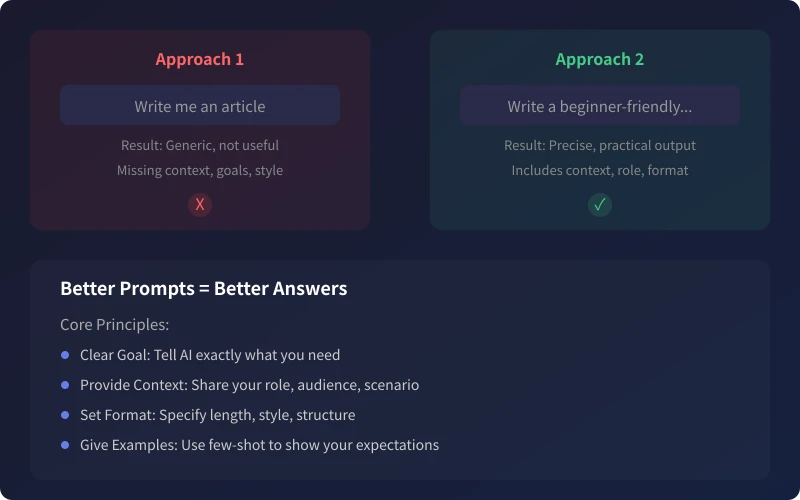
Scenario 1: You walk into a restaurant and tell the waiter "just bring me something good." The waiter is confused — Chinese or Western food? Spicy or not? How many people are eating?
Scenario 2: You say "I'd like a Sichuan hot pot for two, medium spicy, plus two lemonades." The waiter can immediately take your order.
It's the same with AI. The more specific your information, the more precise the results. Here's a 4-step method for writing high-quality prompts.
Step 1: Give AI a Role
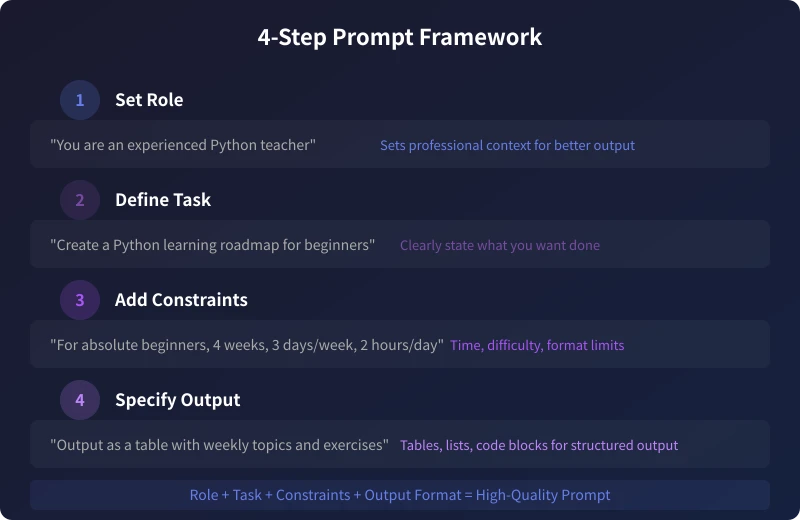
At the beginning of your question, tell AI what role it should play. This step looks simple, but the effect is remarkable — AI immediately switches from "general assistant" to "professional mode."
How to set a role?
Add a line at the front of your question:
- "You are an experienced Python teacher" — for technical teaching scenarios
- "You are a senior copywriter" — for writing and marketing scenarios
- "You are a professional nutritionist" — for health and diet scenarios
- "You are a patient elementary school teacher" — for explaining concepts to beginners
Why does it work? Role-setting activates AI's domain-specific knowledge, just like visiting different hospital departments gives you entirely different medical advice.
Step 2: Define Your Task
Tell AI exactly what you want to do. Don't say "help me write something" — specify the exact task.
Bad vs Good Questioning
Bad: "Help me write an article."
Good: "Help me write a Python beginner's learning guide."
The difference is that the latter tells AI the specific topic and direction. You can further specify: who it's for, how long, what style.
Step 3: Add Constraints
This is the key step that separates "barely usable" from "ready to use." Give AI some constraint conditions to make the output more relevant to your needs.
Dimensions you can specify
- Target audience: For absolute beginners / For experienced developers / For management
- Content length: Under 300 words / 4 sections / No more than 5 points
- Tone and style: Casual and lively / Formal and professional / Concise and crisp
- Time constraints: 30 minutes per day / Complete in 2 weeks / Weekly schedule
- Output language: Chinese / English / Bilingual
Complete Example
Without constraints: "Help me make a learning plan."
With constraints: "For absolute beginners, complete in 4 weeks, 3 days per week, 2 hours per day, with clear daily learning objectives and exercises."
With constraint conditions added, the plan AI provides immediately becomes actionable.
Step 4: Specify Output Format
The final step is telling AI how you want the results presented.
Common output formats
- Table: "Output as a table with weekly topics and exercises"
- List: "Use a step-by-step list format with operation instructions for each step"
- Sections: "Split into 3 parts, each with a sub-heading and detailed explanation"
- Dialogue: "Use a Q&A format simulating a teaching conversation"
- Code blocks: "Use code examples with comments"
Putting It All Together
Combine all four steps into one complete prompt:
"You are an experienced Python teacher. Help me write a Python beginner learning plan for college students with no prior experience, split into 4 weeks, 3 days per week, 2 hours per day. Output as a table with weekly topics, learning content, and practice tasks."
A prompt like this will produce far better results than just "help me write a Python learning plan."
Advanced Tip: Use Examples to Guide AI
Sometimes you don't know how to describe the effect you want, but you can say "something like this." Show AI a reference, and it immediately understands.
Three ways to give examples
- Paste an example: "Help me write a payment reminder email, tone reference: 'Dear customer, according to our contract agreement...'"
- Mention a style reference: "Help me write a product description, style reference Apple's website — clean, rhythmic, highlighting core selling points."
- Provide a structure template: "Help me write a weekly report in this format: 1. Completed this week 2. In progress 3. Next week plan 4. Support needed."
Common Mistakes
Mistake 1: Expecting perfection in one shot
AI supports multi-turn conversation. If the first response isn't satisfactory, simply add follow-up requirements: "This is too long, shorten to 200 words" / "Switch to a more casual tone" / "Add specific numbers and examples." Multi-round optimization is more efficient than writing one extremely long prompt.
Mistake 2: Thinking English works better
For most Chinese scenarios, Chinese prompts work just as well. Only for specific technical terminology might English be more precise. For everyday use, Chinese is perfectly fine.
Mistake 3: The longer the prompt the better
Not at all. What matters is information density — every sentence should provide useful information. Instead of padding with filler, concisely state your core requirements.
Summary
The core formula for writing good prompts: Role + Task + Constraints + Output Format
Remember these four steps and start changing your questioning approach today. You'll find that AI response quality improves dramatically. No programming skills needed, no technical documentation to study — just change how you talk to AI.
Related Articles
AI Speech to Text: Beginner's Guide to Convert Voice to Text in 3 Steps
Learn how to convert speech to text using AI tools. Perfect for meeting notes, content creation, and video subtitles. Three practical scenarios with step-by-step instructions.
TutorialsAI Local Deployment Guide: Run Large Models in 3 Steps for Free
Learn how to deploy AI models locally in just 3 steps. No coding experience needed, completely free, and your data stays private on your own computer.
TutorialsAI Shopping Decision Guide: From Price Comparison to Avoiding Pitfalls
Learn how to use AI for shopping decisions. From price comparison to avoiding pitfalls - make smarter purchasing choices with AI assistance.
Comments are not yet available, stay tuned