Cursor + Token Circle: AI Programming Best Practices
Cursor is one of the most popular AI programming tools. By connecting to the Ciyuan Quan API, you can get a more powerful and flexible AI programming experience. This article will detail the configuration methods and best practices.
What is Cursor?
Cursor is an AI programming editor based on VS Code, with core features including:
- Tab Completion: Real-time code completion, press Tab to accept suggestions
- Cmd+K Edit: Select code, then describe modification requirements in natural language
- Chat Dialogue: Right-side conversation panel, supports multi-turn dialogue to solve complex problems
- Composer: Cross-file editing, automatically generates code for multiple files
- Codebase Indexing: Understands the entire project structure to provide more accurate suggestions
Configure Ciyuan Quan API
Step 1: Open Settings
In Cursor, click sequentially: File > Preferences > Settings (or press Cmd+, / Ctrl+,).
Step 2: Configure OpenAI Compatible API
Find Cursor > Models in the settings, and configure the following options:
| Configuration Item | Value to Fill |
|---|---|
| OpenAI API Key | Your Ciyuan Quan API Key (sk-xxx...) |
| Override OpenAI Base URL | https://www.ciyuano.com/v1 |
| Model | Select or enter a model name (e.g., deepseek-v4) |
Step 3: Verify Connection
After configuration, send a test message in the Chat panel to confirm normal replies.
AI Programming Workflow
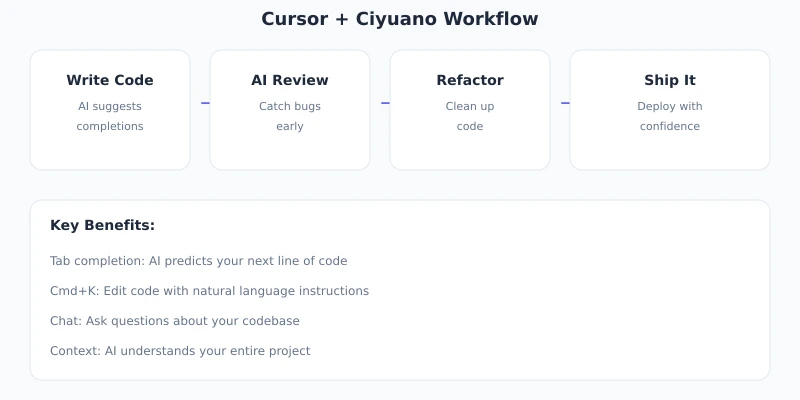
Tab Completion: Daily Coding
Tab Completion is the most basic and commonly used feature of Cursor. When you type code, Cursor gives real-time completion suggestions. Press Tab to accept.
Best Practices:
- Write clear function names and parameter names so AI can understand your intent more accurately
- First write comments describing the functionality, then let AI complete the implementation
- For repetitive code, write one example and AI can automatically infer the rest
Cmd+K: Code Modification
Select a piece of code, press Cmd+K (Mac) or Ctrl+K (Windows), and enter the modification request.
Applicable Scenarios:
- Refactoring: "Extract this code into a separate function"
- Bug Fix: "There's a null pointer exception here, fix it"
- Adding Features: "Add parameter validation to this function"
- Performance Optimization: "Optimize the performance of this loop"
Chat Dialogue: Complex Problems
The Chat panel on the right side is suitable for solving more complex problems:
- Architecture Design: "How to design a user authentication system?"
- Troubleshooting: "Why does this code report an error?"
- Learning New Frameworks: "How to use Next.js App Router?"
- Code Review: "Help me review the security of this code"
Recommended Model Configuration
| Scenario | Recommended Model | Reason |
|---|---|---|
| Tab Completion | deepseek-v4 | Fast speed, low cost |
| Chat Dialogue | deepseek-v4 / mimo-v2.5-pro | Strong reasoning ability |
| Code Refactoring | mimo-v2.5-pro | High code quality |
| Complex Architecture | deepseek-v4 | Strong overall capability |
Efficiency Tips
1. Use Comments to Guide
// Implement an LRU cache that supports get and put operations
// Capacity is capacity, evict the least recently used element when exceeding
class LRUCache {
  // Cursor will auto-complete the implementation based on comments
}
2. Use @ to Reference Context
In Chat, use the @ symbol to reference files or code:
@file:utils.ts— Reference a specific file@codebase— Reference the entire codebase@docs— Reference documentation
3. Complete Complex Tasks Step by Step
Don't ask AI to finish everything at once; proceed step by step:
- First, let AI design the overall architecture
- Then implement each module one by one
- Finally, optimize and test
4. Keep Codebase Index Updated
When the project structure changes significantly, re-index the codebase in Settings to ensure AI understands the latest project structure.
Common Issues
Q: What if it says API Key is invalid?
A: Make sure the API Key is correctly copied and the Base URL is filled in correctly. You can test if the Key is valid in the Ciyuan Quan User Center.
Q: What if the code generated by AI is of poor quality?
A: Try to describe the requirements in more detail and provide more context information. If the result is still not good, switch to a more powerful model (e.g., deepseek-v4).
Q: What if the response speed is too slow?
A: For Tab Completion, use a faster model (e.g., deepseek-v4); for complex tasks, switch to a stronger model.
Summary
The combination of Cursor + Ciyuan Quan can significantly improve programming efficiency. Key points:
- Correct Configuration: Base URL and API Key are critical
- Choose the Right Model: Use fast models for simple tasks, strong models for complex tasks
- Make Good Use of Features: Tab Completion, Cmd+K, and Chat each have their applicable scenarios
- Provide Context: The more detailed the comments, the more accurate AI understands
Next Steps: Try using the Ciyuan Quan API in Cursor for actual project development and experience the efficiency boost from AI programming.
Related Articles
AI Speech to Text: Beginner's Guide to Convert Voice to Text in 3 Steps
Learn how to convert speech to text using AI tools. Perfect for meeting notes, content creation, and video subtitles. Three practical scenarios with step-by-step instructions.
TutorialsAI Local Deployment Guide: Run Large Models in 3 Steps for Free
Learn how to deploy AI models locally in just 3 steps. No coding experience needed, completely free, and your data stays private on your own computer.
TutorialsAI Shopping Decision Guide: From Price Comparison to Avoiding Pitfalls
Learn how to use AI for shopping decisions. From price comparison to avoiding pitfalls - make smarter purchasing choices with AI assistance.
Comments are not yet available, stay tuned