AI-Powered Email Writing: A Complete Guide from Daily Messages to Business Letters
Do you feel overwhelmed every time you open your inbox, faced with a pile of emails to reply to? Business emails need to be formal and polished, client replies need to be timely and professional, and internal communication needs to be concise and clear—different situations require different tones and wording. Now, AI can help you handle all of this quickly.
This article will walk you through how to use AI to write high-quality emails. Whether you're a newcomer or a seasoned professional, you'll find practical tips here.
Why Use AI for Email Writing?
Using AI to assist with email writing isn't lazy—it's a highly efficient productivity tool. Here are some key benefits:
- Save Time:An email that normally takes 15 minutes to draft can have a first version generated by AI in 30 seconds
- Tone Control:Not sure what tone to use for a business email? AI can automatically adjust based on the situation
- Multilingual Support:Need to write an email in English but unsure about grammar? AI helps you write natural expressions
- Reduce Omissions:AI will remind you to include key information, preventing you from forgetting important details
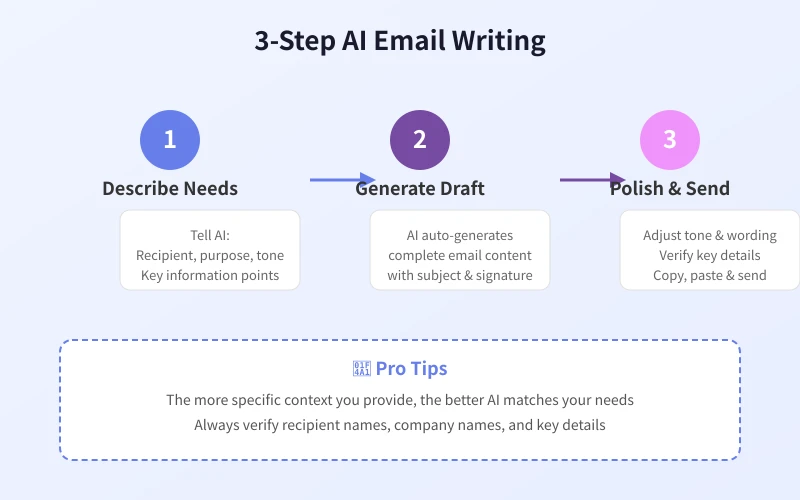
Step 1: Clarify Your Email Needs
Before asking AI to write an email, take 30 seconds to think about the following:
- Who is the recipient? (colleague, client, manager, stranger)
- What is the purpose? (request, notification, thank you, apology, follow-up)
- What tone is needed? (formal, friendly, urgent, casual)
- What are the key details? (time, location, numbers, attachments)
Once you have this information ready, you can start communicating with AI.
Step 2: Use Prompts to Generate Emails
The key to communicating with AI isgiving clear instructions. Here are some practical prompt templates:
Scenario 1: Daily Colleague Communication
Help me write an email to my colleague Xiao Wang, informing him that Wednesday's 3 PM project meeting has been moved to Thursday at 10 AM because the client had a scheduling conflict. The tone should be friendly but professional.
Scenario 2: Client Follow-up Email
Write a follow-up email to client Mr. Zhang. Last week we discussed a partnership proposal and he said he needed to think about it. It's been a week now, and I want to politely ask about his decision while expressing our sincerity about the collaboration. The tone should be professional without being pushy.
Scenario 3: Business Email in English
Write a professional email to a potential partner named Sarah from ABC Corp. I want to introduce our company's services and suggest a meeting next week. Keep it concise, polite, and under 200 words.
Step 3: Optimize and Personalize
AI-generated emails are usually pretty good, but spending 1-2 minutes on the following adjustments can make the email better match your style:
Review Checklist
| Check Item | Description |
| Recipient Name | Confirm name spelling is correct and greeting is appropriate |
| Key Data | Verify times, prices, quantities and other numbers are accurate |
| Tone Consistency | Does it match your relationship with the recipient? |
| Call to Action | Is the next step clearly stated? |
Ask AI to Adjust the Tone
If the tone of the first draft isn't right, you can tell AI directly:
- "Make the tone more formal"
- "Can you make it friendlier, like a conversation between friends?"
- "This email is too long, shorten it to under 100 words"
- "Add an expression looking forward to a reply at the end"
Common Email Scenarios Quick Reference
Here are some common email scenarios where you can directly copy and use the prompts:
Help me write a leave request email. I need 2 days off (July 15-16) due to a family matter, addressed to department manager Director Li. The tone should be formal and apologetic.
Write a thank-you email to interviewer Manager Wang, thanking him for taking the time to interview me yesterday, and expressing my strong interest in the position. The tone should be sincere and professional.
Write a project status report email to the director. The project is 75% complete. We've finished frontend development and API integration. Next steps are testing and deployment. Use a concise bullet-point reporting style.
Advanced Tips
1. Build Your Email Template Library
Have AI generate templates for the types of emails you frequently write, and save them. For similar situations in the future, you only need to replace specific details.
2. Let AI Learn Your Writing Style
If you have email samples you've written before, share them with AI and say "When helping me write emails in the future, mimic this style." AI will learn your word choices and tone preferences.
3. Batch Process Emails
If you have many similar emails to reply to (such as customer inquiries), you can categorize the questions and have AI generate standard response templates for each category.
Important Notes
- Always Review Manually:AI-generated content may contain factual errors—always review carefully before sending
- Protect Privacy:Don't share sensitive information (passwords, financial data, etc.) directly with AI
- Don't Over-Rely:Important emails still need your own judgment—AI is just an assistive tool
- Mind Cultural Differences:When writing emails to people from different countries, tell AI about the target culture's business etiquette
The core value of AI email writing is helping you quickly complete first drafts, so you can spend time on more important things. Master the tips above and your email efficiency will improve by at least 3x.
Related Articles
AI Speech to Text: Beginner's Guide to Convert Voice to Text in 3 Steps
Learn how to convert speech to text using AI tools. Perfect for meeting notes, content creation, and video subtitles. Three practical scenarios with step-by-step instructions.
TutorialsAI Local Deployment Guide: Run Large Models in 3 Steps for Free
Learn how to deploy AI models locally in just 3 steps. No coding experience needed, completely free, and your data stays private on your own computer.
TutorialsAI Shopping Decision Guide: From Price Comparison to Avoiding Pitfalls
Learn how to use AI for shopping decisions. From price comparison to avoiding pitfalls - make smarter purchasing choices with AI assistance.
Comments are not yet available, stay tuned