A Practical Guide to AI Short Video Script Creation Assistant: Four Steps from Topic Selection to Final Draft
Why Use AI to Write Short Video Scripts?
The most headache-inducing part of making short videos isn't filming or editing—it's coming up with the script. Many people stare at their phones not knowing what to shoot or say, and even when they finally land on a topic, they have no idea how to develop it. AI can help you create a script from scratch: identify a topic, build a structure, write a shot-by-shot script, and polish it for natural speech—all in a process that goes from hours down to just ten or fifteen minutes.
This article will teach you how to use AI to create short video scripts from zero, following four core steps. You don't need any writing experience—just the ability to describe your ideas.
Preparation
You need an AI conversation tool. Any of the following will work:
- ChatGPT (OpenAI): Strong overall capability, produces the most natural and fluent script language
- Claude (Anthropic): Excels at creative writing, scripts feel more story-driven
- Tongyi Qianwen / ERNIE Bot: Strong Chinese comprehension, suitable for platforms like Douyin and Kuaishou
- Ciyuano platform: Aggregates multiple models, allowing you to compare different script options
Pick any one to get started. I recommend using the web version, as it's easier to save and repeatedly revise scripts.
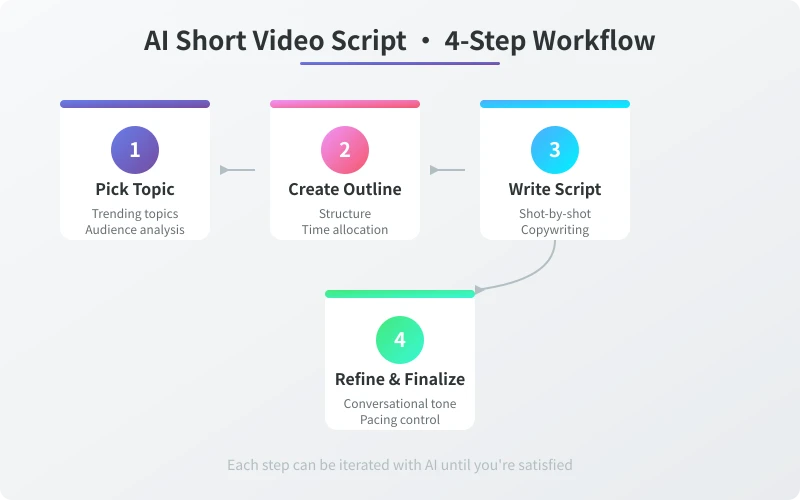
Step 1: Use AI to Determine Your Topic Direction
The topic determines the traffic ceiling of your short video. A good topic needs to meet three conditions at once: something you're good at, something your audience wants to see, and something the platform is currently promoting. AI can help you find the overlap between these three.
Steps
- Tell AI your account positioning and area of expertise
- Provide recent hot topics you're following or competitor accounts
- Have AI analyze which topics have viral potential
- Pick 2-3 topics from AI's recommendations and ask AI to evaluate their priority
Sample prompt:
I'm a Douyin content creator focused on food, with about 20,000 followers. My main audience is office workers aged 25-35. My traffic hasn't been great lately. Please help me analyze: 1) What types of food videos are popular right now? 2) Based on my positioning, recommend 5 topics with viral potential. 3) For each topic, briefly explain why it's worth making and the ideal video length.
Key Principles for Choosing a Topic
- Conflict or contrast: For example, "Making a Michelin-level meal with 10 yuan of ingredients" is more appealing than "Teaching you how to make braised pork"
- Practical value: Viewers should learn something, solve a problem, or gain insight after watching
- Emotional value: Make people laugh, feel touched, or think "Ah, that's why"
- Not too broad: "Cooking" is too broad; "A 5-minute low-fat lunch" is just right
Step 2: Have AI Generate a Script Outline
Once you've settled on a topic, turn your idea into a clear, structured outline. Short videos move fast, and the outline determines whether viewers will watch till the end.
Steps
- Tell AI your chosen topic, along with the target duration (15s / 30s / 60s)
- Specify the video type: tutorial / skit / vlog / talking-head
- AI will produce a segmented outline, noting each section's content and estimated duration
- Review the outline's pacing and tell AI which parts need adjustment
Sample prompt:
Help me write a script outline for a 60-second short video. The topic is "Office worker's 5-minute low-fat lunch bento." The video type is tutorial, combining talking-head and hands-on footage. Requirements: The first 3 seconds must grab attention, the middle shows the core steps, and the ending encourages following. Please note the estimated duration and visual description for each section.
Suggested Durations by Platform
- Douyin / Kuaishou: 15-60 seconds is best; prioritize completion rate—first 3 seconds must grab attention
- Video Account (WeChat): 30-120 seconds is fine; content can be a bit deeper
- Bilibili: 3-10 minutes for mid-length videos; pace can be more relaxed
- Xiaohongshu: 15-60 seconds; focus on practical tips; cover and title are very important
Step 3: Have AI Write the Full Script
Once you have an outline, let AI expand each section into a complete script. The key here is telling AI the style and tone you want.
Steps
- Send the outline to AI and ask for a shot-by-shot expansion
- Specify the tone: lighthearted and funny / professional and informative / warm and comforting / suspenseful with twists
- Ask AI to mark in the script: narration text, visual description, subtitle suggestions, BGM mood
- AI will produce a complete script ready for filming
Sample prompt:
Based on the outline above, write the full short video script. Requirements: 1) Use a lighthearted, conversational tone, like chatting with a friend. 2) For each shot, note the visual description and narration text. 3) The narration should sound natural, not like written language. 4) Add subtitle suggestions for key steps. 5) Design a natural call-to-action at the end.
Script Format Reference
- Shot 1 (0-3s): Visual description + Narration + Subtitles
- Shot 2 (3-10s): Visual description + Narration + Subtitles
- ……
- Final shot: Call-to-action + Follow prompt
Step 4: Polishing for Natural Speech and Finalizing
Scripts generated by AI often lean toward a written style and need to be adjusted into natural spoken language. This step determines whether the script sounds like how people actually talk.
Steps
- Send the AI-generated script back and ask for a "spoken-language rewrite"
- Tell AI: "Like chatting with a friend at a coffee shop—remove all formal written tone"
- Read the script aloud and mark any parts that feel awkward
- Send those awkward parts to AI and ask for another version
Sample prompt:
Please rewrite this script into a completely spoken-language version. Requirements: 1) As natural as if you're talking face-to-face with a good friend. 2) Use short sentences, no long or complex ones. 3) Add some filler words ("uh," "right," "you see"). 4) Remove all transition words like "first," "second," "in conclusion." 5) If the original is too wordy, trim it; if too formal, simplify it to plain speech.
Spoken-Language Checklist
- Does it sound smooth when read aloud?: If it doesn't flow, it will feel awkward to listeners.
- Are there any written-form words?: Words like "given," "therefore," "in summary" don't work in short videos.
- Are sentences short enough?: Break up any sentence longer than 20 words.
- Does it have a sense of engagement?: Use "you," "right," "think about it" to build a connection.
- Does the pace vary?: A fast-slow-fast rhythm is more engaging than a steady pace.
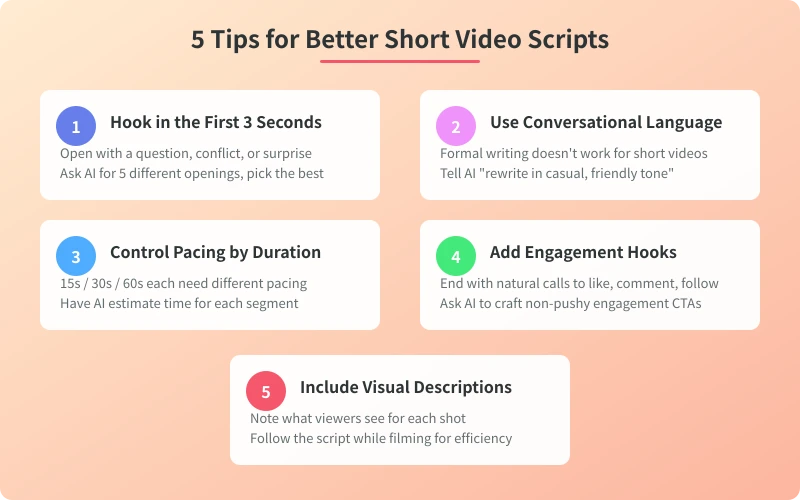
Advanced Tips: 5 Ways to Make Your Script Stand Out
1. Hook viewers in the first 3 seconds
The fate of a short video is sealed in the first 3 seconds. Have AI design several different types of openings: question-based ("Do you know why your bento never tastes good?"), conflict-based ("Spent 50 yuan but got a 500-yuan result"), suspense-based ("I hesitated a long time before sharing this method").
2. Create "information gaps" and "counter-intuitive" content
Viewers love content that challenges their existing knowledge. Have AI weave in twists like "You thought it was A, but it's actually B," or share little-known tips that most people don't know. Information gaps are the core appeal of short videos.
3. Plant "hooks" in the script to maintain completion rate
Set up a suspense point or twist every 10-15 seconds to keep viewers from swiping away. For example: "Here comes the most critical step," "What most people don't know is," "But there's one pitfall you must avoid." Have AI mark the positions of these hooks in the script.
4. Design natural calls-to-action at the end
Don't force a "like and follow" – guide viewers with the content itself. For example: "What do you think of this method? Let me know in the comments," "Type 1 if you want more low-fat recipes." Have AI generate 3-5 different ending lines and pick the most natural one.
5. Use AI to generate multiple versions for comparison
Have AI write 2-3 different styles of scripts for the same topic, compare them, and pick the best one. You can also ask AI to mimic the style of your favorite creators. Comparing multiple versions is the most effective way to improve script quality.
Frequently Asked Questions
Will AI-generated scripts be too similar to others?
There may be similar phrasing, but you can differentiate by adding your own experiences, unique perspectives, and personalized language. AI provides a framework and inspiration; the final script should have your own style.
Can one script be published on multiple platforms?
Yes, but it's best to tweak it based on each platform's characteristics. Douyin suits fast pacing and strong hooks; Bilibili allows for more depth; Xiaohongshu values practical tips. Have AI adapt one script into versions for different platforms.
What if I have no filming skills at all?
Once the script is ready, ask AI to also give you a filming guide: how to shoot each shot, what angle to use, what to watch out for. Many viral videos use simple filming techniques that any phone can handle.
How long does it take to produce a short video?
With AI assistance, from topic selection to script finalization takes about 15-30 minutes. Add filming and editing, and a complete short video can be done in 1-2 hours – 3-5 times faster than traditional methods.
Related Articles
AI Speech to Text: Beginner's Guide to Convert Voice to Text in 3 Steps
Learn how to convert speech to text using AI tools. Perfect for meeting notes, content creation, and video subtitles. Three practical scenarios with step-by-step instructions.
TutorialsAI Local Deployment Guide: Run Large Models in 3 Steps for Free
Learn how to deploy AI models locally in just 3 steps. No coding experience needed, completely free, and your data stays private on your own computer.
TutorialsAI Shopping Decision Guide: From Price Comparison to Avoiding Pitfalls
Learn how to use AI for shopping decisions. From price comparison to avoiding pitfalls - make smarter purchasing choices with AI assistance.
Comments are not yet available, stay tuned