AI Prompting Tips for Beginners: Seven Practical Rules for Writing Effective Prompts
Why Does Your AI Always Give Irrelevant Answers?
Have you ever found yourself excitedly asking an AI a question, only to get a reply that's either too vague or completely off the mark—miles away from what you actually wanted?
Before you blame the AI for being "dumb," know that most of the time, the problem lies in how you ask. It's like going to a restaurant and saying "Give me some food"—the waiter has no idea what to serve. But if you say "I'd like a non-spicy tomato brisket rice," the result is completely different.
The same principle applies when talking to AI. The more specific and clear your input, the more accurate and useful the response. This "way of asking" is what people call a Prompt.
What Exactly Is a Prompt?
Simply put, a prompt is the instruction you send to AI. Every sentence you say to AI is a prompt. But the gap between a "good prompt" and a "casual question" is as wide as the difference between a random doodle and professional design.
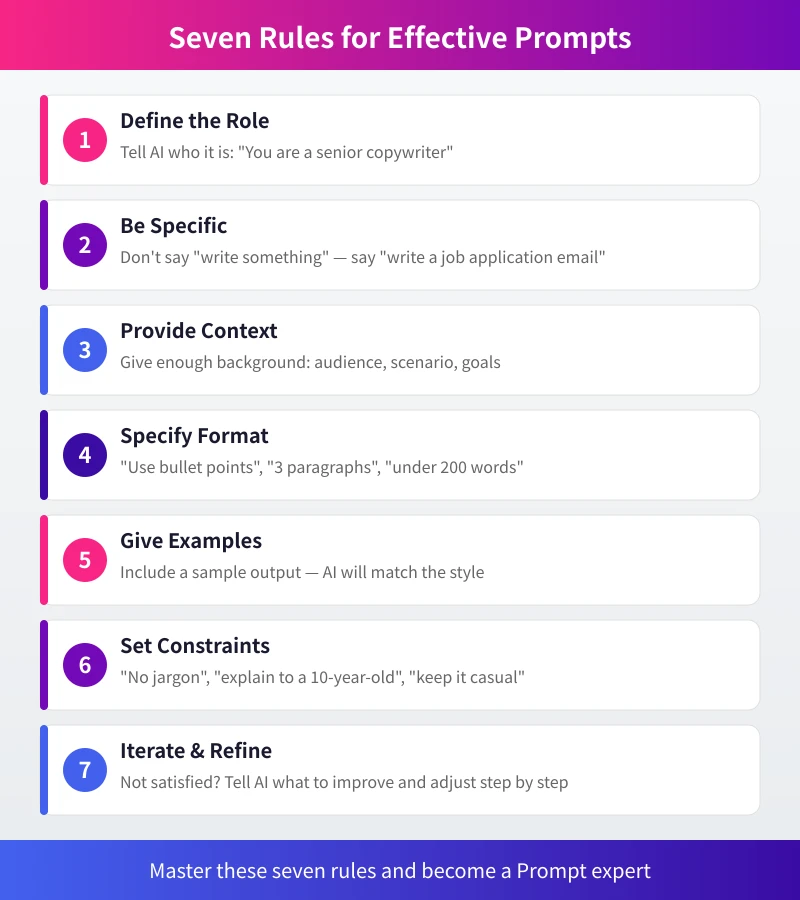
The good news is that writing great prompts doesn't require any programming knowledge or technical background. Master the following seven rules, and you'll instantly improve the quality of AI responses.
Rule 1: Tell AI Who It Is (Set a Role)
This is the most overlooked yet most effective trick. Before asking, assign AI a role. Why? Because the same question gets completely different answers depending on the role.
For example:
- No role: "Write a product description for me." — The result will likely be generic.
- With role: "You are a brand copywriter with 10 years of experience. Please write a coffee product description targeted at young professionals." — The result instantly becomes more professional.
Common role-setting templates:
- "You are a senior product manager…"
- "You are a primary school math teacher…"
- "You are a programmer proficient in Python…"
- "You are a psychological counselor…"
- "You are a travel guide expert…"
The more specific the role, the more targeted AI's response becomes. No need for a long essay—a single sentence is enough.
Rule 2: Be Specific About What You Want (Define the Task)
"Write something for me" or "Analyze this for me"—these vague commands are the number one reason for poor AI responses.
You need to clearly tell AI: what to do, how much to do, and for whom.
Compare:
- Vague: "Write an email for me."
- Specific: "Write an email replying to a customer complaint. The tone should be sincere, promise to resolve the issue within three days, and keep it under 200 words."
Checklist — Does your instruction include these?
- ✅ Task type (write, analyze, summarize, translate…)
- ✅ Specific subject (what topic, what content)
- ✅ Length requirement (word count, number of paragraphs)
- ✅ Target audience (who is it for)
Rule 3: Provide Enough Background (Give Context)
AI can't read minds—it doesn't know your situation. Without background, AI has to guess.
For example, if you ask "How should I reply to this email?", AI has no idea what the email says. But if you say "I received a customer complaint email saying our product arrived with scratches, and the customer wants a refund. I'm the customer service manager. Please help me write a reply." — AI can give a very precise answer.
Common background information to provide:
- Your identity or role
- The context of the situation
- What methods you've already tried
- Any constraints
You don't need to write a long essay, but key information must be included. It's like seeing a doctor—the clearer you describe your symptoms, the more accurate the diagnosis.
Rule 4: Tell AI How to Deliver (Specify Output Format)
For the same question, you might want a paragraph, a list, a table, or a step-by-step tutorial. You need to clearly tell AI what format you want.
Common format instructions:
- "Answer in bullet points."
- "Divide into three sections, each no more than 100 words."
- "Use a table to compare the pros and cons of these options."
- "Provide a Markdown checklist."
- "Explain in plain language, no jargon."
- "Write an article of about 500 words."
Format instructions act like a template for AI, organizing the content according to your requirements. Especially when you need to use AI's answer directly in work scenarios (reports, emails, documents), specifying the format in advance saves a lot of later adjustments.
Rule 5: Show AI a Sample (Provide an Example)
If you have a specific style preference, the best method isn't to describe it in words—just show AI an example.
For instance, if you want AI to write a product description, you can say:
Please write a product description for Bluetooth earbuds in the following style:
[Example] "This coffee mug features double-layer vacuum insulation for 12-hour heat retention. Made of 316 stainless steel, safe and odor-free. The matte finish provides a smooth hand feel. A good cup of coffee starts with keeping it warm."
Style characteristics: concise and impactful, highlight selling points, end with a catchy line.
AI will automatically mimic the style, rhythm, and structure of the example. This is far more efficient than using 100 words to describe "what kind of style I want."
Rule 6: Define Boundaries (Set Constraints)
Sometimes you don't need AI to do something—you need it to not do something. Constraints help you avoid a lot of unnecessary trouble.
Common constraints:
- Language style: "Avoid jargon," "Keep the tone light and humorous," "Use a formal business style."
- Content scope: "Only discuss situations after 2024," "Avoid political topics."
- Audience suitability: "Write for people with no technical background," "Target children aged 8-12."
- Length control: "Each point should be no more than two sentences," "Keep total word count under 300."
Setting constraints is like drawing a box for AI—it will perform within the box instead of going off on wild tangents.
Rule 7: If Unsatisfied, Keep Talking (Iterate and Optimize)
This is the most important and most undervalued rule. Many people think a prompt is a one-shot deal—ask once, and if it's no good, give up. But the best results often come from multiple rounds of conversation.
If AI's first answer doesn't fully meet your expectations, you can:
- Point out the problem: "Point three is too vague—can you elaborate on that?"
- Adjust direction: "Make the tone more formal," "Change the perspective to the user's viewpoint."
- Add information: "I forgot to mention that the target audience is college students."
- Ask for a rewrite: "Overall good, but please rewrite the opening to be more engaging."
Remember, AI never gets upset—you can ask for revisions freely. Usually after 2-3 rounds of adjustment, you'll get a very satisfactory answer.
Real-world Case: From Ordinary to Effective Prompting
Here's a real scenario demonstrating the combined use of all seven rules.
Scenario: You need to write an opening speech for your company's annual party.
Ordinary prompt:
"Write an opening speech for the annual party."
With this approach, AI can only give you a generic opening that would work for any company.
Effective prompt (using all seven rules):
"You are an experienced event host (Rule 1: Role setting). Please write an opening speech for our company's annual party (Rule 2: Define task).
Background (Rule 3): We are an internet startup. This year our business grew 200%, and the team expanded from 20 to 60 people. The party theme is 'Going Further Together.' There will be about 100 people on-site, and we want a light and lively atmosphere.
Requirements (Rule 4: Format): Keep the opening around 300 words, divided into three sections: greeting, review, and outlook.
Style reference (Rule 5: Example): Similar to the opening style of Luo Yonghao's product launches—humorous but not overdone.
Constraints (Rule 6): Avoid 'golden quotes' and motivational clichés. Do not mention specific revenue numbers.
Please write a first draft for me to review."
See the difference? Although the second prompt is a bit longer, AI's answer will be far more precise. If you're not satisfied with the first version, you can continue to refine it (Rule 7).
Common Misconceptions
Misconception 1: Longer Prompts Are Always Better
Not true. What matters is information density, not word count. A 50-word precise instruction can be more effective than a 500-word rambling description. Remove irrelevant information and keep only what's useful for AI.
Misconception 2: Only Professionals Can Write Good Prompts
Not at all. The seven rules introduced in this article require no technical skill. You just need to state your needs clearly, like briefing a smart but unfamiliar colleague on a task.
Misconception 3: Give Up After One Bad Attempt
It's normal for AI's first answer to be unsatisfying. Adjust your prompt, add more information, or try from a different angle. Usually the second attempt is much better. Good results require iteration.
Misconception 4: All AI Is the Same
Different AI models have different strengths. Some excel at writing (e.g., ChatGPT), some at analysis (e.g., Claude), some at programming. Understanding the characteristics of the AI you're using helps you write better prompts.
Quick Reference: Seven Rules in One Sentence Each
- Rule 1: Tell AI who it is → Set a role
- Rule 2: Clearly state what to do → Define the task
- Rule 3: Explain the background → Provide context
- Rule 4: Specify the form of the answer → Output format
- Rule 5: Give a reference sample → Provide an example
- Rule 6: Clearly say what not to do → Set constraints
- Rule 7: If unsatisfied, keep chatting → Iterate and optimize
Save this list. Next time you talk to AI, check it against these rules, and you'll notice a clear improvement in response quality.
Final Thoughts
Prompt techniques are not some deep technical skill—they are a communication ability. Just as you speak differently to different people, talking to AI requires finding the right "channel."
The best way to learn is practice. Starting today, consciously apply these seven rules every time you interact with AI. Before long, you'll find AI has become "smarter"—in truth, it hasn't changed; you have.
Related Articles
AI Speech to Text: Beginner's Guide to Convert Voice to Text in 3 Steps
Learn how to convert speech to text using AI tools. Perfect for meeting notes, content creation, and video subtitles. Three practical scenarios with step-by-step instructions.
TutorialsAI Local Deployment Guide: Run Large Models in 3 Steps for Free
Learn how to deploy AI models locally in just 3 steps. No coding experience needed, completely free, and your data stays private on your own computer.
TutorialsAI Shopping Decision Guide: From Price Comparison to Avoiding Pitfalls
Learn how to use AI for shopping decisions. From price comparison to avoiding pitfalls - make smarter purchasing choices with AI assistance.
Comments are not yet available, stay tuned