Introduction to AI Speech Synthesis: Making Text Speak with APIs

Have you ever thought about having AI turn a piece of text into natural, fluent speech? Whether you are creating audiobooks, dubbing videos, or building a voice assistant, Text-to-Speech (TTS) technology can help you achieve it. This article will guide you step by step on how to call the TTS service through the Ciyuan Circle API, so even beginners can get started quickly.
What is Speech Synthesis
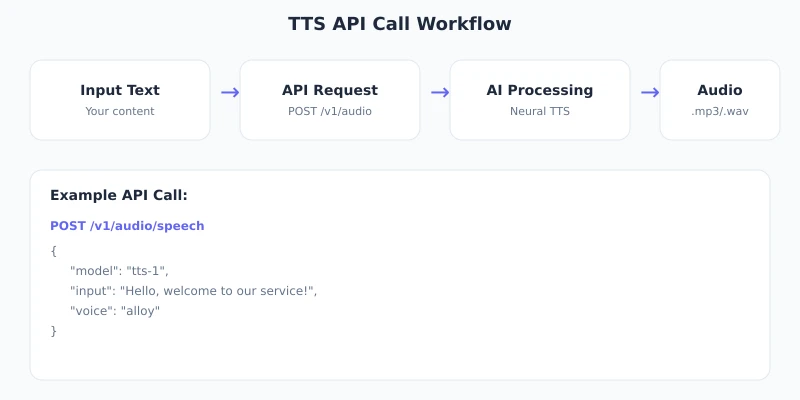
Speech Synthesis (Text-to-Speech, or TTS) is a technology that converts text into speech. Simply put, you give the AI a piece of text, and it can "read" it aloud, with voices sounding increasingly natural.
Modern TTS technology can already achieve:
- Natural and fluent: No longer mechanical electronic voices; it sounds like a real person reading
- Multiple timbres: Choose freely from male voices, female voices, and different styles
- Multilingual support: Can handle mainstream languages like Chinese, English, Japanese, etc.
- Emotional expression: Adjusts tone and emotion based on the content
Preparation
Before you start, you need to prepare the following:
- Ciyuan Circle account: Visit ciyuano.com/register to register
- An API key: Create one in the "API Keys" page in the backend
- An HTTP client: You can use curl (command line), Postman, or any programming language
Tip: The TTS function requires sufficient balance in your account. New users usually have free credits; you can check in the "Usage" page in the backend.
Choosing the Right Voice
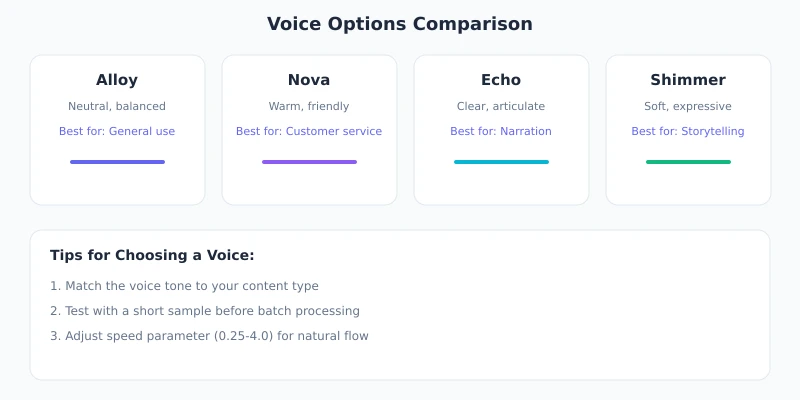
Ciyuan Circle supports multiple voice timbres, each with different stylistic features. Below is a comparison of commonly used timbres:
Suggestions for choosing a voice:
- Not sure which one to use? Choose
alloy, the most versatile neutral voice - Doing customer service or educational content? Choose
nova, warm and friendly - Doing news broadcasting? Choose
echo, clear and professional - Telling stories or dubbing? Choose
fable, full of emotion
Detailed Steps
Step 1: Obtain the API Key
Log in to the Ciyuan Circle backend, go to the "API Keys" page, and create a new key. Copy the key; the format looks like sk-relay-xxxxxxxxxx.
Security Reminder: The key is only displayed once; please save it properly. Do not hardcode the key in public code repositories.
Step 2: Send a TTS Request
Use the curl command to send a simple TTS request:
curl -X POST https://www.ciyuano.com/v1/audio/speech   -H "Authorization: Bearer sk-relay-YOUR_API_KEY"   -H "Content-Type: application/json"   -d '{
    "model": "tts-1",
    "input": "Hello, welcome to Ciyuano TTS service. What a beautiful day!",
    "voice": "alloy"
  }'   --output speech.mp3
Meaning of this command:
POST /v1/audio/speech: Calls the speech synthesis interfacemodel: The model used;tts-1is the standard model,tts-1-hdis the high-definition modelinput: The text content to be converted to speechvoice: The selected timbre--output speech.mp3: Saves the returned audio as an MP3 file
After successful execution, a speech.mp3 file will be generated in the current directory. Open it with any player to hear the AI-generated speech.
Step 3: Adjust Speech Parameters
You can control the speech effect with additional parameters:
{
  "model": "tts-1-hd",
  "input": "This is a test with HD audio quality.",
  "voice": "nova",
  "speed": 1.2,
  "response_format": "mp3"
}
Description of adjustable parameters:
| Parameter | Description | Default Value |
|---|---|---|
model |
Model selection: tts-1 (standard) or tts-1-hd (high-definition) |
tts-1 |
voice |
Timbre selection: alloy / nova / echo / fable / onyx / shimmer | alloy |
speed |
Speech speed, range 0.25 ~ 4.0 | 1.0 |
response_format |
Output format: mp3 / opus / aac / flac / wav / pcm | mp3 |
Tip: If the speech speed is not suitable, adjust it with the speed parameter. For example, for audiobook scenarios, you can use 1.2 ~ 1.5x speed; for explanatory scenarios, use 0.8 ~ 1.0x speed.
Step 4: Call from Code
If you are familiar with Python, you can use the following code to call the TTS interface:
import requests

url = "https://www.ciyuano.com/v1/audio/speech"
headers = {
    "Authorization": "Bearer sk-relay-YOUR_API_KEY",
    "Content-Type": "application/json"
}
data = {
    "model": "tts-1",
    "input": "Hello, this is a test voice.",
    "voice": "nova"
}

response = requests.post(url, headers=headers, json=data)

with open("output.mp3", "wb") as f:
    f.write(response.content)

print("Voice generated:output.mp3")
The JavaScript / Node.js approach is similar:
const response = await fetch("https://www.ciyuano.com/v1/audio/speech", {
  method: "POST",
  headers: {
    "Authorization": "Bearer sk-relay-YOUR_API_KEY",
    "Content-Type": "application/json"
  },
  body: JSON.stringify({
    model: "tts-1",
    input: "Hello, this is a test voice.",
    voice: "nova"
  })
});

const buffer = await response.arrayBuffer();
require("fs").writeFileSync("output.mp3", Buffer.from(buffer));
console.log("Voice generated:output.mp3");
Practical Use Cases
Scenario 1: Batch Generation of Audio Content
If you have a batch of articles to convert to speech, you can write a simple loop script to call the TTS interface segment by segment. Pay attention to controlling the call frequency to avoid triggering rate limits.
Scenario 2: Video Dubbing
When creating tutorial videos, first use TTS to generate the narration audio, then composite it into the video using editing software. This is more efficient than recording yourself and provides more stable audio quality.
Scenario 3: Voice Notifications
Add voice notification functionality to your application, such as order reminders and system alerts. Users will receive warm voice prompts instead of cold text.
Scenario 4: Multilingual Content
Use timbres in different languages to generate multilingual versions of the same content, making it easy to distribute content internationally.
Common Problems
| Problem | Solution |
|---|---|
| Returns 401 error | Check if the API key is correct, or if it has expired or been disabled |
| Returns 429 error | Requests are too frequent; reduce the call frequency or upgrade your plan |
| Audio file is empty | Check if the input field is empty or if the text length exceeds the limit |
| Chinese pronunciation is unnatural | Try switching to a different timbre, or use the tts-1-hd model for better results |
| Slow generation speed | tts-1 is faster than tts-1-hd; for long texts, consider processing them in segments |
Usage Tips
- Text preprocessing: Remove unnecessary special characters and formatting symbols to make the speech more natural
- Segment processing: For long texts, split them by paragraph or sentence, with each segment not exceeding 4000 characters
- Format selection: Use MP3 for everyday use; choose FLAC or WAV if lossless quality is needed
- Cache reuse: Cache audio for identical content to avoid repeated calls and extra costs
- Compare multiple timbres: When unsure which timbre to use, test multiple timbres with short text
Summary
With the Ciyuan Circle TTS API, you can easily convert text into natural, fluent speech. The entire process only requires three steps:
- Obtain an API key
- Send an HTTP POST request
- Receive and save the audio file
Next Steps: Try reading the same piece of text with different timbres to experience the stylistic differences. Then integrate it into your project to provide users with a better voice experience.
Related Articles
AI Speech to Text: Beginner's Guide to Convert Voice to Text in 3 Steps
Learn how to convert speech to text using AI tools. Perfect for meeting notes, content creation, and video subtitles. Three practical scenarios with step-by-step instructions.
TutorialsAI Local Deployment Guide: Run Large Models in 3 Steps for Free
Learn how to deploy AI models locally in just 3 steps. No coding experience needed, completely free, and your data stays private on your own computer.
TutorialsAI Shopping Decision Guide: From Price Comparison to Avoiding Pitfalls
Learn how to use AI for shopping decisions. From price comparison to avoiding pitfalls - make smarter purchasing choices with AI assistance.
Comments are not yet available, stay tuned