Complete Beginner's Guide to AI: Learn to Use AI Chat Tools from Scratch
Why Should You Learn to Use AI?
It's 2026, and AI is no longer just for programmers. Writing emails, translating documents, organizing notes, making plans, learning new things—AI can help you do all of these faster and better. But many people get stuck at the very first step: not knowing how to begin.
This article is written for absolute beginners. You don't need to know programming or technical jargon. Just follow the steps, and you'll be chatting with AI confidently in 10 minutes.
Step 1: Choose an AI Tool and Sign Up
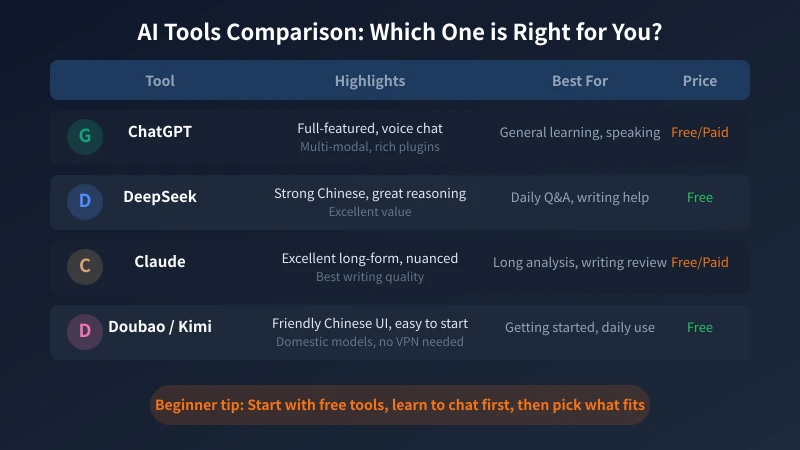
There are many AI chat tools available. As a beginner, just pick a free one to start. Here are some recommendations:
- DeepSeek (Recommended): A free Chinese-made tool with excellent Chinese language understanding. No VPN needed. Visit chat.deepseek.com to sign up.
- Doubao: Made by ByteDance. Chinese interface, available on mobile app and web. Completely free.
- Kimi: Made by Moonshot AI. Excels at processing long texts. Free to use.
- ChatGPT: Made by OpenAI. The most full-featured option, but requires an overseas phone number to register. Has free tier.
Registration Steps (Using DeepSeek as Example)
Open your browser and visit chat.deepseek.com. You'll see a clean login page:
- Click the "Sign Up" button
- Enter your phone number and get a verification code
- Enter the code and set a password
- Registration complete—you'll enter the chat interface automatically
The whole process takes less than 2 minutes. After signing up, you'll see a chat input box—this is where you talk to AI.
Step 2: Send Your First Message
Once registered, there's an input box in front of you. Don't overthink it—just start typing.
Try These Simple Conversations
The first time using AI, many people don't know what to ask. Here are some ice-breakers:
- "Hello, what can you do?"—Let AI introduce itself and learn about its capabilities
- "Explain what inflation is in simple terms"—Test its explanation ability
- "What's the weather like today?"—Simple daily chat
- "Tell me an interesting story"—See its creative abilities
After typing, press Enter or click the send button. AI will respond within seconds. Simple, right?
Understanding Basic Chat Rules
There are a few things to know about chatting with AI:
- It understands natural language: No need for special command formats. Just talk like you would to a friend.
- It remembers context: In the same conversation, it remembers everything you said before. You can follow up and add details.
- It can be corrected: If the answer isn't satisfactory, just say "That's not a good answer, try a different approach."
- It won't contact you: It only responds when you send a message. It won't bother you on its own.
Sending Images and Files
Most AI tools support sending images. You can:
- Take a photo of a menu and ask AI to translate it
- Screenshot an error message and ask AI to analyze the problem
- Photograph a math problem and ask AI to solve it with step-by-step explanations
There's usually an attachment or image button next to the input box. Click it to upload.
Step 3: Learn to Ask Good Questions
The quality of AI's answers largely depends on how you phrase your questions. The same question asked differently can produce vastly different answers.
Good Questions vs Bad Questions
Bad Questions
- "Write me an article" — Too vague. AI doesn't know what topic, how long, or what style.
- "How do I cook?" — Too broad. AI will give you generic advice.
- "Translate this" — No original text provided.
Good Questions
- "Write a 500-word article about the benefits of remote work, in a casual tone, aimed at new professionals" — Topic, length, style, and audience are all clear.
- "Teach me how to make a simple tomato egg stir-fry. I'm a kitchen beginner and need detailed step-by-step instructions" — Scenario and needs are specific.
- "Translate the following English text into Chinese, keeping a professional tone: [paste content]" — Has specific content and requirements.
Four Tips for Writing Good Questions
Tip 1: Explain Your Background
AI doesn't know who you are. Telling it your background helps it give more precise answers:
- "I'm a complete beginner who has never written code" — AI will explain in the simplest way.
- "I have 3 years of Python experience" — AI will skip basics and go straight to advanced content.
- "I'm an elementary school student" — AI will use simple vocabulary and examples.
Tip 2: Specify Output Format
- "Use a table to compare the pros and cons of A and B"
- "Give me a numbered step-by-step checklist"
- "Summarize in under 100 words"
Tip 3: Give Specific Examples
If you have a specific expectation, giving an example is more effective than describing it:
"Write me a leave request email, similar to this style: 'Dear Manager, due to a family matter, I need two days off. I've handed over my work to Xiao Wang. Please approve.'"
AI will mimic the style you provide, which is much more accurate than vague descriptions.
Tip 4: Follow Up Step by Step
Don't ask complex questions all at once. Breaking them down works much better:
- First: "List the things I need to consider when planning a birthday party"
- Then: "Can you elaborate on the second point about venue selection?"
- Then: "Help me create a budget spreadsheet, keeping it under 300 dollars"
This conversational approach is like chatting with an expert consultant—gradually diving deeper.
Step 4: Put It to Use — Practical Daily Scenarios
Scenario 1: Writing Assistance
- Writing emails: "Help me write a follow-up email to a client, professional but not stiff, mentioning the cooperation plan from our last meeting."
- Writing captions: "Write 5 social media captions for a photo of a coffee cup and a book, in a literary style."
- Proofreading: "Check this text for grammatical issues and suggest improvements."
Scenario 2: Information Organization
- "Summarize the three core viewpoints of this article"
- "Organize these meeting notes into a bullet-point list"
- "Help me organize these scattered notes into a logical document"
Scenario 3: Learning New Things
- "Explain what blockchain is in the simplest terms"
- "I want to learn Excel, starting from the very basics, one concept per day"
- "Explain the term 'carbon neutrality' and give some examples"
Scenario 4: Translation and Language Learning
- "Translate this Chinese text into English in a formal tone"
- "Help me revise this English text to sound more natural"
- "Teach me 10 common English sentences for ordering at a restaurant"
Scenario 5: Daily Planning and Decision Making
- "Help me create a 3-month fitness plan. I can go to the gym 3 times a week."
- "I'm going to Chengdu for 3 days. Plan an itinerary focused on food."
- "I can't decide which phone to buy. Budget is 400 dollars, mainly for photos and videos."
Scenario 6: Programming and Technical Help
- "My computer can't connect to Wi-Fi. Help me think of possible causes and solutions."
- "Help me write an Excel formula to sum all numbers greater than 100 in column A."
- "How do I convert a PDF to Word on my phone?"
Advanced Tips
Use Role-Playing
Give AI a role at the start of a conversation, and it will respond in that character's style:
- "You are a senior nutritionist. Check if this recipe is nutritionally balanced."
- "You are a strict English teacher. Proofread this essay and don't hold back."
- "You are a product manager. Analyze the feasibility of this app idea."
Use Multi-Turn Conversations
Don't start a new conversation every time. Continuously chatting in the same thread helps AI understand your needs better:
- Round 1: "Help me write an outline for a project proposal"
- Round 2: "Can you expand on the second part?"
- Round 3: "Make the overall tone more formal"
- Round 4: "Add a risk assessment section"
Save Useful Conversations
When you get a particularly good answer, save it. Good prompts are worth reusing.
Common Misconceptions
Misconception 1: AI Is Always Right
No. AI sometimes "hallucinates" with great confidence, especially with specific data, dates, and names. Always verify important information yourself.
Misconception 2: Using AI Is Cheating
No. AI is a tool, just like using a calculator isn't cheating. The key is understanding the answers, not blindly copying them.
Misconception 3: AI Will Replace All Jobs
Not in the short term. AI is more like an efficiency multiplier—people who use AI are 10x more productive. Learning to use AI adds a powerful assistant to your toolkit.
Important: Privacy and Security
- Don't send ID numbers, bank card numbers, or other sensitive information to AI
- Don't send company confidential documents to public AI tools
- For sensitive data, consider using locally deployed AI models
Recommended API Platform
If you want to use AI in more scenarios (like integrating it into your own tools), you can use the Ciyuano platform. One API key gives you access to DeepSeek, ChatGPT, Claude, and other models with pay-as-you-go pricing:
- Visit Model List to see all available models
- Create a key on the API Key Management page
- Set the API address to
https://www.ciyuano.com/v1, enter your key, and you're ready to go
Summary
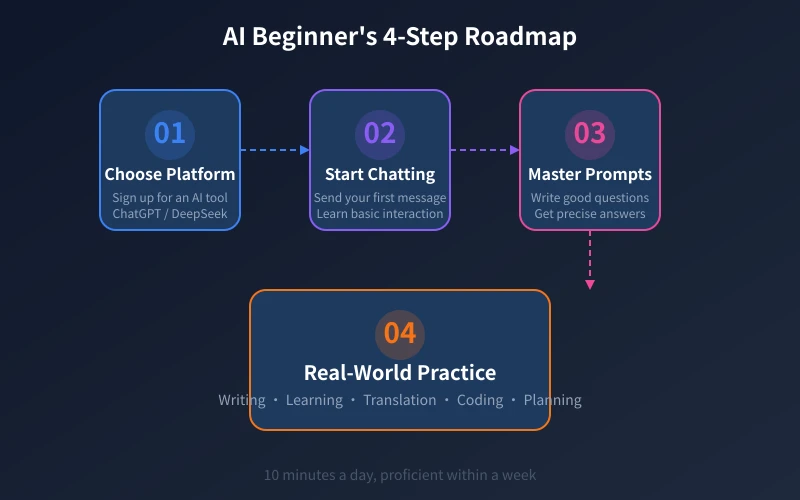
Learning to use AI takes just four steps: Sign up → Send a message → Learn to ask → Start using it. No technical background needed, no money required. You can start today.
The best way to learn is by doing. Open DeepSeek or Doubao, ask any question, and see what kind of answer AI gives you. You'll find this "smart assistant" is even more useful than you imagined.
Don't just bookmark this article—go sign up for an AI tool right now and send your first message.
Related Articles
AI Speech to Text: Beginner's Guide to Convert Voice to Text in 3 Steps
Learn how to convert speech to text using AI tools. Perfect for meeting notes, content creation, and video subtitles. Three practical scenarios with step-by-step instructions.
TutorialsAI Local Deployment Guide: Run Large Models in 3 Steps for Free
Learn how to deploy AI models locally in just 3 steps. No coding experience needed, completely free, and your data stays private on your own computer.
TutorialsAI Shopping Decision Guide: From Price Comparison to Avoiding Pitfalls
Learn how to use AI for shopping decisions. From price comparison to avoiding pitfalls - make smarter purchasing choices with AI assistance.
Comments are not yet available, stay tuned