A Practical Guide to AI Programming Assistants: Code Generation, Bug Fixing, and Code Review All in One
Why do you need an AI coding assistant?
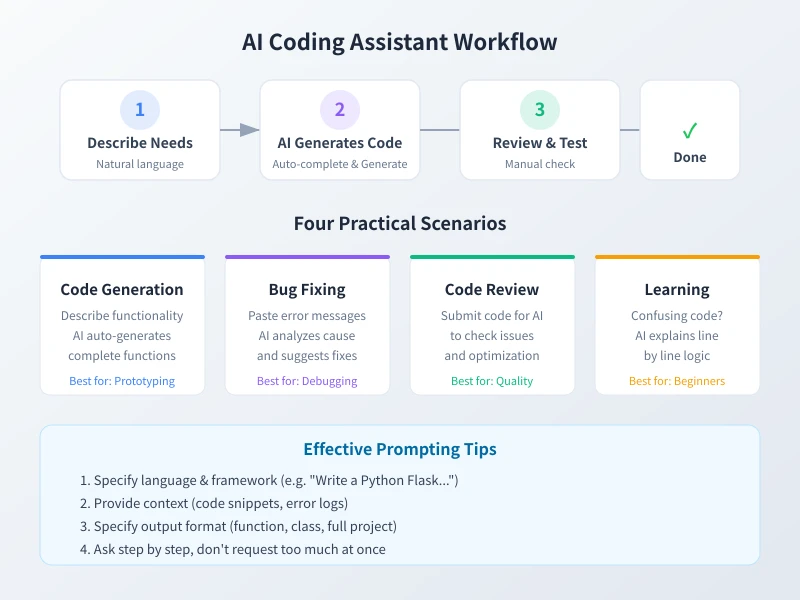
Whether you're a beginner just starting to code or an experienced developer, an AI coding assistant can significantly boost your productivity. It can help you:
- Generate code quickly: Describe your needs in natural language, and the AI directly outputs usable code
- Fix Bugs: Paste error messages, and the AI analyzes the cause and provides a fix
- Understand code: Have the AI explain code snippets you don't understand line by line
- Code Review: Submit code for the AI to check for potential issues and optimization opportunities
Overview of Mainstream AI Coding Tools
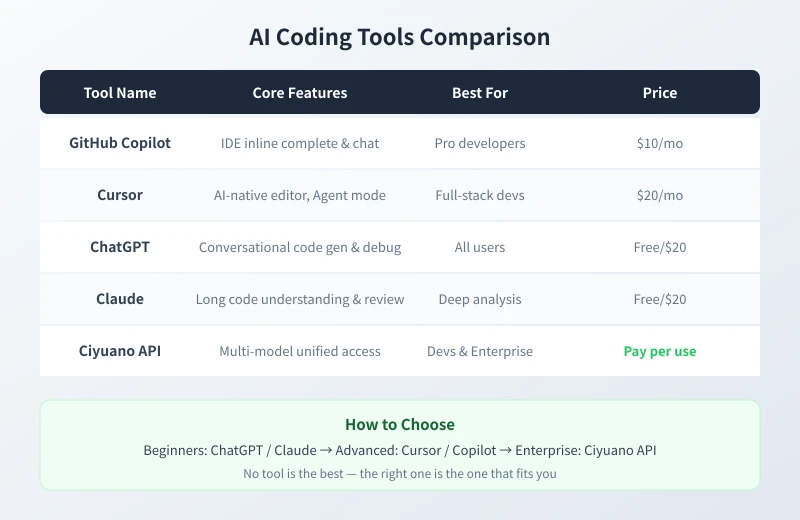
There are several AI coding tools available on the market, each with its own focus:
| Tool | Core Features | Best Suited For |
|---|---|---|
| ChatGPT / Claude | Conversational code generation, debugging, explanation | All users, especially beginners |
| GitHub Copilot | Real-time code completion and chat within the IDE | Professional developers |
| Cursor | AI-native editor, supports Agent mode | Full-stack developers |
| Ciyuan API | Unified access to multiple models, pay-as-you-go | Developers & Enterprises |
Scenario 1: Generating Code with AI
This is the most common use case. You don't need to write the perfect prompt; just describe your needs clearly in natural language.
Steps
- Open the AI tool (ChatGPT, Claude, or the Copilot panel within your IDE)
- Describe your needs, for example:
Write a function in Python that takes a CSV file path as input, reads the data, sorts it by the "Sales" column in descending order, and returns the top 10 records
- After the AI generates the code, carefully read each line
- Copy it into your editor and run a test
- If you need modifications, continue the conversation: "Add error handling for me" or "Change it to return JSON format"
Questioning Tips
| Poorly Phrased | Well Phrased |
|---|---|
| Write a web scraper | Use the Python requests library to scrape news headlines from example.com and save them as a CSV |
| Help me build a website | Write a personal resume page using HTML + CSS, including three sections: photo, experience, and skills |
| Write an algorithm | Implement a binary search function in JavaScript that takes a sorted array and a target value and returns the index |
Scenario 2: Fixing Bugs with AI
Don't panic when you encounter an error; just hand the error message over to the AI.
Steps
- Copy the complete error message (including traceback, error code)
- Attach the relevant code (the function or file causing the error)
- Explain the context (what operation you were performing when the error occurred)
- Send it to the AI, for example:
I get an error when running this Python code: TypeError: list indices must be integers, not str. The code is: [paste code]. Please help me analyze the cause and fix it.
- The AI will identify the problem and provide the corrected code
- After verifying the fix, you can follow up with: "How can I avoid this type of error?"
Scenario 3: Having AI Explain Code
Taking over someone else's project, or found a piece of example code online but can't understand it? Let the AI help you break it down.
Steps
- Paste the code snippet into the AI chat window
- Ask a question, for example:
Please explain what this code does line by line and explain why it's written this way
- The AI will explain the meaning of each line in plain language
- Follow up: "Is there a more concise way to write this?" or "Are there any potential issues with this code?"
Scenario 4: Code Review and Optimization
After you finish writing code, have the AI do a "manual review" for you.
Steps
- Submit the complete code to the AI
- Request a review, for example:
Please review this code and check for: 1) Security vulnerabilities 2) Performance issues 3) Coding standards issues 4) Readability improvements
- The AI will list specific issues and suggestions for improvement
- After making modifications one by one, you can ask the AI to review it again
5 Tips for Efficient Use
| Tip | Explanation |
|---|---|
| Specify Language and Version | "Use Python 3.11" is more precise than "Use Python" |
| Provide Context | Attach relevant code, error logs, and project structure |
| Ask Step-by-Step | Ask one question at a time, gradually going deeper |
| Verify Before Using | Always test AI-generated code; don't blindly copy it |
| Iterate and Refine | If you're not satisfied, keep asking until the AI gets it right |
Integrating Coding Capabilities via the Ciyuan API
If you want to integrate AI coding capabilities into your own application, you can use the Ciyuan API for unified access to multiple models:
from openai import OpenAI

client = OpenAI(
    base_url="https://www.ciyuano.com/v1",
    api_key="your-api-key"
)

response = client.chat.completions.create(
    model="deepseek-v4",
    messages=[{
        "role": "user",
        "content": "Implement a simple TODO CLI tool in Python"
    }]
)
print(response.choices[0].message.content)
Supports multiple models including DeepSeek V4, GPT-4o, Claude, and more. Switch between them with a single API Key.
Summary
AI coding assistants are not here to replace developers, but to help you spend your time on more valuable things. Whether it's writing code, debugging bugs, learning new technologies, or doing code reviews, AI can become a reliable partner for you.
The key is: Learn how to ask, Verify the results, Iterate continuously.
Get Started: Register for a Ciyuan account, get your API Key, and let AI become your coding partner.
Related Articles
AI Prompting Tips: 7 Practical Methods for More Accurate Answers
Learn 7 practical prompting techniques to get more accurate and useful AI responses. From role assignment to step-by-step instructions, master the art of asking AI the right way.
Tech FrontierAI Email & Business Document Writing: Write Professional Emails in 5 Steps
Learn how to use AI to write professional emails. Five simple steps from basic information to polished final draft. Perfect for business communication.
Tech FrontierAI Note-Taking Assistant: Efficiently Organize Notes, Summarize Articles, and Manage Knowledge with AI
Bookmarks collecting dust, notes scattered, no time for long reads? This guide shows you how to use AI to organize your materials in four steps—summarizing articles, consolidating notes, building a knowledge base, and cleaning up bookmarks—with ready-to-use prompt templates.
Comments are not yet available, stay tuned