AI Note-Taking Assistant: Efficiently Organize Notes, Summarize Articles, and Manage Knowledge with AI
Why Do You Need AI to Organize Your Materials?
Have you ever had this experience: you've saved hundreds of articles but never read them, your notes are scattered and hard to find key points, you take a lot of meeting notes but forget them later? The root of these problems isn't that you're not working hard enough, but that there's too much information and organizing it is too slow.
The emergence of AI has completely changed this situation. It can help you accomplish in seconds what used to take hours of organizing—summarizing long articles, extracting key points, categorizing notes, and generating abstracts. You just need to throw your materials at AI, and it will give you back a well-structured, focused result.
Scenario 1: Quick Summaries of Long Articles
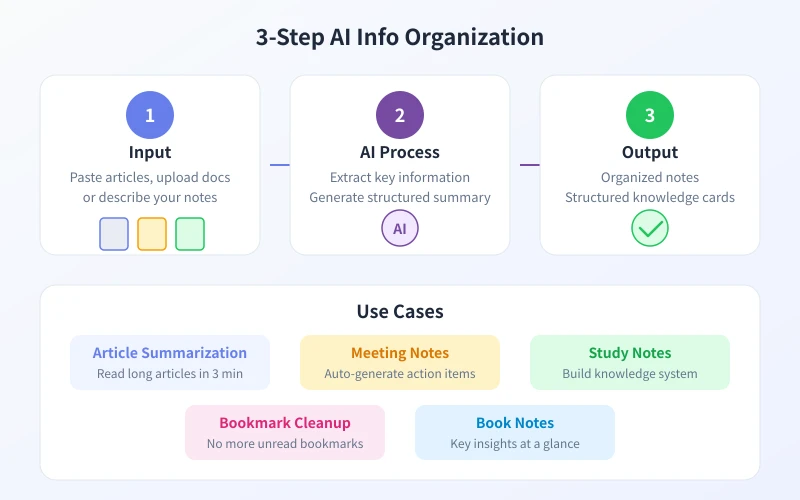
You come across a ten-thousand-word article online with an enticing title, but you don't have time to read it all. That's when AI becomes your "speed reading assistant."
Steps
Step 1: Copy the full article (or key paragraphs) and paste it into the AI dialog.
Step 2: Send the following instruction:
"Please help me summarize the core points of this article, listing 3-5 key points, each no more than two sentences. Finally, summarize the main theme of the article in one sentence."
Step 3: AI will immediately return a structured summary. You can continue to ask for specifics, such as "Can you elaborate on the third point?" or "What are the limitations of this article's conclusion?"
Advanced Tips
- Specify output format: Tell AI "compare different viewpoints using a table" or "organize events chronologically", and it will output in the format you request
- Compare multiple articles: Paste 2-3 similar articles at the same time, let AI find differences, similarities, and consensus
- Extract highlights: Ask AI to "extract the 3 most inspiring sentences from the article" for easy citation later
Scenario 2: Organizing Scattered Notes
Notes taken casually during meetings, lectures, or while watching videos are often fragmented. AI can help you piece these fragments together into a complete knowledge map.
Steps
Step 1: Paste all your scattered notes to AI, no need to organize the format, just the raw state.
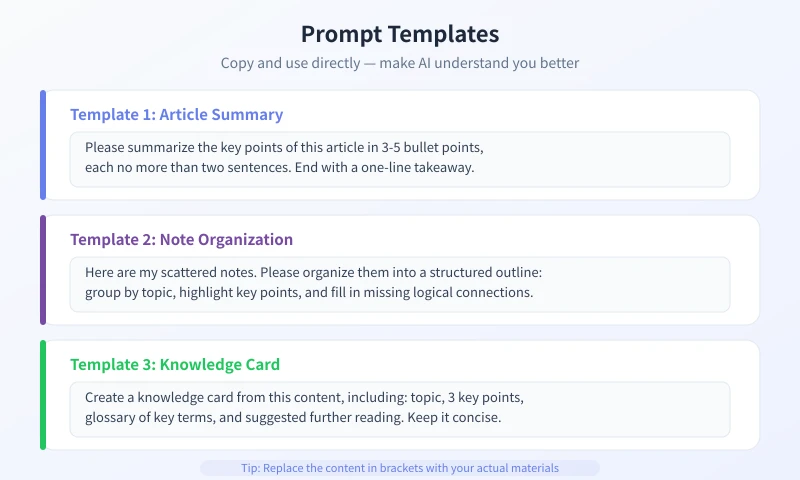
Step 2: Use this prompt:
"Below are my scattered notes. Please help me organize them into a structured outline. Requirements: categorize by theme, highlight key content, add missing logical connections, and rewrite vague expressions in concise language."
Step 3: AI will return an outline categorized by theme. You can continue to adjust, such as "split the second theme into two sub-themes" or "add some practical examples".
Use Cases
- Meeting minutes: Organize scattered discussion into a structure of "Topic → Discussion points → Resolutions → To-dos"
- Reading notes: Organize highlights and annotations into a framework of "Core ideas → Evidence → Personal reflections"
- Study notes: Organize class notes into a knowledge system of "Concepts → Principles → Examples → Summary"
- Inspiration records: Organize fragmented thoughts into an action list of "Direction → Feasibility → Next steps"
Scenario 3: Building a Personal Knowledge Base
Organizing is not the goal; accumulation is. AI helps you turn the results of each organization session into reusable knowledge assets.
Steps
Step 1: Choose a field you want to delve into, such as "Artificial Intelligence", "Investment and Finance", or "Time Management".
Step 2: Send all the materials you've accumulated in this field (articles, notes, screenshots, links) to AI, then say:
"Please help me organize these materials into a knowledge framework. Requirements: list core concepts and their relationships, mark what I already know and what needs to be supplemented, and recommend the next learning direction."
Step 3: AI will return a knowledge map. You can update it regularly by adding new content you learn.
Knowledge Base Management Suggestions
| Practice | Effect |
|---|---|
| Spend 15 minutes each week organizing notes | After one month, you'll have a structured knowledge base |
| Add tags and categories to each note | Search efficiency increases 10 times |
| Use AI to regularly review and update | Knowledge deepens continuously and won't be forgotten |
| Share the organized results with others | Teaching is the best way to learn |
Scenario 4: Organizing Web Bookmarks
Hundreds of links are sitting in your browser bookmarks, never opened a second time. AI can help you "digest" these collections.
Steps
Step 1: Export your browser bookmarks (most browsers support exporting as HTML file).
Step 2: Paste the bookmark content to AI, say:
"Below are my browser bookmarks. Please help me: 1) categorize by theme; 2) delete obviously outdated links; 3) recommend 2-3 most worth reading for each category; 4) generate a short reading plan."
Step 3: AI will return categorized results and reading suggestions. You just need to follow the reading plan, no more worrying about hundreds of links.
Useful Prompt Collection
Below are some verified efficient prompts that you can copy and use directly:
| Scenario | Prompt |
|---|---|
| Article Summary | "Summarize this article in 3 points, each point in one sentence" |
| Comparative Analysis | "Compare the pros and cons of A and B, present in a table" |
| Note Organization | "Organize these scattered notes into an outline, mark key points" |
| Knowledge Cards | "Turn this content into knowledge cards: topic + key points + term explanations" |
| Action Plan | "Based on these notes, create an actionable plan" |
Frequently Asked Questions
Are the results from AI accurate?
AI's organizing ability is strong, but it's not infallible. It's recommended to treat AI's output as a "draft" and double-check the key information for accuracy. Especially in professional fields, AI may miss important details or generate misunderstandings.
How much content can be processed at once?
Most AI models support input of several thousand to tens of thousands of characters. If your materials are extremely long, you can process them in batches and finally ask AI to merge the organized results into a complete document.
Where should organized notes be stored?
It is recommended to use note-taking tools (such as Notion, Obsidian, Feishu Docs) to save AI's organized results. Treat AI as an "organizing assistant" and note-taking tools as a "storage warehouse"—the combination works best.
Do I need to describe my requirements every time?
No. Save commonly used prompts as templates and simply copy and paste each time. As you use them more, you'll discover which prompts work best and gradually form your own "organizing workflow."
Get Started: Find a long article you've always wanted to read but didn't have time for, paste it into AI now, and try the "article summary" prompt. You'll find that in 3 minutes you can grasp the core content of a ten-thousand-word article.
Related Articles
AI Prompting Tips: 7 Practical Methods for More Accurate Answers
Learn 7 practical prompting techniques to get more accurate and useful AI responses. From role assignment to step-by-step instructions, master the art of asking AI the right way.
Tech FrontierAI Email & Business Document Writing: Write Professional Emails in 5 Steps
Learn how to use AI to write professional emails. Five simple steps from basic information to polished final draft. Perfect for business communication.
Tech FrontierA Practical Guide to AI Programming Assistants: Code Generation, Bug Fixing, and Code Review All in One
A tutorial on using AI programming assistants for beginners, covering four key scenarios: code generation, bug fixing, code explanation, and code review, along with tips for effective prompting and tool recommendations.
Comments are not yet available, stay tuned