AI Creative Writing Assistant Guide: Write Stories, Scripts & Poetry Step by Step
Why Use AI for Writing?
Many people have a dream of writing — a novel, a script, or just some interesting stories. But when they actually sit down to write, they get stuck at the beginning: not knowing what to write, how to write it, or whether the result will be any good.
AI creative writing isn't about having a machine write for you. It's about helping you break through creative blocks. AI is like an always-available writing partner that helps you develop plots, build characters, and polish your words. You provide the creativity and direction; AI helps turn your ideas into text.
Step 1: Decide What to Write
The first step isn't writing — it's figuring out what to write. This is where many people get stuck for a long time, but with AI, you can quickly explore different directions.
Choose Your Genre
First, decide what type of work you want to create:
- Short story: Perfect for beginners — a complete story in 3,000-8,000 words
- Novel: Requires more planning, but AI can help you write it chapter by chapter
- Script/Dialogue: Great for video scripts, podcast outlines, or stage plays
- Poetry/Prose: Express emotions; AI can help refine rhythm and imagery
- Children's story: Tell stories to kids or write picture book scripts
Use AI to Explore Ideas
If you're not sure what to write, let AI help you brainstorm:
"I want to write a short story of about 3,000 words. Sci-fi genre. The protagonist is a chef working on a space station. Help me brainstorm 5 different story directions."
AI will give you several interesting directions. Pick the one you like best and keep developing it. Much more efficient than staring at a blank page.
Set Basic Parameters
Once you have a direction, give AI clear settings:
- Genre (sci-fi, mystery, romance, fantasy, etc.)
- Time period (ancient, modern, future)
- Target audience (adults, young adults, children)
- Length (short story ~3,000 words, novella ~10,000 words, etc.)
- Tone (lighthearted, serious, thrilling)
Step 2: Let AI Design Your Outline
The outline is the skeleton of your story. A good outline means half the battle is won. This is where AI helps the most.
Request a Story Outline
Give AI detailed instructions to plan the entire story structure:
"Help me write an outline for a short story. Genre: urban mystery. The protagonist is an amnesiac coffee shop owner who wakes up to find a dead body in their shop. The story needs 3 plot twists and an unexpected ending. List the main plot points for each chapter."
AI will give you a chapter-by-chapter outline including the setup, development, climax, and resolution. Review it carefully and ask for adjustments if needed.
Design Characters
Great stories need great characters. Let AI design well-rounded people:
"Help me design the main characters for this story. Each character needs: name, age, occupation, personality traits, secret, and relationship with other characters. Design at least 3 characters."
Once characters are designed, you can dig deeper: "What is this character's childhood experience?" or "What is their greatest fear?" These details make characters come alive.
Outline Refinement Tips
After getting your outline, optimize it like this:
- "The twist in Chapter 3 is too abrupt — add some foreshadowing"
- "The ending isn't impactful enough — give me a more surprising one"
- "This supporting character has too little screen time — add a subplot"
- "The pacing is too slow — cut some unnecessary descriptions"
Step 3: Generate the Text Chapter by Chapter
Once your outline is set, it's time to write the actual text. The key is to write in segments — don't ask AI to write the entire piece at once.
Write One Chapter at a Time
Following your outline, ask AI to write one chapter at a time:
"Based on the outline, help me write Chapter 1. Length: 800-1,000 words. Style: first-person narration with a suspenseful tone. End with a cliffhanger."
After writing a chapter, read it carefully. If you're satisfied, move to the next. If not, tell AI what to fix:
- "Too much dialogue — add some environmental descriptions"
- "The opening is too slow — start directly with the discovery of the body"
- "The protagonist's inner thoughts need more depth"
Keep the Style Consistent
The biggest challenge of writing in segments is maintaining a unified style. Some tips:
- Repeat style requirements with each request: "Continue the suspenseful, tight style"
- Paste the previous chapter's content as a reference for AI
- If the style drifts, correct it immediately: "This section is too literary — return to the gritty style"
Handling Dialogue
Dialogue is the most challenging part of storytelling. Let AI write natural conversations:
"Help me write a dialogue between the protagonist and the suspect. The atmosphere is tense — the suspect is trying to hide the truth while the protagonist is fishing for information. The dialogue should have subtext — don't state things directly."
Step 4: Polish and Finalize
After all chapters are written, it's time for the final polish. This step is just as important.
Full Review
Let AI check for overall issues:
"Please check this story for overall logic: Are there any contradictions? Are the characters' actions reasonable? Are there timeline issues? List everything that needs fixing."
Writing Enhancement
Request specific improvements for individual paragraphs:
- "This description is too dry — add sensory details (visual, auditory, olfactory)"
- "This dialogue is too stiff — make the tone more natural"
- "The ending is too rushed — write a more lingering conclusion"
Final Checklist
Before you finalize, check these items:
- Does the story logic flow smoothly?
- Are the characters consistent throughout?
- Is the pacing balanced (fast and slow moments)?
- Is the opening engaging?
- Is the ending satisfying?
- Are there any typos or grammar issues?
Writing Tips for Different Genres
Writing Short Stories
The key to short stories is "less is more":
- No more than 3 characters — focus on the protagonist
- Single plot line — avoid too many branches
- Start with conflict immediately — don't build up too long
- Endings can be open-ended, leaving room for imagination
Writing Scripts / Dialogue
The core of scriptwriting is dialogue and action:
"Help me write a 5-minute short video script. Scene: Two people bump into each other at a coffee shop and discover they are pen pals who lost touch years ago. The dialogue should be natural with emotional ups and downs. End on a warm note."
Writing Poetry
AI can help you refine imagery and rhythm:
"Help me write a modern poem about autumn. 4-6 lines. Use fallen leaves and old photographs as imagery. The style should be melancholic but not heavy."
After the first draft, keep refining: "The imagery in line 2 isn't specific enough — use something more vivid." or "Adjust the rhythm to make it flow better when read aloud."
Writing Children's Stories
Specify the age group clearly:
"Help me write a story for a 5-year-old. The main character is a little rabbit. The theme is learning to share. Around 500 words, simple language, repetitive sentence patterns, and a warm ending."
Common Problems and Solutions
AI's Writing Feels Too Formulaic
This is the most common issue. Solutions:
- Give AI more specific constraints: "Don't use the prince-rescues-princess trope"
- Request unexpected elements: "Add a completely surprising twist in Chapter 2"
- Provide works you like as style references
Content Doesn't Connect Between Chapters
This often happens with segmented writing:
- When writing a new chapter, paste the last two paragraphs of the previous one for AI
- Explicitly tell AI that this chapter's opening should connect to the previous chapter's ending
- After writing, ask AI to check if transitions between chapters are smooth
AI Suddenly Changes Style
Style drift occasionally happens in multi-turn conversations:
- Correct immediately: "Return to the cold, hard-boiled style from Chapter 1"
- Use a paragraph you like as an example: "Continue writing in the style of this paragraph"
- Start a new conversation and resend your outline and style requirements
A Recommended API Platform
For an even better writing experience, try connecting to different models through the Ciyuano platform. Different models have different writing styles — try several to find your favorite:
- Visit Model List to see all available models
- Create a key on the API Key Management page
- Set the API address to
https://www.ciyuano.com/v1, enter your Key, and you're ready to go
Conclusion
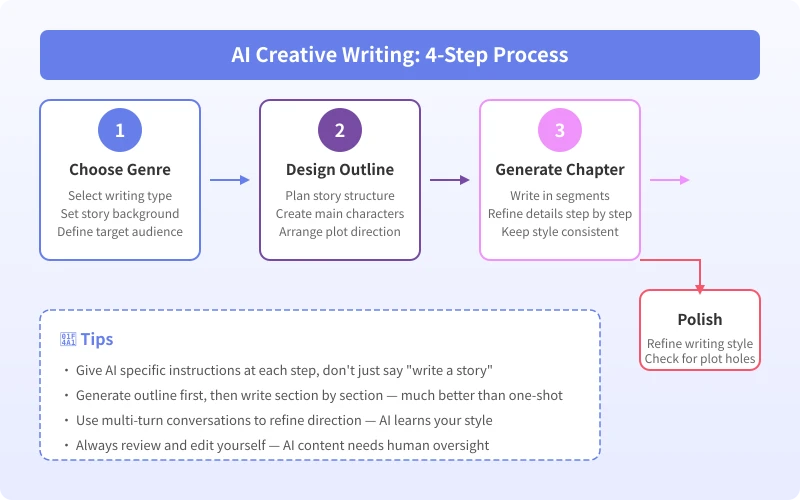
The core AI creative writing process: Choose genre → Design outline → Generate chapter by chapter → Polish and finalize. Give AI specific instructions at every step, and keep adjusting until you get the result you want.
Remember, AI is your writing partner, not a replacement. The best work is always a collaboration between you and AI — you provide the creativity and soul, and AI helps turn your ideas into words.
Open an AI tool right now and try having AI help you brainstorm a story. Your first piece of creative work could start today.
Related Articles
AI Speech to Text: Beginner's Guide to Convert Voice to Text in 3 Steps
Learn how to convert speech to text using AI tools. Perfect for meeting notes, content creation, and video subtitles. Three practical scenarios with step-by-step instructions.
TutorialsAI Local Deployment Guide: Run Large Models in 3 Steps for Free
Learn how to deploy AI models locally in just 3 steps. No coding experience needed, completely free, and your data stays private on your own computer.
TutorialsAI Shopping Decision Guide: From Price Comparison to Avoiding Pitfalls
Learn how to use AI for shopping decisions. From price comparison to avoiding pitfalls - make smarter purchasing choices with AI assistance.
Comments are not yet available, stay tuned