AI Weekly and Work Report Assistant Guide: Four Steps to Efficient Reporting
Why Is Writing a Weekly Report So Painful?
Every Friday afternoon, many people's first reaction isn't excitement but anxiety — it's time to write the weekly report again. You scroll through chat logs, emails, and documents, trying to recall what you did this week, then stare at a blank document for half an hour, and finally cobble together a bunch of logs.
The pain of writing a weekly report mainly comes from three aspects:
- Vague memory: By Friday, you can no longer remember the details of what you did on Monday
- Not sure what to write: You did a lot, but you're uncertain which items are worth reporting
- Muddled format: The final output is either too wordy or too brief, leaving your manager unsatisfied
The good news is that AI can help you solve all these problems. You just need to provide the raw material, and AI will organize it into a clear, focused report.
Four Steps to Writing a High-Quality Weekly Report with AI
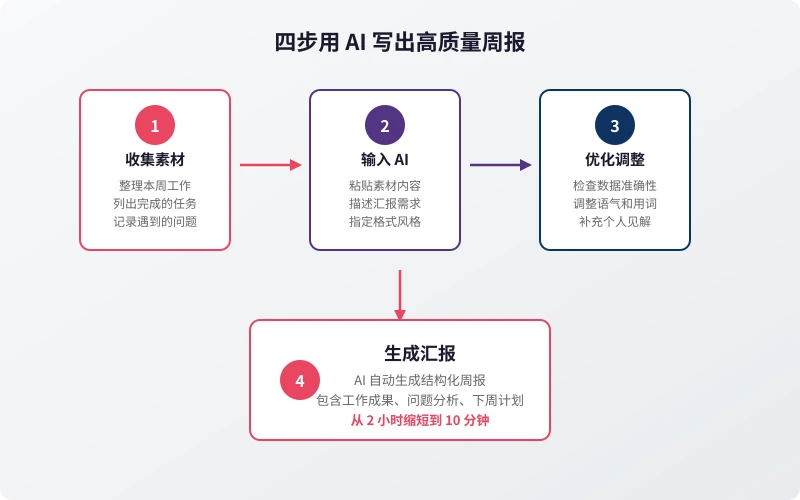
Step 1: Collect Raw Material (5 minutes)
Before asking AI to write your weekly report, you need to organize this week's work material. You don't have to write it out fully — just list the key points.
Sources of material include:
- Chat logs: Browse through work groups in WeChat, DingTalk, and Feishu to find important matters discussed this week
- Task management tools: Check Jira, Trello, and Feishu tasks for items completed this week
- Calendar: Which meetings did you attend and who did you meet this week?
- Emails: Important emails sent or received this week
- Documents: Documents you wrote or edited this week
Practical tip: Starting now, spend 1 minute at the end of each workday recording what you did that day. You can use your phone's memo app, sticky notes, or directly send it to an AI assistant. That way, by Friday, the material is ready to go.
Step 2: Give the Material to AI (2 minutes)
Once you've collected the material, paste it directly to AI and tell it what kind of report you need. Below is a ready-to-use prompt template:
Weekly report template:
Based on the following work material, please write a weekly work report for me. Requirements:
1. Divide into three sections: "This Week's Achievements," "Problems Encountered and Solutions," and "Next Week's Work Plan"
2. Use bullet points for each section, with concise and professional language
3. Highlight results and value — don't just list a log of activities
4. Include data where appropriate (if mentioned in the material)
Work material is as follows:
[Paste your material]
Step 3: Optimize and Adjust (3 minutes)
AI's first draft is usually quite good, but you still need to do three things:
- Check accuracy: Ensure data, times, names, etc., are correct
- Adjust tone: Tailor the wording style to your company culture (some companies prefer a formal tone, others a relaxed one)
- Add personal insights: Include your own thoughts on problems and your plans for next week to make the report more insightful
If the AI-generated content is too long or too short, just tell it:
- "Trim it to under 300 words"
- "Expand on each point with specific details"
- "Make the tone more formal"
- "Add data comparisons to highlight growth"
Step 4: Generate the Final Report (1 minute)
Once you're satisfied with the adjustments, ask AI to format it into the final version. You can specify the output format:
- Plain text: Paste directly into email or chat tools
- Markdown: Suitable for platforms that support rich text, like Feishu and DingTalk
- PPT outline: If you need to make a presentation
Prompt Templates for Different Reporting Scenarios
Weekly Report: Routine Work Summary
Based on the following material, write a weekly report in this format:
I. This Week's Achievements (3-5 items, each including what was done and the result)
II. Problems and Risks (difficulties encountered, current status, support needed)
III. Next Week's Plan (prioritized, with estimated completion dates)
Material: [Paste content]
Monthly Report: Periodic Summary
Based on the following monthly work material, write a monthly report with these requirements:
1. Start with a brief overview (overall situation for the month)
2. Categorize key tasks by project; for each project, explain progress, results, and next steps
3. List changes in key data indicators (if any)
4. Propose core goals and plans for the next month
Material: [Paste content]
Project Report: Special Progress Update
Please write a project progress report for me with the following requirements:
1. Brief project background (2-3 sentences)
2. Current progress (completed, in progress, pending)
3. Key milestones and timeline
4. Risks and countermeasures
5. Resources or support needed
Project information: [Paste content]
Performance Review: Annual/Semi-Annual Summary
Please write a performance review report for me with the following requirements:
1. Overview of job responsibilities
2. Key work achievements (supported by data)
3. Personal growth and takeaways
4. Shortcomings and areas for improvement
5. Goals for the next period
Work records: [Paste content]
Five Tips to Make Your Report Stand Out
Tip 1: Let Data Speak
Don't just say "I did a lot of things." Instead, say "I completed 5 requirements, fixed 12 bugs, and conducted 8 code reviews." When asking AI to polish, tell it "please supplement with specific data."
Tip 2: Highlight Value, Not Process
Don't write "I spent three days troubleshooting." Write "I resolved the XX online issue, avoiding a loss of XX." Managers care about results, not how much overtime you worked.
Tip 3: Bring Solutions with Problems
When reporting a problem, don't just say "I encountered a difficulty." Also say "Here's how I plan to solve it." Even if you haven't solved it yet, show that you're thinking about it.
Tip 4: Make Plans Concrete
"Will follow up next week" is not a good plan. "Finish the first draft of the proposal by Wednesday and complete the review by Friday" is a good plan. Ask AI to turn vague plans into actionable steps.
Tip 5: Stay Consistent
Use the same format every week. It's easier for your manager to read, and faster for you to write. Fix your template — just fill in the content each week.
Frequently Asked Questions
Will the weekly report written by AI be too templated?
If you just give AI a one-liner like "write a weekly report," yes, it will be templated. But if you provide detailed material and tell AI your specific needs, the generated content will be very targeted. The key is: input quality determines output quality.
Will it leak company secrets?
When using mainstream AI platforms, avoid inputting overly sensitive information (e.g., specific client names, contract amounts, core technical details). You can use code names or vague descriptions. If your company has an internal AI tool, prioritize using that. The Ciyuano platform supports private deployment, keeping your data fully under your control.
Do I need to record something every day for the weekly report?
Ideally yes, but it doesn't need to be detailed. Spend 1 minute at the end of each workday jotting down 2-3 keywords on your phone. By Friday, those keywords become your material. If you forgot to record, you can supplement by browsing chat logs and task tools.
Besides weekly reports, what other reports can I write with AI?
Almost all types of reports can be assisted by AI: daily reports, weekly reports, monthly reports, quarterly summaries, annual performance reviews, project progress reports, meeting minutes, client reports, etc. The key is mastering how to write prompts — tell AI what format and style you need.
Can my manager tell it was written by AI?
If you submit the AI-generated content verbatim, it may come across as impersonal. But if you build on the AI draft by adding your own thoughts, adjusting the tone, and supplementing details, the final report will be better than one you wrote entirely by hand. AI is a tool, not a replacement.
```Related Articles
AI Speech to Text: Beginner's Guide to Convert Voice to Text in 3 Steps
Learn how to convert speech to text using AI tools. Perfect for meeting notes, content creation, and video subtitles. Three practical scenarios with step-by-step instructions.
TutorialsAI Local Deployment Guide: Run Large Models in 3 Steps for Free
Learn how to deploy AI models locally in just 3 steps. No coding experience needed, completely free, and your data stays private on your own computer.
TutorialsAI Shopping Decision Guide: From Price Comparison to Avoiding Pitfalls
Learn how to use AI for shopping decisions. From price comparison to avoiding pitfalls - make smarter purchasing choices with AI assistance.
Comments are not yet available, stay tuned