AI Data Analysis for Beginners: Understand Your Data in 3 Steps
Dreading those endless rows of numbers in Excel? Your boss asks you to analyze data and all you can do is calculate an average? Don't worry — AI can turn a messy pile of numbers into clear insights. No coding required, no statistics degree needed.
What Can AI Data Analysis Do?
Many people think data analysis is only for programmers or data scientists. But with AI, anyone can perform these analyses:
- Trend Analysis: Is the data going up or down? How fast is it changing?
- Anomaly Detection: Which data points are clearly off? What might be the cause?
- Comparison Analysis: What are the differences between time periods, products, or channels?
- Correlation Discovery: Which factors are related? When A changes, what happens to B?
- Predictions and Recommendations: Based on existing data, where are things heading? What decisions should you make?
This kind of analysis used to require learning Excel formulas, Python programming, or even a statistics course. Now, you just need to know how to type.
Three Steps to Complete Your Analysis
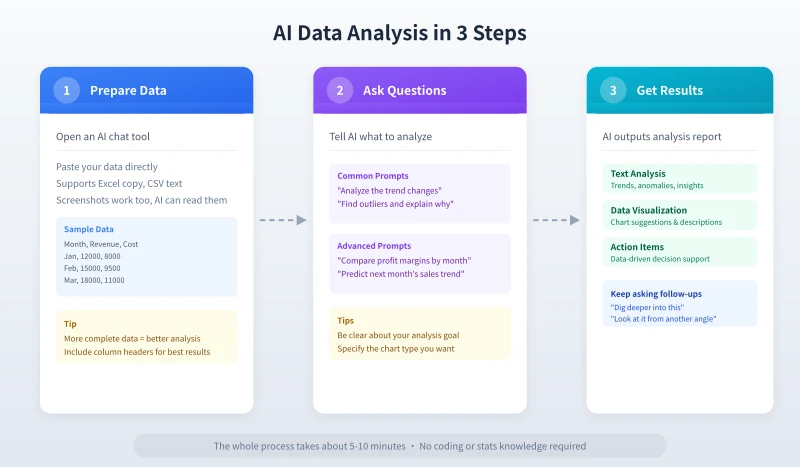
Step 1: Prepare Your Data (1 Minute)
Get your data ready. AI supports multiple formats:
- Copy and Paste: Select data from Excel or a spreadsheet, Ctrl+C then Ctrl+V into the AI chat
- Text Description: If there isn't much data, just type it out for the AI
- Screenshot Recognition: Send a screenshot of your table and AI can read it automatically
- CSV Text: If you have a CSV file, just paste the contents directly
Pro Tip: Including column headers (like "Month", "Revenue", "Cost") helps AI understand what each column means more accurately.
Step 2: Tell AI What to Analyze (2 Minutes)
This is the most important step. Use natural language to tell AI what you want to discover from the data. Here are some ready-to-use prompt templates:
Basic Analysis:
Please analyze the following data and help me find:
1. Overall trend (rising/falling/stable)
2. Maximum and minimum values
3. Any abnormal data points
4. Your conclusions and recommendations

Data:
[paste your data here]
Comparison Analysis:
Compare the differences between these two data sets:
1. Which performs better? By how much?
2. Which dimension shows the biggest gap?
3. What might be the reasons?
4. Provide improvement suggestions

Data:
[paste your data here]
Predictive Analysis:
Based on the following historical data, predict the trend for the next 3 months:
1. Give a predicted value range
2. Explain the basis for your prediction
3. Identify risk factors that could affect the forecast
4. Suggest countermeasures

Historical data:
[paste your data here]
Step 3: Get Your Results (2 Minutes)
AI will deliver results in seconds, usually covering:
- Data Overview: A summary of the basic data characteristics
- Trend Analysis: Direction and patterns of change
- Key Findings: Notable data points and anomalies
- Conclusions and Recommendations: Data-driven decision suggestions
If the first analysis isn't deep enough, keep asking follow-up questions:
- "Can you dig deeper into the data from month 3?"
- "Look at this data from a cost perspective"
- "Can you show the comparison as a table?"
- "Generate a summary table I can copy to Excel"
Five Practical Scenarios
Scenario 1: Sales Data Analysis
Throw your monthly sales data at AI to analyze seasonal patterns, growth trends, and each product line's contribution. When your boss asks "How's sales this month?" you'll never have to say "It's okay" again.
Scenario 2: Personal Spending Analysis
Paste several months of spending records (exported from Alipay or WeChat Pay) and let AI analyze where your money goes and which expenses can be optimized. More intuitive than any budgeting app.
Scenario 3: Survey Results
Conducted a survey but don't know how to analyze it? Give the results to AI and it can do frequency analysis, cross-tabulation, uncover hidden patterns, and even write the analysis report for you.
Scenario 4: Competitor Comparison
Collect pricing, features, and ratings data for competitors, then let AI do a comparative analysis to identify your strengths and weaknesses for more targeted strategies.
Scenario 5: Academic Performance Analysis
Give AI your exam scores from multiple tests to analyze which subjects improved, which declined, where the weak spots are, and create a targeted study plan.
Five Tips for Better Analysis
Tip 1: Clean Your Data First
Before giving data to AI, check for obvious errors (like an extra zero, inconsistent date formats). Garbage in, garbage out — even AI can't save that.
Tip 2: State Your Purpose Clearly
Don't just say "analyze this for me." Tell AI what you're trying to find out. "I want to find out why sales dropped" gets much better results than "analyze the sales data."
Tip 3: Provide Context
Tell AI the background of your data. For example, "This is an e-commerce store's sales data for the first half of 2026." AI can give more relevant analysis when it understands the context.
Tip 4: Ask Step by Step
For complex data, don't ask AI to do everything at once. Start with a data overview, then trend analysis, then dive into specific questions. One step at a time yields more accurate results.
Tip 5: Verify Key Conclusions
AI's analysis is a great reference, but important decisions should still be verified. Especially for specific numbers like amounts and percentages, it's worth manually checking against the original data.
Frequently Asked Questions
What if I have a lot of data?
If your data has hundreds of rows or more, try giving AI a summary table or a sample first so it understands the structure. You can also split data by time period or category and analyze it in batches.
How accurate are AI's results?
AI's analysis is based on the data it sees. For trend detection, anomaly detection, and comparison analysis, accuracy is high. But for specific calculations (like exact percentages), it's worth verifying with a calculator.
Will my data be leaked?
Mainstream AI platforms have privacy protection mechanisms. If your data is highly sensitive (like customer personal information or financial records), consider using a platform that supports private deployment, like Ciyuano. Or anonymize the data before analysis.
Do I need to learn Excel or Python?
No. The biggest advantage of AI data analysis is zero barrier to entry. You just need to know how to copy-paste data and type your questions. Of course, if you have basic Excel skills, data handling will be a bit more convenient.
What types of data aren't suitable for AI analysis?
Data containing personal privacy (like ID numbers, phone numbers) shouldn't be sent directly to AI. Also, real-time data streams requiring instant processing (like server log monitoring) are better handled by specialized analytics tools.
Related Articles
AI Speech to Text: Beginner's Guide to Convert Voice to Text in 3 Steps
Learn how to convert speech to text using AI tools. Perfect for meeting notes, content creation, and video subtitles. Three practical scenarios with step-by-step instructions.
TutorialsAI Local Deployment Guide: Run Large Models in 3 Steps for Free
Learn how to deploy AI models locally in just 3 steps. No coding experience needed, completely free, and your data stays private on your own computer.
TutorialsAI Shopping Decision Guide: From Price Comparison to Avoiding Pitfalls
Learn how to use AI for shopping decisions. From price comparison to avoiding pitfalls - make smarter purchasing choices with AI assistance.
Comments are not yet available, stay tuned