AI Writes Your Weekly Reports: Finish in 10 Minutes Instead of Overtime
Every Friday afternoon, do you find yourself staring at a blank document, not knowing where to start your weekly report? You accomplished so much during the week, but when it is time to write, your mind goes blank. Do not worry — AI can help you shorten this process to just 10 minutes.
This article will walk you through using AI to write a high-quality weekly report and work summary. No technical background needed — just follow along.
Why Use AI for Weekly Reports?
Before we start, here is why it is worth using AI:
- Save time: Shorten from 1-2 hours to 10-15 minutes
- Clear structure: AI automatically organizes your content so it does not read like a diary
- Professional tone: Transforms scattered work items into polished reporting language
- Reduce stress: No more agonizing over how to write it
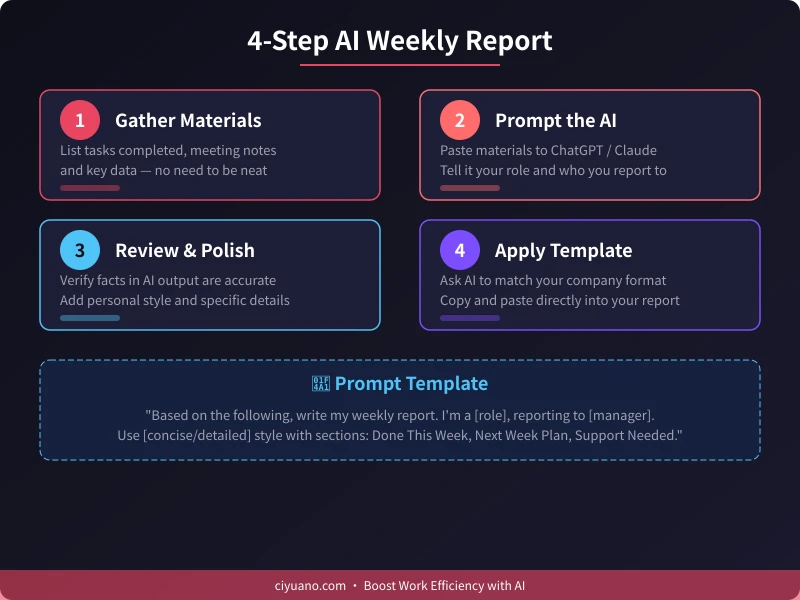
Step 1: Gather Your Work Materials
AI needs raw material to work with. Before opening any AI tool, spend 3-5 minutes listing what you did this week:
- Completed tasks: Reports written, bugs fixed, clients onboarded
- Meetings attended: Project reviews, requirement discussions, team standups
- Key metrics: Orders completed, user growth, test coverage improvements
- Problems encountered: Difficulties faced and how you resolved them
- Next week plans: What you plan to work on next
Tip: You do not need to write neatly. Keywords and fragmented sentences work fine. For example:
"Monday: requirements review meeting. Wednesday: shipped v2.1, fixed 3 production bugs. User satisfaction from 85% to 90%. Next week: build data report module."
Step 2: Give the AI a Good Prompt
Open your preferred AI tool (ChatGPT, Claude, Gemini, or any other), paste your materials, and give it a clear instruction.
Here is a universal prompt template you can copy and use directly:
Basic version:
Based on the following content, write my weekly report for this week.
My role: [your role, e.g., Product Manager / Frontend Developer / Marketing]
Reporting to: [your manager / department head]
Style: concise and professional
Please organize into four sections: "This Week", "Achievements", "Challenges", and "Next Week Plan".
Advanced version (more detailed):
You are a professional workplace writing assistant. Based on my work content below, write a weekly report.
Requirements:
1. Organize into four sections: "Work Completed", "Results & Metrics", "Issues & Solutions", "Next Week Plan"
2. Start each item with an action verb (e.g., "Completed", "Advanced", "Optimized")
3. Include data wherever possible
4. Use concise, professional language — avoid casual expressions
5. Keep total word count between 300-500 words
Here is my work content for this week:
[paste your materials]
Step 3: Review and Polish
AI-generated content is not always perfect. You need to check the following:
- Fact-check: Are the numbers, dates, and project names correct?
- Add details: AI may have missed important information you did not mention
- Adjust tone: Make sure it matches your usual reporting style
- Remove fluff: Cut overly generic or template-like expressions
If the first result is not satisfactory, you can follow up with:
- "Make it more concise — 2-3 sentences per section"
- "Emphasize the data and metrics more"
- "Expand the challenges section with more detail"
- "Make the tone more formal / more casual"
Step 4: Apply Your Company Template
Many companies have their own weekly report format. You can ask AI to adapt:
Please reformat the above content to match this template:
1. Work Completed This Week
2. Results & Metrics
3. Issues & Risks
4. Next Week Plan
5. Support Needed
This way, the output can be directly copied into your company reporting system, saving formatting time.
More Use Cases
Beyond weekly reports, the same approach works for:
- Monthly summaries: Combine 4 weeks of reports and let AI extract monthly highlights
- Quarterly reviews: Provide 3 months of summaries for AI to draft your review presentation
- Annual reviews: Year-long projects and achievements organized into a complete year-end summary
- Project retrospectives: Provide project process and results for AI to write a post-mortem report
FAQ
Q: Will AI-generated content sound too generic?
A: It can, which is why Step 3 matters — add your personal style and specific details. AI provides the framework; you provide the soul.
Q: Will my manager know it was written by AI?
A: Not if you review and edit carefully, adding personal touches. The key is making sure the content is accurate and authentic.
Q: Which AI tool is best for writing reports?
A: ChatGPT and Claude both work great. Use whichever tool you are most comfortable with.
Q: Any tips for writing better reports?
A: Honesty comes first. AI helps organize your language, but the data and facts must be real. Also, let numbers speak louder than adjectives.
Start today — save the time you spend on reports and invest it in more meaningful work.
Related Articles
AI Resume Writing: From Zero to Professional in 5 Steps
Learn how to use AI to write a professional resume. Five simple steps from basic information to polished final draft. Perfect for job seekers who want to stand out.
Productivity ToolsAI Note Organization: Build a Personal Knowledge System in 5 Steps
Learn how to use AI for note organization. Build a personal knowledge system in 5 steps. Perfect for knowledge workers and students.
Productivity ToolsAI Side Hustle Planning: Find Your Second Income Source
Want to earn extra income through a side hustle but don't know where to start? AI can help you analyze your skills, match directions, make plans, and track progress. Find your ideal side hustle within a month, even with zero experience.
Comments are not yet available, stay tuned