AI Document Summary & Extraction: A Practical Guide to Quickly Digest Long Documents
Have you ever faced a 50-page report, paper, or contract and just wanted to quickly grasp the key points? AI document summarization tools can compress hours of reading into minutes. This guide walks you through processing various documents with AI — from uploading to extracting key information, with detailed instructions at every step.
Why Use AI for Document Summarization
Let's start with a direct comparison:
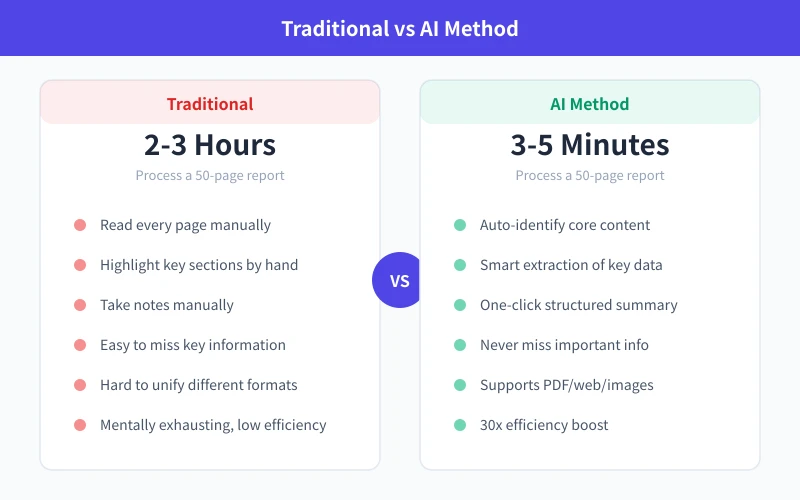
Traditionally, processing a 50-page industry report takes 2-3 hours: reading page by page, manually highlighting, and taking notes. With AI, the same document produces a structured summary in 3-5 minutes, with no key data missed.
Core advantages of AI document summarization:
- Speed: Tens of thousands of words summarized in 10-30 seconds
- Completeness: AI reads the entire document without skipping important sections due to fatigue
- Customizable: Tell AI what you care about, and it focuses on exactly that
- Multi-format: Handles PDFs, Word docs, web pages, and images
What AI Can Do for You
Many people think AI can only "summarize," but its capabilities go far beyond that:
Document Summarization: Condense long text into key points of a few hundred words, preserving core information
Data Extraction: Extract numbers, dates, names, amounts, and other structured data from reports
Multi-document Comparison: Upload multiple documents and have AI find differences and commonalities
Q&A Mode: Ask questions about document content and get answers with source citations
Step-by-Step Guide
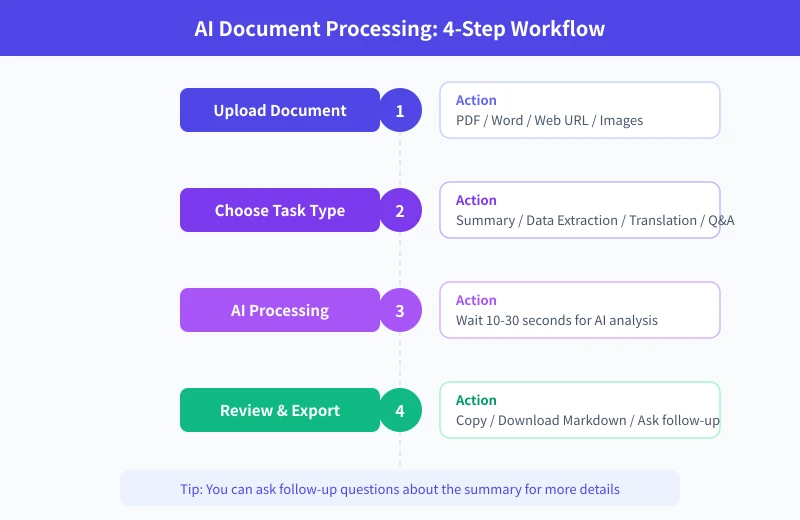
Step 1: Prepare Your Document
Before starting, confirm your document format. Most AI tools support the following:
- PDF files: Most common, just upload directly
- Word documents (.docx): Upload directly
- Web URLs: Paste the link and AI automatically fetches the content
- Images: Take a photo or screenshot, AI uses OCR to recognize text
- Plain text: Paste directly into the chat box
Tip: If your PDF is a scanned version (image-based), use a tool with OCR support, otherwise AI may not be able to recognize the text.
Step 2: Choose the Right AI Tool
Different scenarios call for different tools:
Scenario 1: Everyday Document Summarization
Use general chat tools like ChatGPT, DeepSeek, or Kimi. Paste the document content or upload the file, then tell AI what you want.
Scenario 2: Long PDF Processing
Recommended: Kimi or Claude — they support ultra-long context and can process an entire book at once.
Scenario 3: Batch Processing
If you need to process large volumes of documents regularly, use the Token Circle API to build an automated workflow.
Step 3: Write Effective Prompts
This is the most critical step. The same document with different prompts produces vastly different results.
Basic Version (Simple Summary):
Please summarize the core content of this document in bullet-point format, keeping it under 500 words.
Advanced Version (Structured Extraction):
Please analyze this industry report and organize it as follows:

1. Report topic and background (2-3 sentences)
2. Key findings (list 3-5 main points)
3. Key data (extract all important numbers and percentages)
4. Conclusions and recommendations
5. Risk points I should be aware of
Professional Version (Comparative Analysis):
I've uploaded 3 competitor analysis reports. Please:

1. Summarize the core viewpoint of each report
2. Compare the strengths and weaknesses of each company
3. Create a comparison table
4. Give your overall assessment
Step 4: Review Results and Ask Follow-up Questions
After AI returns the summary, don't stop there. You can ask follow-up questions to dig deeper:
- "Can you elaborate on point 3?"
- "What exactly is the XX data mentioned in the report?"
- "Where is this in the original text? Give me the quote."
- "Translate the summary into Chinese."
- "Based on this report, draft a 200-word summary email for me."
Real-World Examples
Scenario 1: Quickly Digest an Industry Report
You receive a 40-page "2026 China AI Industry Report" and your boss wants a briefing in 30 minutes.
Steps:
- Open Kimi or ChatGPT and upload the PDF
- Enter the prompt: "Please extract the key points of this report, organized by: market size, growth trends, major players, technology directions, and investment opportunities. 2-3 sentences for each section."
- Wait 15-30 seconds for the AI to return a structured summary
- Follow up: "Can you give me the specific market size numbers mentioned in the report?"
Scenario 2: Extract Key Contract Terms
You need to quickly understand key terms before signing a contract, but it's 20 pages of legal jargon.
Steps:
- Upload the contract PDF
- Enter: "Please extract the key terms of this contract, focusing on: contract duration, payment terms, liability for breach, confidentiality clauses, and non-compete restrictions. Explain in plain language."
- After AI responds, ask: "Are there any terms that are unfavorable to me? Please highlight them."
Scenario 3: Speed-Reading Academic Papers
Your advisor assigned 10 papers for you to read this week, each over 20 pages.
Steps:
- Upload papers one by one
- Enter: "Please summarize this paper using the following structure: research question, methodology, main findings, innovations, and limitations. 1-2 sentences for each."
- Finally ask AI to compare: "What are the commonalities and differences in research methods across these 10 papers?"
Practical Tips
Tip 1: Process Long Documents in Sections
If a document exceeds the tool's length limit, upload it chapter by chapter, processing one section at a time, then have AI merge the summaries.
Tip 2: Specify Output Format
Tell AI exactly what format you want: bullet points, tables, or paragraphs. The more specific the format, the more usable the result.
Tip 3: Request Source Citations
Add to your prompt: "Please indicate where each key conclusion appears in the original text." This lets you quickly verify the accuracy of AI's summary.
Tip 4: Use Multi-Turn Conversations to Dig Deeper
Don't expect a perfect result from a single question. Get the big picture first, then gradually drill into details through follow-up questions.
Advanced: Automate with API
If you process documents frequently, you can use the Token Circle API to build an automated workflow. The basic approach:
- Use code to read document content (PDF parsing, web scraping, etc.)
- Send the content to an AI model with a summarization prompt
- Receive the results and save to a file or database
This approach is ideal for scenarios requiring batch document processing, such as daily automated industry news summaries or periodic meeting minutes compilation.
Common Mistakes and Solutions
Mistake 1: Document too long, exceeds AI processing limit
Solution: Upload in sections, or use a model with long context support (like Kimi or Claude).
Mistake 2: Summary too vague, lacks specific information
Solution: In your prompt, explicitly request "extract specific data," "cite original text," and "provide numbers."
Mistake 3: AI fabricates content not in the document
Solution: Ask AI to cite sources, then spot-check. For important information, always verify against the original.
Mistake 4: Messy formatting, hard to read
Solution: Specify the output format in your prompt, such as "present in Markdown table" or "use numbered list."
Conclusion
AI document summarization is one of the most practical AI use cases. No technical background needed — if you can type, you can use AI to digest a long document in minutes. The key is mastering prompt writing: be clear about what you want, what to focus on, and what format you need, and AI will deliver high-quality results.
Starting today, try throwing your most dreaded document at AI. You'll discover that reading can be this effortless.
Related Articles
AI Speech to Text: Beginner's Guide to Convert Voice to Text in 3 Steps
Learn how to convert speech to text using AI tools. Perfect for meeting notes, content creation, and video subtitles. Three practical scenarios with step-by-step instructions.
TutorialsAI Local Deployment Guide: Run Large Models in 3 Steps for Free
Learn how to deploy AI models locally in just 3 steps. No coding experience needed, completely free, and your data stays private on your own computer.
TutorialsAI Shopping Decision Guide: From Price Comparison to Avoiding Pitfalls
Learn how to use AI for shopping decisions. From price comparison to avoiding pitfalls - make smarter purchasing choices with AI assistance.
Comments are not yet available, stay tuned