AI Home Decoration & Interior Design Assistant Guide: Style Selection, Space Layout, Budget Control Made Easy
Don't know where to start with your renovation? Choosing styles, matching colors, buying furniture, and managing budgets — every step can be overwhelming. An AI home design assistant can generate floor plans, recommend color schemes, suggest furniture, create budget lists, and even provide construction inspection tips. This article walks you through 5 practical scenarios to handle your entire renovation process with AI.
What Is an AI Home Design Assistant
An AI home design assistant is an interior design tool powered by large language models. Tell the AI about your floor area, renovation budget, and style preferences, and it will create a customized renovation plan. Compared to hiring a designer, AI assistants offer three key advantages:
- Zero-cost design plans: No design fees needed — get multiple renovation plans in a single conversation
- Rapid iteration: Not satisfied? Get a revised plan in seconds
- End-to-end coverage: From layout to color schemes, furniture to budgets — all in one place
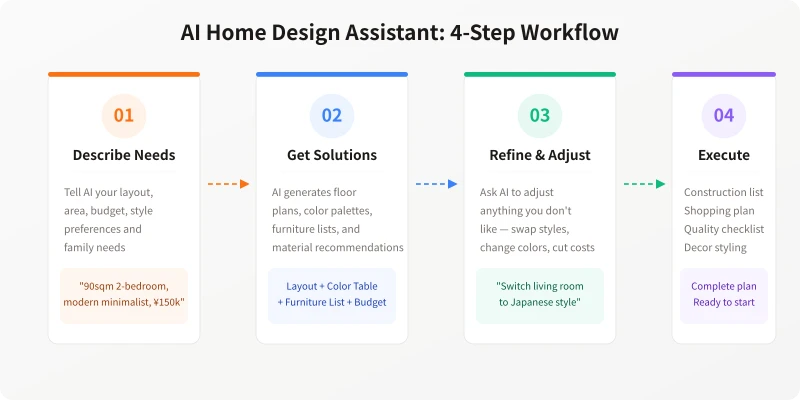
Step 1: Tell AI About Your Layout and Needs
The first step is to provide your basic information. The more detailed it is, the more tailored the AI's plan will be.
Information you need to prepare:
- Layout data: Floor area, number of rooms, floor level, orientation
- Family situation: Number of household members, elderly or children, pets
- Style preference: Modern minimalist / Nordic / Japanese / Chinese / Luxury, etc.
- Functional needs: Study room, walk-in closet, open kitchen, etc.
- Budget range: Total budget and how to split between hard and soft furnishing
Example prompt: "My home is 90 sqm, 2 bedrooms + 1 living room + 1 bathroom, north-south facing, 15th floor. Family of three (couple + 5-year-old child) with a cat. We like modern minimalist style, budget is ¥150k (¥100k for hard furnishing + ¥50k for soft furnishing). Need a study nook, and the living room should be spacious and bright."
Step 2: Get Floor Plan Layouts
AI can generate multiple spatial layout plans based on your floor information. This is the foundation of renovation and directly determines everything that follows.
How to do it:
- Tell AI your basic information from above
- Add: "Please provide 2 different layout plans with pros and cons for each"
- AI will generate traffic flow plans, functional zoning, and furniture placement suggestions
- Choose your preferred plan and ask AI to refine it further
You can also ask about specific details: "Which wall should the sofa go against?" "How to design the entryway storage?" "Should I go with an open kitchen?" AI will give professional advice based on lighting, traffic flow, and lifestyle habits.
Step 3: Choose Style and Color Scheme
After finalizing the layout, the next step is determining the decoration style and color palette. Many people struggle at this stage, but AI can help you quickly find the right direction.
Color scheme prompt templates:
"My home is modern minimalist style, 90 sqm, average lighting. Please recommend a complete color scheme including wall colors (color codes), floor colors, furniture colors, curtain colors, and lighting color temperature suggestions."
"I like Japanese natural wood style but have a limited budget. Please recommend cost-effective material combinations including flooring, cabinet panels, and countertop materials with brand references."
AI will return a detailed color scheme with specific color codes, material suggestions, and matching principles. You can fine-tune based on your preferences, such as swapping a color for something warmer or cooler.
Step 4: Furniture Selection and Budget Control
After finalizing the style, AI can generate a complete furniture list and budget spreadsheet. This is one of the most practical features, helping you avoid overspending.
| Budget Range | Recommended Strategy | What AI Can Do |
|---|---|---|
| Under ¥100k | Light hard furnishing, focus on soft furnishing + value furniture | Recommend budget alternatives, online shopping lists |
| ¥100k–200k | Mid-range renovation, partial custom cabinetry | Brand comparisons, material pairing plans |
| Over ¥200k | Full custom, premium materials | Designer-level plans, imported material recommendations |
Budget list prompt:
"My total budget is ¥150k. Please create a detailed renovation budget spreadsheet, categorized by hard furnishing (plumbing/electrical, walls, flooring, ceiling) and soft furnishing (furniture, appliances, lighting, curtains). For each item, provide the budget amount, recommended brands, and money-saving tips."
Step 5: Construction Inspection and Pitfall Guide
The most error-prone part of renovation is construction and inspection. AI can help you organize inspection checklists for each phase, so you don't get shortchanged by contractors.
Inspection checklist prompt:
"Please provide a renovation construction inspection checklist, organized by phase (plumbing/electrical, masonry, carpentry, painting). For each phase, list the must-check items, acceptance criteria, and common issues."
The inspection checklist from AI is very practical — you can print it out and check against it after each phase is completed. If you're unsure about anything, you can ask AI to explain specific acceptance criteria in detail.
Important reminder: AI renovation advice is for reference only. Actual construction should be adapted to site conditions. Hidden works like plumbing/electrical and waterproofing should be done and inspected by professionals.
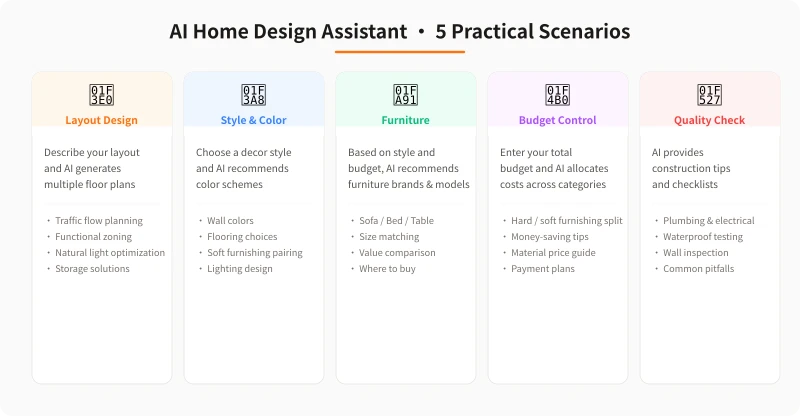
5 Practical Scenarios Summary
| Scenario | What You Do | What AI Does |
|---|---|---|
| Floor Layout | Describe layout and needs | Generate multiple floor plans |
| Style & Color | Describe preferred style | Recommend color schemes + material pairings |
| Furniture | Define style and budget | Recommend brands + value comparisons |
| Budget Control | Enter total budget | Allocate costs + money-saving tips |
| Construction QA | Enter construction phase | Provide checklists + pitfall guide |
Pro Tips
To get the most accurate renovation advice from AI, keep these in mind:
- Provide accurate layout info: The more precise the area, orientation, and floor level, the more reasonable the layout plan
- Describe your lifestyle: Do you cook often? Work from home? Have pets?
- Work step by step: First finalize layout, then style, then budget — don't ask everything at once
- Iterate and refine: If the first plan isn't right, tell AI what to adjust and let it redesign
- Reference real examples: Share photos of renovations you like, and AI can analyze the style and give similar plans
Get Started
Open an AI chat tool right now and tell it about your renovation needs. Start with something simple like "My home is 90 sqm, modern minimalist style, budget ¥150k, please help me plan the layout," then explore more features step by step.
Start Your Smart Renovation Journey
Choose an AI chat tool and ask your first renovation question
Related Articles
AI 本地部署入门:零基础三步跑起大模型,完全免费
不用注册、不用充钱、完全离线。本文手把手教你用 Ollama 等工具,在自家电脑上部署运行开源大模型,从零开始完成本地 AI 部署的全过程。
TutorialsAI 帮你做购物决策:从比价到避坑的完整实操指南
买手机、买耳机、买电脑,AI 真的能帮你选对吗?本文用五个实操步骤,手把手教你让 AI 完成价格对比、参数解析、口碑筛选和避坑提醒,小白也能 10 分钟搞定购物决策。
TutorialsAI 语音输入与语音转文字:零基础 5 分钟上手,解放双手的写作新方式
打字太慢?说话比打字快 3 倍。这篇文章手把手教你用 AI 语音输入工具,从选择工具、开始录音到转文字、编辑导出,五大步骤、六大场景,让你从此"说话即写作"。
Comments are not yet available, stay tuned