Practical Guide to AI Diary and Mood Management: Record Moods, Sort Emotions, and Build Good Habits All in One
Have you ever had that experience—feeling down and wanting to talk to someone, but not wanting to bother a friend? Or wanting to jot something down at the end of the day but not knowing where to start? An AI journaling assistant can help you with these issues.
What is an AI Journaling Assistant?
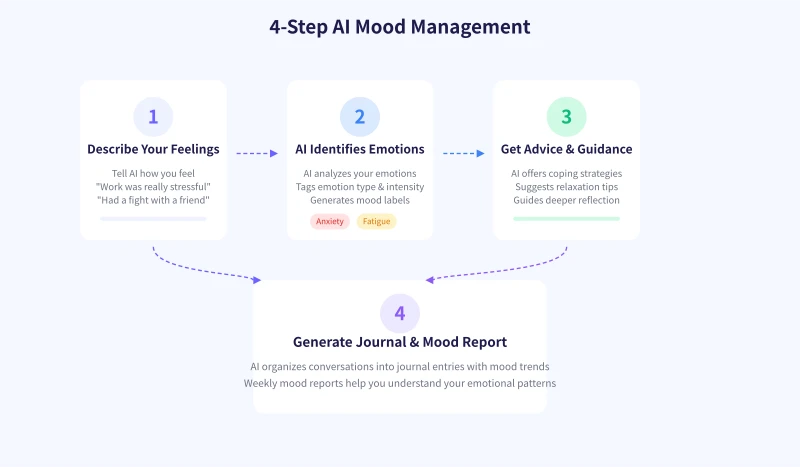
Simply put, it's an AI tool that can chat with you, help you write a diary, and track your mood changes. You just need to tell it how you're feeling today, like talking to a friend, and the AI will:
- Identify your emotion type (happy, anxious, exhausted, sad, etc.)
- Offer suggestions for mood regulation
- Organize the conversation into a diary entry
- Track your mood trends over the long term
Step 1: Choose an AI Tool
The following tools are all suitable for mood journaling:
ChatGPT
The most versatile option. You can simply tell it: "I'd like you to be my mood journal assistant, check in with me for a few minutes each day, and help me record my feelings." It will remember your request and maintain context in every subsequent conversation.
Claude
Great for deep conversations, especially when you need to vent and reflect. Its responses are more nuanced, making it well-suited for longer diary entries.
Kimi / Tongyi Qianwen
Domestic tools with better Chinese understanding and fast response times. Suitable for users who don't want to use a VPN.
Specialized Diary Apps (e.g., Daylio, Moodflow)
If you only need to simply record your mood level without lengthy conversations, these apps are lighter. Some also have built-in AI analysis features.
Step 2: Chat with AI About How You Feel Today
You don't need to write formally; just be as natural as sending a text message. Here are a few examples:
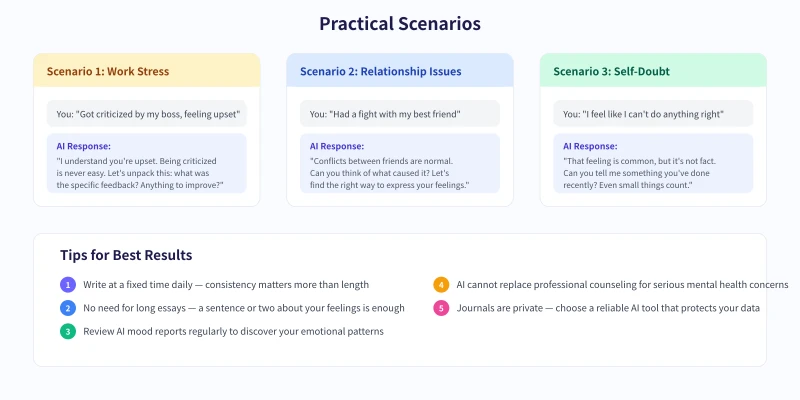
Example Conversation 1: Work Stress
You: The project deadline got moved up today, and I'm feeling so stressed I can't sleep well at night.
AI: It sounds like you've been under a lot of work pressure lately. An earlier deadline can certainly cause anxiety. Let's sort through it together: how is the project progress so far? Which parts worry you the most? Maybe breaking it down into smaller tasks will help ease the pressure.
Example Conversation 2: Feeling Down
You: I don't feel like doing anything today. I'm really down.
AI: Everyone has low days—that's perfectly normal. Can you describe when this feeling started? Was it triggered by something specific, or is it just a vague emotion? Sometimes admitting "I just don't want to move today" is a form of self-acceptance.
Example Conversation 3: Happy Moments
You: A coworker complimented me today, said my proposal was really good. I'm so happy!
AI: That's awesome! Being recognized feels great. Can you tell me more about the proposal? What do you think were the key factors that made it good? Record these positive experiences—you can look back at them when you're feeling down.
Step 3: Let AI Organize It into a Diary Entry
After chatting, you can directly say:
- "Help me turn today's conversation into a diary entry."
- "Write a diary entry in the first person about today, around 200 words."
- "Summarize my feelings and takeaways from today."
The AI will distill your conversation into a well-structured diary entry, including: what happened today, how you felt, and any advice or reflections from the AI.
Step 4: Check Your Mood Report Regularly
After a week of consistent recording, you can ask the AI to do a mood analysis:
- "Summarize my mood changes this week."
- "What was my most frequent emotion this week?"
- "When am I most likely to feel anxious?"
The AI will identify emotional patterns based on your diary content. For example, you might find that your mood is lowest every Monday, or that you always have trouble sleeping after overtime—these insights can help you better manage your mental state.
Tips for Use
1. Set a fixed time for journaling
It's recommended to spend 5 minutes chatting with the AI before bed each day. Building the habit matters more than how much you write. Even just saying "Today was okay" is a good start.
2. You don't need to write a long essay
A sentence or two describing your feelings is enough. The AI's role is to help expand the conversation; you don't need to overthink.
3. Make good use of emotion tags
Ask the AI to tag each diary entry with an emotion (e.g., happy, anxious, calm, tired) for easy statistics and review later.
4. Pay attention to privacy protection
Diaries involve your personal feelings, so pay attention to the privacy policy when choosing a tool. If using ChatGPT, you can disable the "Use conversations to improve the model" option in settings.
5. AI cannot replace professional help
If you experience long-term low mood, insomnia, or significant changes in appetite, the AI diary is only a supplementary tool. It's advisable to seek professional psychological counseling.
Advanced Tips
Once you've developed the habit of journaling, you can try these advanced uses:
- Mood Calendar: Ask the AI to mark each day's mood with an emoji and generate a monthly mood calendar.
- Gratitude Practice: Each day, have the AI guide you to write three things you're grateful for.
- Goal Tracking: Combine your diary with your goals and record daily progress.
- Dream Recording: Chat with the AI about your dreams as soon as you wake up; the AI will record and analyze them.
Using AI for journaling isn't about letting a machine think for you—it's about creating an "emotional outlet" for yourself. Often, just speaking it out is the best healing.
Related Articles
AI Speech to Text: Beginner's Guide to Convert Voice to Text in 3 Steps
Learn how to convert speech to text using AI tools. Perfect for meeting notes, content creation, and video subtitles. Three practical scenarios with step-by-step instructions.
TutorialsAI Local Deployment Guide: Run Large Models in 3 Steps for Free
Learn how to deploy AI models locally in just 3 steps. No coding experience needed, completely free, and your data stays private on your own computer.
TutorialsAI Shopping Decision Guide: From Price Comparison to Avoiding Pitfalls
Learn how to use AI for shopping decisions. From price comparison to avoiding pitfalls - make smarter purchasing choices with AI assistance.
Comments are not yet available, stay tuned