A Practical Guide to AI Image Recognition and Visual Assistants: Photo Q&A, Image Translation, and Chart Analysis in One Step
Have you ever been in these situations: you see a plant you don't know on the roadside and want to look up its name, you receive a full English manual you can't understand, or you have a complex chart you don't know how to interpret? Previously, you might have had to open a search engine and slowly look things up. Now, you just need to take a photo and send it to AI, and it can help you identify, translate, and analyze. This article will guide you step by step on how to use AI's "eyes" to solve everyday problems.
What is AI Image Recognition
AI image recognition, simply put, is enabling AI to "see" images. You give it a photo, and it can tell you what is in the image, what is written, and what it expresses. This technology has made a qualitative leap in 2024-2025—previously, AI could only recognize simple objects (like cats and dogs), but now it can read handwritten text, analyze complex charts, and understand contextual relationships.
Currently, mainstream AI tools that support image recognition include:
- ChatGPT (GPT-4o): Strongest overall capability, high recognition accuracy
- Claude: Excellent detail analysis capabilities, suitable for long document images
- DeepSeek: Free to use, good Chinese recognition
- Doubao: Convenient for domestic use, well-optimized for Chinese scenarios
- Tongyi Qianwen: Produced by Alibaba, strong image understanding capabilities
5 Most Common Use Scenarios
Scenario 1: Identify Unknown Objects
Walking on the street and see a flower but don't know its name? Take a photo and send it to AI. It will tell you what plant this is, and even its blooming period and care methods.
How to do it:
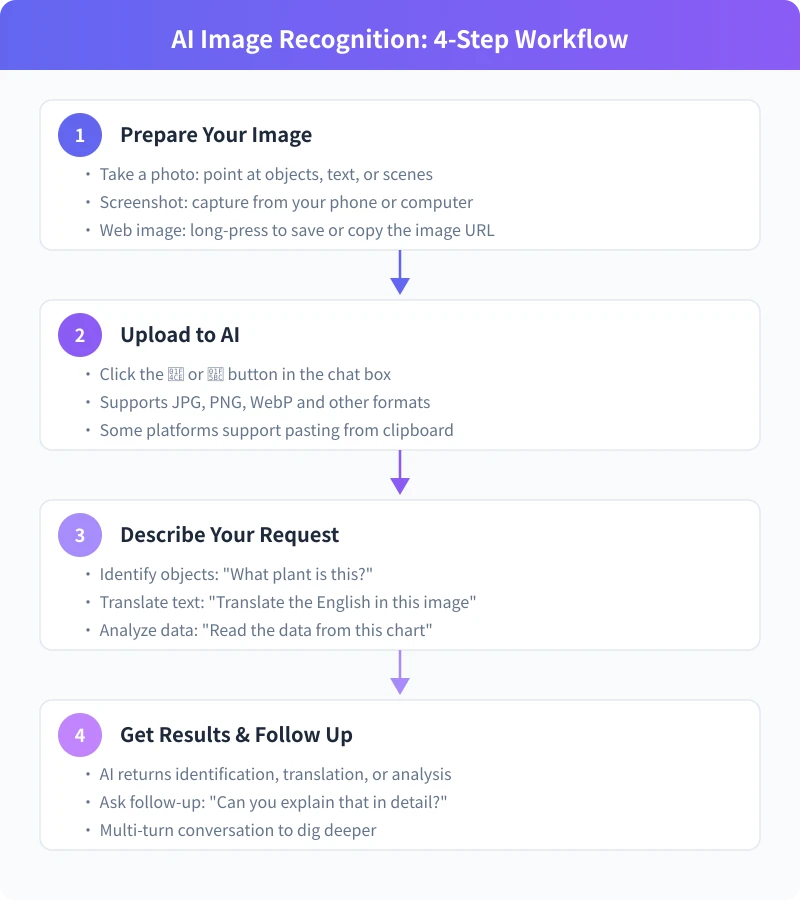
- Open your phone camera, point at the target and take a clear photo.
- Open any AI chat tool (ChatGPT, DeepSeek, Doubao, etc.)
- Click the image upload button in the chat dialog (usually a 📎 or 🖼️ icon).
- Select the photo you just took, then input: "What plant is this? Please introduce it."
- AI will return the identification result and detailed introduction.
Tip: When taking photos, try to make the subject occupy most of the frame, avoid backlighting and blur. Photos with sufficient light and a front-facing angle give the best recognition results.
Scenario 2: Translate Text in Images
Traveling abroad and can't read the menu? Received an English contract but don't know what it says? Take a screenshot and send it to AI, it can translate for you word by word.
How to do it:
- Screenshot or take a photo, ensure the text is clear and readable.
- Upload to the AI chat dialog.
- Input: "Please translate all text in the image, preserving the original format."
- AI will translate paragraph by paragraph and maintain the original layout structure.
If you need more professional translation, you can add instructions: "This is a legal document, please translate using professional terminology" or "This is a restaurant menu, please translate the dish names and briefly introduce each dish."
Scenario 3: Analyze Charts and Data
At work, you often encounter complex Excel charts, bar charts, and pie charts, and need to quickly extract key information. Screenshot and send to AI, it can summarize data trends for you.
How to do it:
- Screenshot the chart on your computer and save it.
- Upload to the AI chat dialog.
- Input: "Please analyze this chart, summarize the main data trends and key findings."
- AI will identify the chart type, read the data, and give analysis conclusions.
Note: If the chart has many data points, AI may not be able to accurately read every number. It is better at identifying trends and relative relationships; for specific numbers, we recommend cross-checking with the original source.
Scenario 4: Answer Questions and Homework
A blessing for students and parents—when you encounter math or physics problems you can't solve, take a photo and send it to AI. It not only gives the answer but also provides detailed solution steps.
How to do it:
- Point at the problem and take a photo, ensure the problem text and graphics are clear.
- Upload to the AI chat dialog.
- Input: "Please solve this problem and write detailed solution steps."
- AI will analyze the problem, list the solution process, and give the final answer.
If the first answer is not detailed enough, you can follow up: "Can you explain how step 2 came about?" AI will patiently supplement.
Scenario 5: Read Documents and Business Cards
Received a business card and want to quickly save the contact information? Need to digitize a paper document? Take a photo and send it to AI, it can extract the text content for you.
How to do it:
- Place the document or business card flat, keep it level when taking the photo, avoid shadows blocking.
- Upload to the AI chat dialog.
- Input: "Please extract all text from the image and organize it into a structured format."
- AI will recognize all text and output it in a logical structure.
6 Tips for More Accurate Recognition
1. Take clear photos
Blurry photos will seriously affect recognition accuracy. Keep your phone steady when taking photos, ensure the target object is in sharp focus. If the light is insufficient, you can turn on the flash or move to a well-lit area.
2. Avoid obstructions and reflections
When photographing documents, make sure no fingers are blocking the text. When photographing a screen, adjust the angle to avoid reflections. When photographing plants, try to capture the characteristic parts of leaves and flowers.
3. Provide contextual information
Don't just send an image without text. Tell AI what you want to know, so it can give a more targeted response. For example: "This is a flower I photographed in a Beijing park" will get a more accurate answer than just sending a picture of a flower.
4. Specify output format
If you need a specific format for the answer, tell AI directly. For example: "Please list the names, prices, and ratings of all products in the image in table format" or "Please summarize the key findings of this chart in a bullet point list."
5. Take photos from multiple angles
For complex objects (such as a building or a piece of art), you can take multiple photos from different angles, upload them separately to AI, and let it analyze comprehensively.
6. Make good use of follow-up questions
AI's first answer may not be comprehensive. You can continue to ask: "Can you elaborate a bit more?" "Are there other possibilities?" "What is the basis for this conclusion?" Multiple rounds of conversation often yield deeper analysis.
Comparison of Image Recognition Capabilities Across Platforms
| Platform | Chinese Recognition | Chart Analysis | Free Quota | Recommended Scenarios |
|---|---|---|---|---|
| ChatGPT | ⭐⭐⭐⭐⭐ | ⭐⭐⭐⭐⭐ | Limited | General use, complex analysis |
| Claude | ⭐⭐⭐⭐ | ⭐⭐⭐⭐⭐ | Limited | Long documents, detail analysis |
| DeepSeek | ⭐⭐⭐⭐⭐ | ⭐⭐⭐⭐ | Free | Chinese scenarios, daily recognition |
| Doubao | ⭐⭐⭐⭐⭐ | ⭐⭐⭐⭐ | Free | Domestic users, Chinese recognition |
| Tongyi Qianwen | ⭐⭐⭐⭐⭐ | ⭐⭐⭐⭐ | Free | Document recognition, OCR |
Universal Query Templates
Below are a few query templates that you can directly copy and use, suitable for different scenarios:
🔍 Identify Object:
"Please identify the [object type] in the image, tell me what it is, its features and uses."
🌐 Translate Text:
"Please translate all text in the image into Chinese, preserving the original format and layout. If there are technical terms, please note the original in parentheses."
📊 Analyze Chart:
"Please analyze this chart, tell me: 1) Chart type and topic; 2) Main data trends; 3) Key findings; 4) Possible issues or suggestions."
📝 Extract Text:
"Please extract all text content from the image and organize it into a structured format. If it's a business card, please categorize by name, title, phone, email."
📐 Solve Problems:
"Please solve this problem. First analyze the knowledge points tested, then write detailed solution steps, and finally give the final answer."
Limitations of AI Image Recognition
Although AI image recognition is already very powerful, it is not omnipotent. Understanding its limitations can help you use it better:
- Cannot recognize all faces: Due to privacy protection, most AI tools will not perform detailed facial recognition (e.g., telling you who it is)
- Handwriting recognition has errors: For scrawled handwriting, recognition accuracy may not be high
- Complex charts may be misread: For data-dense charts, AI might misread individual numbers
- Cannot replace medical diagnosis: For rashes on skin, X-rays, etc., AI can only provide reference opinions, not replace a doctor
- Image quality affects results: Blurry, too dark, or overexposed images will significantly degrade recognition performance
Important Reminder: AI recognition results are for reference only. For important decisions (such as medical, legal, financial), please consult professionals.
Frequently Asked Questions
Will uploaded images be saved?
Most mainstream AI platforms will use uploaded images for model improvement (unless you disable this option in settings). If you are processing sensitive images (such as ID cards, contracts), it is recommended to use platforms like DeepSeek that support disabling data saving, or upload after anonymization.
How many images can be uploaded at once?
Different platforms have different limits. ChatGPT can upload multiple images in one conversation, DeepSeek and Doubao usually support uploading 1-5 images at a time. If you need to analyze multiple images, it is recommended to upload them in batches, attaching specific questions to each image.
Is there a size limit for images?
Usually within 10-20MB. If your photo is too large, you can compress it using the phone's built-in editing features, or save it as a screenshot (screenshots are usually much smaller than the original).
What if the recognition result is wrong?
Try taking a clearer photo from a different angle. You can also provide more contextual information when asking, such as: "This was taken in Beijing, in June." If AI's answer is obviously wrong, directly tell it "This result is incorrect, please re-analyze," and it will re-examine the image.
Are the recognition results of free platforms sufficient?
They are fully sufficient for daily use. The free versions of DeepSeek, Doubao, and Tongyi Qianwen can handle common recognition tasks well. Only when dealing with very complex professional images (such as medical images, engineering drawings) do you need to consider paid professional versions.
Related Articles
AI Speech to Text: Beginner's Guide to Convert Voice to Text in 3 Steps
Learn how to convert speech to text using AI tools. Perfect for meeting notes, content creation, and video subtitles. Three practical scenarios with step-by-step instructions.
TutorialsAI Local Deployment Guide: Run Large Models in 3 Steps for Free
Learn how to deploy AI models locally in just 3 steps. No coding experience needed, completely free, and your data stays private on your own computer.
TutorialsAI Shopping Decision Guide: From Price Comparison to Avoiding Pitfalls
Learn how to use AI for shopping decisions. From price comparison to avoiding pitfalls - make smarter purchasing choices with AI assistance.
Comments are not yet available, stay tuned