AI Meeting Notes Assistant Guide: Audio Transcription, Smart Summaries & Action Items Made Easy
Still manually typing up meeting notes after every call? Listening to recordings three times over? With AI tools, you can go from audio to polished meeting minutes in just minutes. This guide walks you through the entire workflow step by step.
Why You Need an AI Meeting Assistant
Traditional meeting notes have three pain points:
- Time-consuming: A 1-hour meeting can take 30-60 minutes to organize notes
- Easy to miss things: Manual notes miss key details, especially in multi-person discussions
- Inconsistent format: Everyone takes notes differently, making consolidation a mess
An AI meeting assistant automatically transcribes speech, distinguishes speakers, extracts key conclusions, and even generates structured meeting minutes. The entire process goes from "hours" to "minutes."
Four Steps to Perfect Meeting Minutes
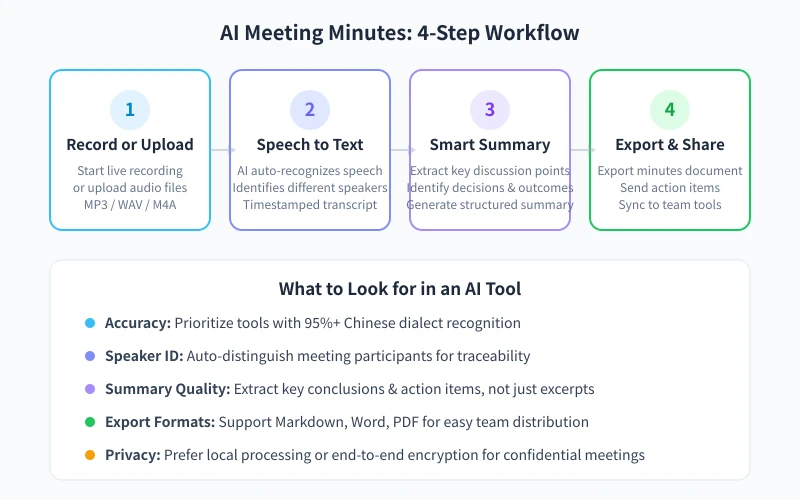
Step 1: Record or Upload Audio
Most AI meeting tools support two methods:
- Live recording: Open the tool during your meeting and hit "Start Recording." The tool transcribes in real time in the background
- File upload: After the meeting, upload your audio file (MP3, WAV, M4A, etc.) to the platform
Pro tip: For online meetings (Tencent Meeting, Feishu, Zoom, etc.), use the platform's built-in recording feature for better audio quality and higher transcription accuracy. For in-person meetings, place your phone in the center of the table, within 2 meters of speakers.
Step 2: Speech to Text
Once uploaded, AI performs automatic speech recognition (ASR) to convert audio into text. Key capabilities include:
- Multi-language support: Accuracy in Chinese-English mixed scenarios
- Speaker diarization: Auto-labels "Speaker 1," "Speaker 2"; some tools match names after you enter them
- Timestamps: Each segment is tagged with its time position for easy playback
Common issue: If your meeting has lots of jargon, add a "custom vocabulary" in the tool's settings. Industry terms, product names, and person names can significantly boost accuracy.
Step 3: Smart Summarization & Structuring
This is where AI meeting assistants deliver the most value. After transcription, AI analyzes the full text and generates a structured summary, typically including:
- Meeting topic: A one-sentence overview of the core discussion
- Key discussion points: Organized by agenda item with each side's views
- Decisions & conclusions: Clear record of consensus and decisions made
- Action items: Who does what by when
- Open questions: Unresolved issues requiring follow-up
Tip: Some tools support custom summary templates. If your team has a standard minutes format, set it up in advance and AI will output accordingly.
Step 4: Export & Share
After the minutes are generated, common distribution methods include:
- Export document: Download as Markdown, Word, or PDF for your knowledge base
- Direct share: Generate a link and send to WeChat Work, DingTalk, or Feishu groups
- Sync action items: Push action items directly to project management tools (Notion, Feishu tables)
- Email: Some tools support one-click minutes distribution to all attendees
Top AI Meeting Tools Compared
| Tool | Live Transcription | Speaker ID | Smart Summary | Free Tier |
|---|---|---|---|---|
| Feishu Minutes | ✅ | ✅ | ✅ | 300 min/mo |
| Tongyi Tingwu | ✅ | ✅ | ✅ | 10 hrs/day |
| iFlytek Hear | ✅ | ✅ | ✅ | Welcome bonus |
| Tencent Meeting AI | ✅ | ✅ | ✅ | Free in-meeting |
| Fireflies.ai | ✅ | ✅ | ✅ | 300 min/mo |
| Otter.ai | ✅ | ✅ | ❌ | 300 min/mo |
How to choose: For primarily Chinese meetings, go with Feishu Minutes or Tongyi Tingwu for the best Chinese accuracy. For English-heavy meetings, Fireflies.ai and Otter.ai are better picks. If you're already a Tencent Meeting user, the built-in AI Minutes feature is the most convenient option.
Prompt Tips for Better Minutes
If you're using a general AI (like ChatGPT or Kimi) to process meeting transcripts, these prompts can dramatically improve quality:
Basic Prompt Template
Paste your transcript into the AI chat, then use this prompt:
Based on the meeting transcript above, generate a structured meeting summary including:
1. Meeting topic (one sentence)
2. Key discussion points (organized by agenda item)
3. Decisions and conclusions reached
4. Action items (with responsible person and deadline)
5. Open questions
Advanced Tips
- Specify output format: Tell AI "output in Markdown" or "use table format" for easier formatting later
- Add context: Mention "this is a product review meeting" or "this is a weekly standup" so AI can prioritize better
- Flag uncertainties: Add "if any part of the transcript is unclear or uncertain, mark it with [?]" to prevent AI from guessing
- Process in chunks: For meetings over 1 hour, feed 20-30 minute segments to AI separately for better results
Real-World Scenarios & Tips
Scenario 1: Online Weekly Meeting
Enable recording + AI minutes directly in Tencent Meeting or Feishu. You'll have auto-generated minutes within 2 minutes after the meeting. Just review the action items for accuracy and forward to the group chat.
Scenario 2: Client Visit (In-Person)
Record with your phone's voice recorder app, then upload to Tongyi Tingwu afterward. AI will distinguish between you and the client, generating a visit summary. Double-check that client requirements and commitments are fully captured.
Scenario 3: Training & Knowledge Sharing
Long training sessions are perfect for generating text transcripts, then having AI extract key points. The transcript also serves as internal documentation for new team members.
Scenario 4: Cross-Border Meetings (Mixed Languages)
Use tools with multi-language support (like Feishu Minutes or Fireflies.ai). After transcription, have AI translate the minutes into the other language for attendees with different native languages.
Privacy & Security Notes
- Be cautious with sensitive meetings: For confidential or private meetings, prefer local/on-device transcription solutions
- Inform all attendees: Always notify and get consent before recording — this is a legal requirement in many jurisdictions
- Clean up recordings regularly: Delete original audio files after transcription to reduce data breach risk
- Check sharing permissions: When sharing minutes links, verify access settings to prevent leaks
Wrap-Up
AI meeting tools are mature enough that the entire workflow — from recording to structured minutes — can be completed in 5 minutes. The key steps: choose the right tool → start recording → review transcription → refine summary → distribute action items.
Start with free tools (Tongyi Tingwu or Feishu Minutes) to experience the full workflow, then choose a paid plan based on your team's needs. Save the time you'd spend on note-taking and focus on the meeting itself — that's the real value of an AI assistant.
Related Articles
AI Speech to Text: Beginner's Guide to Convert Voice to Text in 3 Steps
Learn how to convert speech to text using AI tools. Perfect for meeting notes, content creation, and video subtitles. Three practical scenarios with step-by-step instructions.
TutorialsAI Local Deployment Guide: Run Large Models in 3 Steps for Free
Learn how to deploy AI models locally in just 3 steps. No coding experience needed, completely free, and your data stays private on your own computer.
TutorialsAI Shopping Decision Guide: From Price Comparison to Avoiding Pitfalls
Learn how to use AI for shopping decisions. From price comparison to avoiding pitfalls - make smarter purchasing choices with AI assistance.
Comments are not yet available, stay tuned