Practical Guide to AI Mind Map Assistant: Organize Thoughts, Plan Projects, and Streamline Knowledge All in One
Have you ever found yourself with a head full of ideas but no way to organize them? Or after reading a book or finishing a lecture, the knowledge points are scattered and hard to connect? Mind maps are the perfect solution to this problem, but many people find drawing them too troublesome or don't know how to start. Now with AI, you just need to describe what you want, and AI can generate a clear, structured mind map for you. This article walks you through the process in four simple steps.
What Is a Mind Map and Why You Need It
A mind map is a tool that displays information in a tree-like structure. You place a central topic in the middle and extend outward like branches with subtopics and details. Its benefits are:
- Simplifying complexity: Breaks down complex information into clear layers, giving you a bird's-eye view at a glance
- Stimulating associations: Starting from one point, naturally connects related knowledge points
- Easy to remember: Visual information is easier to recall than plain text
- Efficient communication: A single image can clearly convey your thoughts
In the past, drawing a mind map required specialized software and a fair amount of time. Now with AI, you just tell it what content you want to organize, and it automatically generates a complete structure. You can then fine-tune it to your needs, improving efficiency by more than 10 times.
Four-Step Workflow Overview
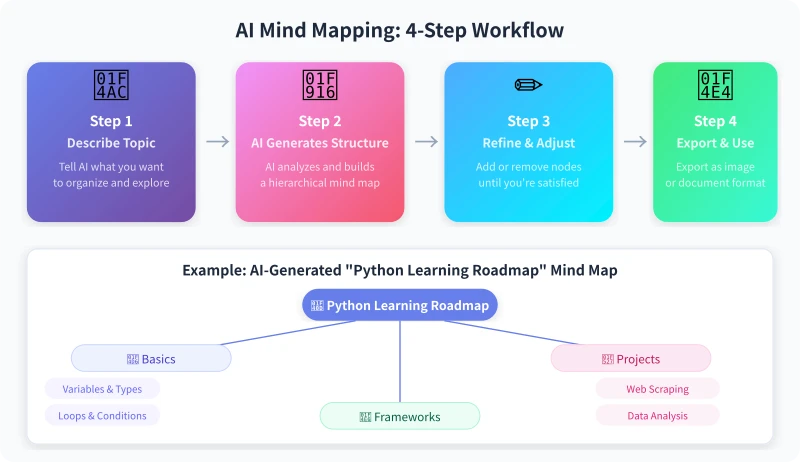
The whole process is very simple:
- Describe the topic: Tell AI what content you want to organize
- AI generates the structure: AI automatically analyzes and produces a clear hierarchical map
- Adjust and optimize: Add or delete nodes, adjust levels based on your needs
- Export and use: Apply the mind map to study, work, or sharing
Below is a detailed explanation of each step.
Step 1: Describe Your Topic
This is the foundation and the most critical step. The more specific the information you give AI, the more the generated map will match your needs.
Basic Question Format
The simplest way to ask:
"Create a mind map for me with the topic: Python learning roadmap."
AI will give you a basic map structure. But if you want it to be more practical, add more details:
"Create a mind map for a Python learning roadmap. I'm a complete beginner aiming to use Python for data analysis. Include 3-5 main branches, and under each branch list specific learning content and recommended resources."
The More Specific Your Description, the More Accurate the Map
Here are examples of questions for different scenarios — you can copy and use them directly:
- Study notes: "Create a mind map organizing the core knowledge points from the book 'Computer Systems: A Programmer's Perspective' in three levels."
- Project planning: "Create a mind map for project planning. The project is developing an e-commerce mini-program. List main functional modules, technology choices, and development timeline."
- Meeting notes: "Organize the following meeting notes into a mind map: (paste meeting minutes)"
- Exam review: "Create a mind map for Data Structures final exam review, covering common data structures and algorithms, with each node annotated by importance level."
Step 2: Let AI Generate the Map Structure
Send your request to AI, and it will generate a hierarchical structure. It usually looks something like this:
🐍 Python learning roadmap
├── 📖 Basic syntax
│ ├── Variables and data types
│ ├── Conditionals and loops
│ └── Functions and modules
├── 📦 Data processing
│ ├── NumPy basics
│ ├── Pandas data analysis
│ └── Data visualization
└── 🔧 Practical projects
├── Data cleaning exercises
└── Full analysis report
If you're happy with the structure, you can move straight to the next step. If adjustments are needed, simply tell AI.
Advanced: Ask AI for a Specific Format
If you plan to use professional tools (like XMind, MindNode) to edit, you can ask AI to output in a specific format:
- "Please output in Markdown indentation format, suitable for importing into XMind."
- "Please output in Mermaid mindmap syntax."
- "Please output in JSON format for programmatic processing."
Step 3: Adjust and Optimize
The mind map generated by AI is a starting point, not the finish line. You'll usually need to make some adjustments:
Common Adjustment Operations
- Add nodes: "Under 'Data visualization', add three child nodes: Matplotlib, Seaborn, Plotly."
- Delete nodes: "Remove the 'Input/Output' node under 'Basic syntax' — it's too simple to list separately."
- Adjust levels: "Promote 'NumPy' and 'Pandas' to main branches at the same level as 'Basic syntax'."
- Add details: "Add estimated study time to each node."
- Change style: "This map is too academic; rewrite it with more conversational descriptions."
Practical Tips
- Control hierarchy depth: 3-4 levels is usually enough; going deeper can make it less useful.
- Number of main branches: 3-7 is optimal; too many can look cluttered.
- Node descriptions: Use short phrases rather than long sentences.
- Add icons/color hints: Ask AI to add emoji before nodes or annotate priorities for better visual clarity.
Five Common Scenarios and Question Templates
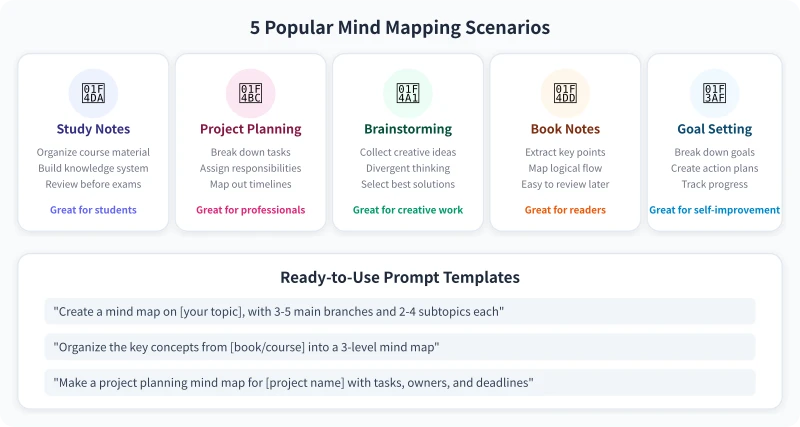
Below are five of the most common mind map scenarios, each with a ready-to-use question template:
Scenario 1: Study Notes Organization
Ideal for students and self-learners to connect scattered knowledge points into a system.
"Organize the core knowledge points from [course name/book title] into a mind map. Use three levels: main topic → knowledge point → key detail. Annotate each knowledge point as important (⭐) or just for awareness (○)."
Scenario 2: Project Planning
Perfect for product managers, project managers, or team leads.
"Create a mind map for project planning. Project: [project name]. List: functional modules, technology choices, development phases, team assignments, and risk points. Display the priority and estimated timeline for each module in a table format."
Scenario 3: Brainstorming
Great for creative workers who need to diverge their thinking.
"I want to [goal]. Help me brainstorm all possible directions and ideas using a mind map. Start with 5 broad directions, then think of 3-5 concrete approaches for each direction. No limits on creativity — the bolder, the better."
Scenario 4: Book Notes
Designed for reading enthusiasts and knowledge workers.
"Organize the core content of [book title] into a mind map. Include: the author's main argument, key supporting evidence, important cases, and practical methods. No more than 4 levels deep."
Scenario 5: Goal Planning
Ideal for individuals breaking down annual/quarterly goals.
"Create a mind map for annual goal planning. My goal: [list your goal]. Break it down into quarterly → monthly → weekly action steps, and annotate each step with an estimated completion date."
Step 4: Export and Use
Once your mind map is ready, there are several ways to use it:
Copy and Use Directly
If AI outputs a text-based tree structure, you can directly:
- Copy it into note-taking apps (Notion, Obsidian, Yuque) as an outline
- Paste it into a document as a table of contents or outline
- Send it to colleagues or classmates as a collaborative reference
Import into Professional Tools
If you want a more polished visual, you can import the AI-generated structure into professional mind mapping tools:
- XMind: Supports Markdown import
- Mubu: Supports outline-to-mind-map conversion
- MindNode: Top choice for Mac users with a beautiful interface
- ProcessOn: Online tool supporting multi-user collaboration
Let AI Generate Visualizations Directly
If you have a bit of technical skill, you can ask AI to directly generate visual mind map code (e.g., Mermaid, HTML) and render it on supported platforms.
5 Tips for Higher Quality Mind Maps
- Outline first, then detail: On the first pass, ask AI to generate only the main branches. Once satisfied, expand child nodes one by one.
- Ask with comparison: "Compare the learning roadmaps of Python and Java and create a comparison mind map."
- Add constraints: "I'm a complete beginner and can only study 1 hour per day. Create a 3-month learning roadmap for me."
- Let AI draw relationship lines: "What dependencies exist between these knowledge points? Mark them with arrows."
- Iterate and refine: Don't expect a perfect result in one go — usually 2-3 rounds of adjustments are needed.
Recommended Platform
For a better AI mind map experience, we recommend accessing different models through the Ciyuan platform. Different models excel in different areas — feel free to try several:
- Visit the model list to see all available models.
- Create an API key on the API Key Management page.
- Set the API endpoint to
https://www.ciyuano.com/v1and enter your Key to start using it.
Summary
The core process of creating mind maps with AI: Describe the topic → Generate the structure → Adjust and optimize → Export and use. No professional tools are needed — just an AI chat window is enough.
Mind maps aren't the destination; they're a tool to help you clarify your thinking. When you turn scattered ideas in your head into a clear, structured diagram, many problems naturally find their answers.
Give it a try now. Pick something you've been learning recently, ask AI to draw a mind map for you, and you'll discover how easy organizing knowledge can be.
Related Articles
AI Speech to Text: Beginner's Guide to Convert Voice to Text in 3 Steps
Learn how to convert speech to text using AI tools. Perfect for meeting notes, content creation, and video subtitles. Three practical scenarios with step-by-step instructions.
TutorialsAI Local Deployment Guide: Run Large Models in 3 Steps for Free
Learn how to deploy AI models locally in just 3 steps. No coding experience needed, completely free, and your data stays private on your own computer.
TutorialsAI Shopping Decision Guide: From Price Comparison to Avoiding Pitfalls
Learn how to use AI for shopping decisions. From price comparison to avoiding pitfalls - make smarter purchasing choices with AI assistance.
Comments are not yet available, stay tuned