AI Holiday Greetings and Social Etiquette: A Practical Guide for Greeting Generation, Gift Suggestions, and Occasion Management
Why You Need an AI Social Etiquette Assistant?
Every holiday, do you find yourself torn between sending generic mass greetings (too impersonal) and crafting individual messages (too much effort)? When a friend’s birthday comes around, do you browse endlessly for a gift only to fall back on a red packet? And when you need to say no, do the words get stuck in your throat?
Social etiquette may seem simple, but for many, it’s a daily headache. AI can act as your personal social consultant — just tell it the scenario, the recipient, and your needs, and in seconds you’ll get polished greetings, thoughtful gift ideas, and tactful refusal scripts. This article walks you through the five most common social situations, showing you how to use AI to handle relationships with ease.
Preparation
You’ll need an AI conversation tool. Here are a few recommendations:
- ChatGPT (OpenAI): The most popular AI chat tool, free tier works well, great at natural language generation
- Claude (Anthropic): Excellent at nuanced emotional expression, generates warmer greetings
- Tongyi Qianwen / ERNIE Bot: Domestic Chinese models with deeper understanding of traditional festivals and local social culture
- Ciyuano platform: Aggregates multiple models for easy switching, ideal for comparing outputs from different styles
Pick any one and you’re ready to go. The mobile app is recommended for quick copying and sending.
Scenario 1: Let AI Generate Personalized Holiday Greetings
Sending mass greeting messages is a common social pain point — send them and worry they’re too generic, skip them and risk being rude. AI can help you create personalized greetings tailored to different recipients, sincere and thoughtful.
Steps
- Open the AI tool and tell it the type of holiday you’re greeting for
- Specify your relationship with the recipient: boss, elder, coworker, friend, or client
- Describe the tone you want: formal and dignified, warm and touching, humorous and funny, or literary and fresh
- If you have special requirements, such as mentioning something recent about the recipient, include that as well
Example Prompt:
Mid-Autumn Festival is coming. I need to send greetings to five people, but I don’t want to send the same message to everyone. Please write for me: 1) To my boss (formal but not stiff); 2) To my parents (warm and caring); 3) To my college roommate (funny and hilarious); 4) To a client (polite and professional); 5) To my crush (subtle and romantic). Around 50 words each, and don’t start with something too cliché like “Happy Mid-Autumn.”
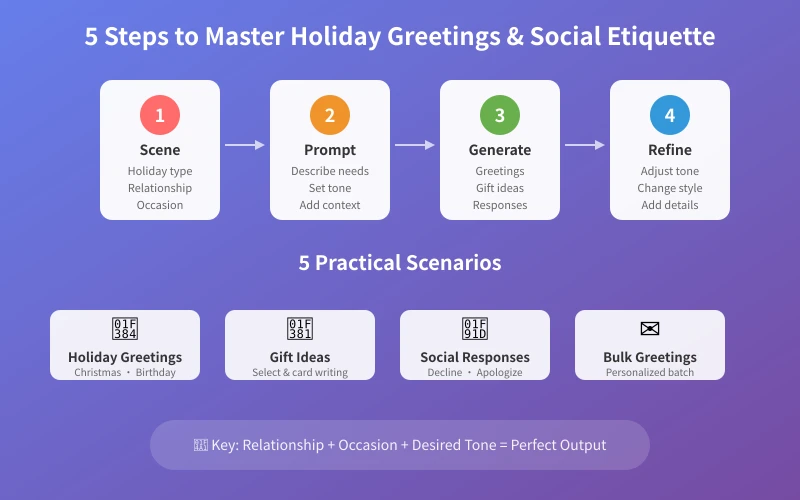
The AI will generate different styles of greetings based on each relationship. For the boss, it might be “The moon is round and families reunite. Thank you for your guidance and patience this year. Wishing you and your family a peaceful Mid-Autumn and everything goes well.” For the roommate, it might be “Bro, I already ate your mooncake for you — don’t worry, I’ll take the calories. Happy Mid-Autumn! Next gathering, your treat.”
Advanced Tips
- Tell the AI what kind of greeting you sent last year to avoid repeating yourself
- Ask the AI to create three versions of the same theme, then pick the one that fits best
- If you’re sending a WeChat red packet greeting, have the AI also recommend an appropriate amount
- For Spring Festival greetings, ask the AI to include the recipient’s zodiac animal element for a personal touch
Scenario 2: Let AI Help You Choose Gift Ideas
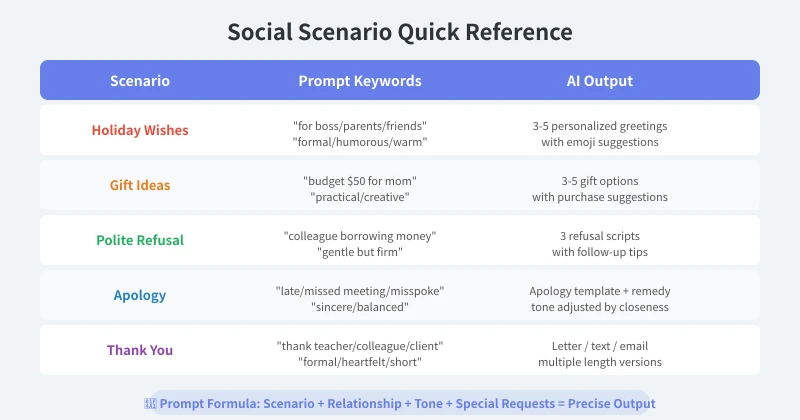
Gift-giving is one of the most stressful parts of social life. What to give? How much to spend? Will they like it? AI can recommend thoughtful and appropriate gift options based on your budget, recipient, and occasion.
Steps
- Tell the AI your budget (e.g., 200–500 RMB)
- Specify the recipient: age, gender, relationship (colleague/friend/elder/lover)
- Describe the occasion: birthday, housewarming, wedding, thank-you, hospital visit, etc.
- If you know the recipient’s interests (e.g., loves coffee, owns a cat, works out), share that information
Example Prompt:
My coworker is getting married next month. Budget around 300 RMB. She likes coffee, has a cat, and is recently decorating her new home. Please recommend 3–5 wedding gift ideas that are: 1) Practical, no decorative ornaments; 2) Include approximate price and suggested shopping channels; 3) Explain why each is suitable as a wedding gift.
The AI might suggest: a premium coffee gift set (symbolizing “sweet affection”), smart home gadgets (perfect for a new house), custom cat-themed home items, etc., along with the meaning and appropriateness of each gift.
Advanced Tips
- Ask the AI to compare the pros and cons of a few gift ideas to help you decide
- If the recipient is someone you don’t know well, ask the AI for a “safe bet” gift — something hard to go wrong with
- Have the AI generate a greeting card message to go along with the gift
- Tell the AI what you want to avoid (e.g., “No flowers, that’s too cliché”)
Scenario 3: Let AI Teach You How to Politely Refuse
The hardest part of social interaction isn’t saying “yes” — it’s saying “no.” A colleague asks for help when you’re busy, a friend wants to borrow money you don’t want to lend, your boss piles on extra work you can’t handle… AI can help you find a way to express refusal without damaging the relationship while still holding your ground.
Steps
- Describe the specific situation you need to refuse
- Explain your relationship with the person and the reason for refusal
- Describe the effect you want: gentle, firm, leaving room for later, or straight to the point
- The AI will generate multiple refusal scripts; you choose the best one
Example Prompt:
A not-so-close colleague keeps asking me to do their work. I’ve helped many times, but I’m very busy myself now. I don’t want to burn bridges, but I need to make it clear I can’t keep helping. Please write three responses in different tones: 1) Gentle version (don’t want to hurt feelings); 2) Direct version (clear refusal); 3) Redirect version (offer an alternative solution). Use conversational language suitable for WeChat messages.
The AI will generate different versions of refusal. The gentle version might be: “I’ve got quite a bit on my plate lately, so I might not be able to help. Sorry about that!” The direct version might be: “This is really beyond my capability. I suggest you ask [Name] — they’re better at this.”
Advanced Tips
- Ask the AI to anticipate possible responses from the other person and prepare counter-strategies
- For a long-term “helping” relationship, ask the AI to design a gradual reduction strategy
- Have the AI analyze whether your refusal has any weak points (e.g., an excuse that sounds fake, a reason that’s too flimsy)
- Test the AI-generated script with a trusted friend first to confirm the tone is appropriate
Scenario 4: Let AI Help You Mend Relationships (Apologies & Reconciliation)
Saying the wrong thing, forgetting an appointment, unintentionally hurting someone… friction happens in social life. Many people don’t refuse to apologize — they just don’t know how to start. AI can help you find the right way to apologize.
Steps
- Tell the AI what happened: what you did, how the other person reacted
- Describe the outcome you want: repair the relationship, clear up a misunderstanding, show sincerity
- Describe the depth of your relationship: casual friend, close buddy/bestie, partner, family member
- The AI will generate apology scripts and remedial suggestions based on the situation
Example Prompt:
Last week at a gathering with friends, I said something I shouldn’t have. I didn’t think much of it at the time, but later I noticed that friend has been keeping their distance. We’ve known each other for five years and have always gotten along well. I want to fix this, but without making it too forced. Please help me: 1) Analyze why that remark might have hurt the other person; 2) Write an apology suitable for WeChat that is sincere but not overly heavy; 3) Suggest a natural follow-up way to reconnect.
The AI will analyze potential pain points and generate a sincere yet light apology message. For example: “I thought about what I said the other day, and I realize it was inappropriate and didn’t consider your feelings. I’ve been wanting to say sorry. We’ve been close for so long — I don’t want a careless remark to come between us.”
Advanced Tips
- Ask the AI to help distinguish between situations that truly require an apology and those where the other person might be oversensitive
- If a face-to-face apology is too difficult, have the AI draft a message to break the ice first
- After the apology, ask the AI to plan a “relationship repair action plan,” such as inviting the person for a meal
- Ask the AI to flag no‑go zones in apologies, like excuses that sound like “I didn’t mean it” (which can be seen as defensive)
Scenario 5: Let AI Help You Write Thank-You Messages
Saying thank you after receiving help is a fundamental social courtesy. But many people just utter a flat “thanks,” which can feel dismissive. AI can help you craft sincere, specific, and memorable thank-you messages.
Steps
- Tell the AI what kind of help you received
- Specify the format you want: WeChat message, thank-you letter, or spoken words
- Describe your relationship and the level of gratitude you want to express
- The AI will generate thank-you content in different lengths and styles
Example Prompt:
Last month when I moved, a colleague came over and helped me carry stuff all day. I want to send him a thank-you WeChat message and also treat him to dinner. Please write a WeChat message that: 1) Specifically mentions his help (carrying boxes, assembling furniture); 2) Expresses genuine gratitude rather than polite formality; 3) Naturally extends an invitation for a meal. The tone should be friendly, not too formal.
The AI will generate a warm yet understated thank-you message, such as: “Man, I can’t thank you enough for helping with the move — you carried boxes all day and even helped assemble my bookcase, messing up your whole weekend. Are you free this weekend? Let me buy you a good meal — you pick the place.”
Advanced Tips
- Ask the AI to differentiate between “gratitude” and “politeness,” helping you write truly heartfelt expressions
- For workplace thank-you notes, ask the AI to draft a formal email copied to the recipient’s supervisor
- Ask the AI to adjust tone and length based on platform (WeChat/SMS/email/greeting card)
- For significant help, ask the AI to plan a “gratitude combo”: message + meal + small gift
Important Notes When Using an AI Social Etiquette Assistant
AI is a great social helper, but a few things to keep in mind:
- Sincerity comes first: AI helps you organize words, but the emotion must be genuine. Copying and pasting even the best script backfires if the recipient senses insincerity.
- Personalization matters: Don’t use the AI text verbatim. Add details only the two of you share (inside jokes, shared memories, the other person’s catchphrase) to make it warmer.
- Watch the occasion and timing: AI can craft the content, but you need to judge when to send it. Sending a message late at night or calling when someone is busy — no matter how good the script — will fall flat.
- Don’t over‑rely on it: Social skills require practice. AI can help you out of tight spots, but you should gradually learn to express yourself.
- Protect your privacy: When describing social scenarios to the AI, try not to reveal real names or sensitive information.
Summary
The value of an AI social etiquette assistant lies in helping you find the most appropriate way to express yourself. Often, it’s not that we don’t want to say the right thing — we just can’t think of how to say it in the moment. AI acts as an always‑available social consultant, turning the words you’ve wanted to say but couldn’t into graceful, sincere, and comfortable expressions.
Starting today, try using AI to handle one social situation you’ve been struggling with — whether it’s a greeting you’ve been putting off, a request you don’t know how to decline, or an apology you don’t know how to start. You’ll find that social interaction isn’t as hard as it seems.
Related Articles
AI Speech to Text: Beginner's Guide to Convert Voice to Text in 3 Steps
Learn how to convert speech to text using AI tools. Perfect for meeting notes, content creation, and video subtitles. Three practical scenarios with step-by-step instructions.
TutorialsAI Local Deployment Guide: Run Large Models in 3 Steps for Free
Learn how to deploy AI models locally in just 3 steps. No coding experience needed, completely free, and your data stays private on your own computer.
TutorialsAI Shopping Decision Guide: From Price Comparison to Avoiding Pitfalls
Learn how to use AI for shopping decisions. From price comparison to avoiding pitfalls - make smarter purchasing choices with AI assistance.
Comments are not yet available, stay tuned