AI Social Media Content Assistant: One-Click Generation for Moments, Xiaohongshu & Weibo
What is an AI Social Media Content Assistant
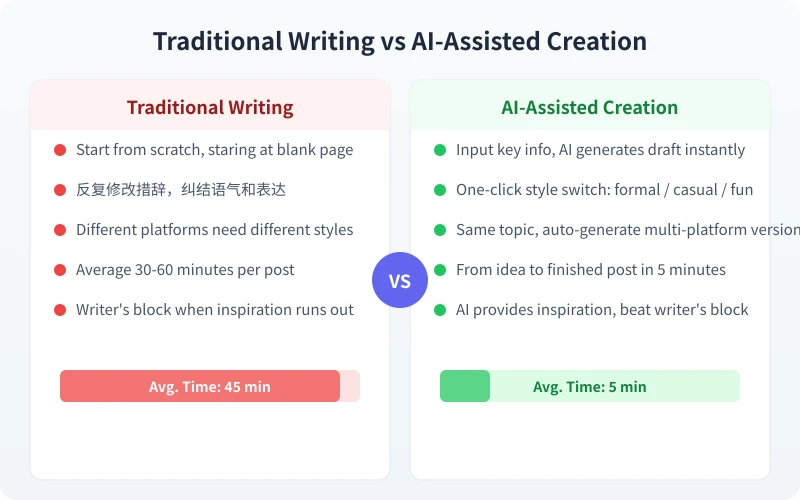
An AI social media content assistant is a tool that helps you write social media content. You tell it what you want to write, who the audience is, and which platform it is for — and it generates a suitable post for you. You do not need to start from scratch or worry about wording — the AI prepares a draft for you, and you just polish and publish.
Its core value is simple: compress the thinking about content process from 30 minutes to 5 minutes.
4-Step Content Creation Process
No matter which platform you are writing for, the core process is these four steps:
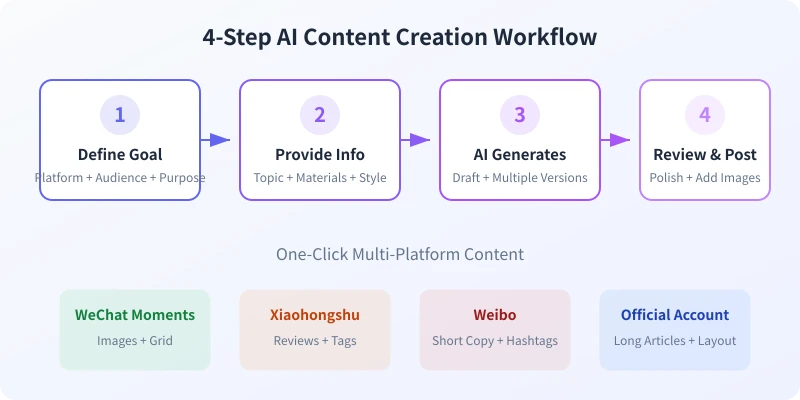
Step 1: Define Your Goal
Before you start, answer three questions:
- Which platform? — Moments, Xiaohongshu, Weibo, Official Accounts — each has a completely different content style
- Whos the audience? — Friends, followers, clients, colleagues — audience determines tone
- What effect do you want? — Sharing life, product recommendations, brand promotion, work summaries
Step 2: Provide Information
Share your materials with the AI. They do not need to be perfect — just the key info:
- What is the topic (e.g., visited West Lake in Hangzhou this weekend)
- What materials you have (photo descriptions, product info, event content)
- What style you want (formal, casual, humorous, artistic)
Step 3: AI Generates
Input the information into AI, and it generates a draft. You can ask for multiple versions at once, then pick the best one. If you are not satisfied, you can ask AI to adjust based on a particular version.
Step 4: Review and Publish
The AI-generated draft is not the final version. Check for accuracy, appropriate tone, and platform compliance. Once confirmed, add images and publish.
Practice: Content Generation for 4 Platforms
Scenario 1: WeChat Moments
The core of Moments is authenticity. Too formal feels like an ad, too casual feels lazy. AI helps you find the balance.
Prompt Template:
Help me write a WeChat Moments post.

Scene: Took family to West Lake in Hangzhou this weekend
Photos: Broken Bridge, lakeside willows, family on a boat
Mood: Very relaxed, life should be like this
Requirements:
- Casual and natural tone, like chatting with friends
- Not too long, 80-120 characters
- Do not use overused slang
- Add 2-3 appropriate emojis
Scenario 2: Xiaohongshu Post
Xiaohongshu content needs to be useful and visually appealing. Titles should be attractive, body should have substance, and include relevant tags.
Prompt Template:
Help me write a Xiaohongshu product review.

Product: A portable coffee maker
Selling points: Compact (only 300g), rechargeable, 3-minute brew
Price: 299 yuan
Target audience: Business travelers

Requirements:
- Catchy title using numbers or pain points
- 300-400 words, clear paragraph structure
- Tone like a friends recommendation, not a hard sell
- End with 8-10 relevant tags
Scenario 3: Weibo Post
Weibos core is short, fast, opinionated. Best under 140 characters with a clear viewpoint that sparks discussion.
Prompt Template:
Help me write a Weibo post.

Topic: Impact of AI tools on regular people
My view: AI is not here to take jobs, it is here to handle grunt work
Requirements:
- Under 140 characters
- Sharp but not harsh tone
- End with an interactive question to drive comments
Scenario 4: Official Account Article
Official Account articles need depth, structure, and rhythm. AI can quickly build the article framework for you to fill in details.
Prompt Template:
Help me create an outline for an Official Account article.

Topic: How ordinary people can use AI to boost work efficiency
Target readers: 25-35 year old professionals interested in AI
Requirements:
- Attractive title, avoid bland titles like AI Tutorial
- List 5-8 key points, each summarized in one sentence
- Logical structure: pain points first, methods second, cases last
- Tone: relaxed but professional, not too academic
Advanced Tips: Making AI Content Sound Like You
Many people find AI-generated content generic because they do not give AI enough personal characteristics. Here are three tips:
Tip 1: Show AI Your Previous Posts
Paste 3-5 of your previous Moments or Weibo posts to AI and say write in this style. AI will learn your vocabulary habits, sentence patterns, and expression style, making the generated content sound more like you.
Tip 2: Use a Dont Want List
Besides telling AI what you want, also tell it what you do not want. For example: Do not end with exclamation marks, Do not use fam or besties, Do not write in ad copy style. Negative constraints are often more effective than positive descriptions.
Tip 3: Generate Multiple Versions and Pick
Do not just ask for one version. Have AI generate 3 different styles simultaneously — one formal, one casual, one humorous — then pick the best or combine strengths from different versions.
FAQ
Will AI-generated content be duplicated with others?
No. AI generates completely new content each time based on the information you provide. Even two people asking the same question will get different results. But it is recommended to review before publishing to ensure the content meets your expectations.
Does content written with AI count as original?
Yes. AI is a tool, like using a keyboard to type. AI helps you organize language and structure, but the core information and viewpoints come from you. The final published content, after your review and adjustments, is your original work.
Will platforms detect it as AI-written?
Currently, mainstream platforms (WeChat, Xiaohongshu, Weibo) do not have detection mechanisms for AI-generated content. More importantly, the content you write with AI is based on your own ideas and materials — AI just helps you express them, so there is no detection issue.
Summary
AI content creation assistants do not replace your creativity — they help you quickly turn ideas into words. You just need to think about three things: who you are writing for, what to write, and where to use it. Let AI handle the rest. 5 minutes for a draft, 2 minutes for polish — 10 times faster than writing from scratch.
Start today. Try using AI to write your first Moments post.
Related Articles
AI Resume Writing: From Zero to Professional in 5 Steps
Learn how to use AI to write a professional resume. Five simple steps from basic information to polished final draft. Perfect for job seekers who want to stand out.
Productivity ToolsAI Note Organization: Build a Personal Knowledge System in 5 Steps
Learn how to use AI for note organization. Build a personal knowledge system in 5 steps. Perfect for knowledge workers and students.
Productivity ToolsAI Side Hustle Planning: Find Your Second Income Source
Want to earn extra income through a side hustle but don't know where to start? AI can help you analyze your skills, match directions, make plans, and track progress. Find your ideal side hustle within a month, even with zero experience.
Comments are not yet available, stay tuned