AI Research & Decision Guide: Use AI to Make Smarter Choices and Beat Decision Fatigue

Why Use AI for Decision-Making?
Choosing a phone, a school, a city, a renovation company, an insurance product — modern people make decisions every day. The traditional approach: open a search engine, scroll through dozens of results, read review articles, ask in forums, and end up more confused than before.
AI can compress this process to just a few minutes. You simply describe your needs clearly, and AI organizes information, compares pros and cons, and offers recommendations. No need to search, compare, and filter one by one.
This article teaches you a practical 4-step method for using AI to handle research and decision-making. Each step includes ready-to-use prompt templates you can copy directly.
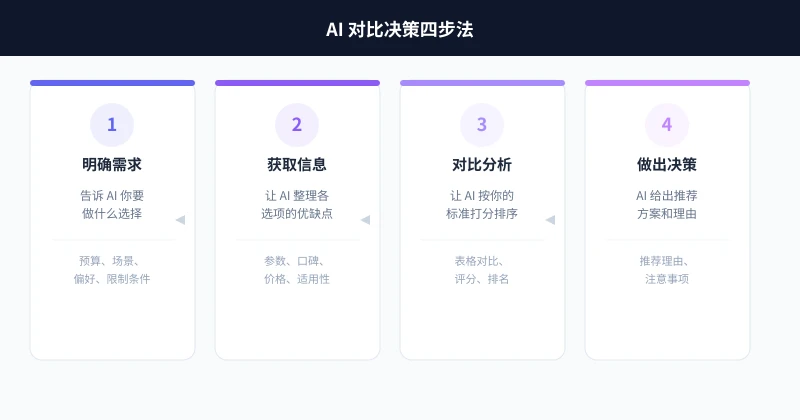
Overview: The 4-Step Process
No matter what you're choosing, you can follow these four steps:
Let's walk through each step in detail.
Step 1: Define Your Needs
This is the most critical step. Many people get poor results from AI not because the AI is bad, but because they haven't clarified what they want.
You need to tell AI three things:
- What you're choosing: The specific range of options (e.g., "Android phones between $300-$450")
- Your use case: How you plan to use it (e.g., "mainly for photos and watching videos")
- Your constraints: Budget, timeline, location, and other hard limits
Prompt Template
"I want to choose a [what you're selecting].
My situation: [use case description]
Budget: [specific amount]
Especially important: [1-2 things you care about most]
Not acceptable: [absolute dealbreakers]
First, help me think through this: what key dimensions should I focus on when making this choice?"
Example
"I want to choose a laptop suitable for a college student.
My situation: Liberal arts major, mainly for writing papers, taking online courses, and occasional video editing
Budget: $550-$830
Especially important: Lightweight, good battery life
Not acceptable: Over 1.5kg
First, help me think through this: what key dimensions should I focus on when choosing a laptop?"
AI will tell you to focus on processor, memory, screen, battery life, weight, ports, and other dimensions, explaining each one's importance for your specific scenario. This step helps you build a selection framework so you don't miss critical factors later.
Step 2: Gather Candidate Information
Once you have a selection framework, the next step is to have AI collect information about candidate options.
Let AI Recommend Candidates
If you have no idea what options exist, you can ask AI directly:
"Based on my needs above, recommend 3-5 specific products. For each, provide: name, price range, core selling points, and main drawbacks."
Let AI Organize Your Existing Options
If you already have some candidates, you can ask AI to organize the information:
"I'm currently considering these options: [Option A], [Option B], [Option C].
Please organize detailed information for each, including: price, key specs, user reviews, and who each is best for."
Ask AI to Search for Latest Info
AI's training data has a cutoff date. For rapidly changing information like prices and promotions, add a note:
"Based on your knowledge, tell me about these options. If you're uncertain about certain information (like current prices), please flag it so I can verify myself."
The benefit: AI won't fabricate information it's unsure about, and you'll know what needs further verification.
Step 3: Comparative Analysis
Once you have candidate information, have AI perform a structured comparison.
Table Comparison
The most intuitive approach is to have AI generate a comparison table:
"Please compare these options in a table. Dimensions: price, performance, portability, battery life, screen quality.
Score each dimension from 1-5, then calculate an overall composite score."
AI will generate a clear comparison table that lets you instantly see each option's strengths and weaknesses.
Weighted Scoring
If you care more about certain dimensions, have AI weight them according to your preferences:
"Please rescore using these weights:
- Portability: 30% (I care most about being lightweight)
- Battery life: 25%
- Performance: 20%
- Screen: 15%
- Price: 10%
Rank by weighted total score and show me the final ranking."
Scenario Simulation
For complex decisions, you can have AI simulate actual usage scenarios:
"Suppose I choose [Option A]. Please describe a typical day of use, telling me where it performs well and where it might fall short. Do the same for [Option B]."
This approach is more vivid than pure number comparisons and helps you imagine the actual experience.
Step 4: Make the Decision
The final step — have AI give a clear recommendation.
Ask for a Direct Recommendation
"Based on all the analysis above, give me a final recommendation. Requirements:
1. Clearly state which one you recommend
2. Explain the reasons (no more than 3 points)
3. Tell me what to watch out for if I choose it
4. If I could add $70 to my budget, would the recommendation change?"
Ask for Multiple Options
Sometimes you may want recommendations with different emphases:
"Please give three recommendation options:
1. Best value for money
2. Best overall experience
3. Best fit for me
Explain each in one sentence."
Practical Example: Choosing a Laptop
Here's a complete example showing the 4-step method in action.
Scenario
A college student with a budget of $550-$830 wants a lightweight laptop with good battery life, mainly for writing papers and watching online courses.
Complete Conversation Flow
Round 1 (Define Needs):
"I'm a college student with a budget of $550-$830, looking for a laptop. Main uses: writing papers, online courses, occasional photo editing with Photoshop. I especially care about portability and battery life — I often use it in the library all day. Help me think through: what dimensions should I focus on when choosing a laptop?"
Round 2 (Gather Information):
"Recommend 3-5 specific models. For each, provide: model name, price, weight, battery life, processor, RAM, screen size, and core pros/cons."
Round 3 (Compare):
"Compare these laptops in a table. Weights: portability 30%, battery life 25%, performance 20%, screen 15%, price 10%. Rank by weighted total score."
Round 4 (Decide):
"Based on the full analysis, give me a final recommendation. Tell me the reasons, what to watch out for, and where to get the best deal."
Four rounds of conversation, about 5-10 minutes, and you have a well-reasoned choice. Much more efficient than spending days doing your own research.
More Use Cases
The 4-step method isn't just for buying electronics — it works for virtually any comparison-based decision:
Choosing a City to Settle In
"I'm considering moving to Chengdu, Hangzhou, or Shenzhen. I work in internet marketing and care about: cost of living, job opportunities, urban environment, and climate. Please compare these three cities for me."
Choosing a Graduate School
"I'm a computer science major looking to attend a top-tier university for grad school. My grades are above average, and I want a school with good employment prospects and strong advisor resources. Recommend 5 schools and compare their difficulty, employment outcomes, and research atmosphere."
Choosing a Renovation Company
"My apartment is about 970 sq ft, renovation budget is $21,000, and I prefer a modern minimalist style. Tell me what pitfalls to watch for when choosing a renovation company and how to compare quotes from different companies."
Choosing Insurance
"I'm 30 years old with basic social insurance. I want to buy commercial medical insurance and critical illness insurance. Budget under $700/year. Help me understand what to look for and recommend a few good-value products."
Common Questions
Are AI Recommendations Reliable?
AI recommendations can serve as reference, but shouldn't be fully relied upon. Two reasons:
- Information Currency: AI's knowledge has a cutoff date; prices and product updates may be outdated
- Individual Differences: AI provides general advice; your specific situation may need adjustments
Think of AI recommendations as a "narrowing down" tool. Verify key information yourself before making a final decision.
How Is AI Search Different from Traditional Search?
| Dimension | Traditional Search | AI Search |
|---|---|---|
| Information Gathering | Must read and filter results yourself | AI organizes key points directly |
| Comparison | Must create comparison tables yourself | AI auto-generates comparison tables |
| Personalization | Same results for everyone | Customized to your needs |
| Time Cost | Can take hours | Usually 5-10 minutes |
How Do I Know If AI Is Making Things Up?
A few simple methods to check:
- Check specificity: If AI gives very precise numbers (like exact prices), it likely needs verification
- Check consistency: Ask the same question differently and see if the answers match
- Check for hedging: Good AI will say "based on my training data" or "I recommend verifying"
- Spot-check: Verify 2-3 key information points AI provided by checking official sources
Advanced Tips
Multi-Round Follow-ups
Don't expect a perfect answer from a single question. Good decisions often require 3-5 rounds of conversation:
- Round 1: Define needs and selection criteria
- Round 2: Get candidate options
- Round 3: Deep-dive comparison on your top 2-3
- Round 4: Ask about details and risks
- Round 5: Get the final recommendation
Have AI Play Different Roles
For the same question, have AI analyze from different perspectives:
"Please analyze my choice from these three perspectives:
1. A budget-conscious student
2. A quality-focused professional
3. A tech enthusiast
How would their recommendations differ?"
Use Token Circle for Multiple Models
Different AI models excel at different things. On the Token Circle platform, you can access multiple models with one API key:
- Use DeepSeek or Claude for deep analysis
- Use web-search-enabled models for the latest information
- Use MiMo or GPT-4o-mini for quick answers
Visit the Token Circle Model List to see all available models, or go to API Key Management to create a key.
Summary
AI-powered decision-making comes down to four steps: Define Needs → Gather Information → Compare → Decide. The key isn't how smart the AI is — it's how well you ask.
Remember one principle: the more specific information you give AI, the better its advice. "Help me choose a phone" is far less effective than "My budget is $400, I mainly take photos, I don't play games — recommend 3 options and compare them."
Next time you're stuck on a decision, try this method. Instead of agonizing for days, spend 10 minutes asking AI.
Next Step: Open your favorite AI tool and use the templates in this article to tackle a decision you've been struggling with. You'll find that many anxiety-inducing choices can actually be sorted out in 10 minutes.
📖 Related Articles
AI Mobile Photography Assistant Practical Guide: Composition Tips, Scene Optimization, and Post-Processing All in One
Can't take good photos with your phone? This article teaches you how to use AI tools to handle composition, settings, and post-processing. From food to portraits, from daytime to night scenes, four scenarios broken down step by step. Even beginners can capture stunning photos that get likes on social media.
TutorialsAI Sleep Management Assistant: Track Sleep, Improve Routine, and Boost Sleep Quality
Struggling with sleep? This article shows you how to use AI tools to track sleep data, analyze sleep patterns, and create personalized improvement plans. From trouble falling asleep to waking up in the middle of the night, AI helps you find the root cause and continuously optimize—a sleep management guide that even beginners can use.
TutorialsAI Legal Assistant Guide: Contract Review, Rights Protection & Document Drafting Made Easy
Can't understand your lease? Don't know how to handle a workplace dispute? AI can help you review contracts, analyze legal issues, and draft legal documents. This guide covers three practical scenarios to turn AI into your personal legal advisor.
💬 Comments are not yet available, stay tuned